


TL;DR
Help desk software for travel is a ticketing system built for travel operations. It captures the booking reference, travel date, supplier, and ticket type as native fields, then ranks every ticket by how close the deadline is something generic tools never do. This guide explains what it is, how it works, how travel-built tools compare to generic ones, and what to look for, so any travel company can tell the two apart.
The demo looked flawless. Clean inbox, fast macros, a slick automation builder. The team signed, migrated, and then the first real test arrived. A cancellation landed six hours before a non-refundable deadline, with money on the line. But the tool had no field for the travel date, so nothing flagged how close the cutoff was. It had no supplier lane, so the escalation went out as a forwarded email and lost its thread. And because every request shared one flat queue, the urgent cancellation sat behind a routine “where’s my invoice?” question.
That is the trap of choosing a help desk from a generic feature checklist. Travel support does not behave like IT or retail support. So, whether you run an OTA, a tour operator, a DMC, a bed bank, a consolidator, or a travel-tech, payments, or insurance business, the lesson holds: travel runs on logic a generic tool was never built to understand.
What is help desk software for travel?
Help desk software for travel is the system that receives, classifies, prioritizes, and resolves support tickets in one place and also captures travel context. It records the booking reference, the departure or check-in date, and the supplier, then routes and ranks each ticket against a real travel deadline rather than a generic timer. That last part is what sets it apart from a horizontal tool.
The boundary matters too, because teams often blur three systems. The booking engine sells and stores reservations. The back office reconciles supplier invoices and settles payments. The help desk handles the live questions in between for example, a cancellation, an amendment, or a supplier dispute. Companies that assume their booking platform “covers support” end up with no real ticketing layer at all.
Key Terms Worth Knowing
Help desk software : The system that receives, classifies, prioritizes, and resolves support tickets in one place.
PNR : Passenger Name Record; the booking record holding a traveler’s itinerary, dates, and supplier details.
Deflection rate : The share of tickets resolved without a human agent, usually through self-service or automation.
Ticket type: A category of query with its own workflow, such as a cancellation, reissue, or supplier dispute.
Why do travel companies outgrow generic help desk software?
Most travel companies start with whatever tool their first support hire knew. At low volume, that works. But as bookings grow and disruptions multiply, the gaps show: no travel-date field the system acts on, no supplier lane, no way to rank a ticket by how close the deadline is. Vendors built generic tools for internal IT or retail, where every requester sits inside the company, and no ticket truly expires. Travel breaks both assumptions.
Volume makes the mismatch expensive. According to Salesforce (2024), 76% of service organizations expect higher case volumes ahead. In travel, that growth clusters around disruption, when supplier escalations and rebookings spike together. So, a tool that handles 200 tickets a day can buckle at 800 if it cannot classify or route them.
The travel data your help desk software must capture
A travel help desk must hold fields a generic tool ignores: the booking reference (or PNR), the travel date, the supplier, and the ticket type. These should be native, not bolt-on custom fields, because they drive routing, severity, and automation. According to ITSM.tools (2026), 74% of organizations already have AI working in at least one service management team, yet AI can only act on data the system holds. A generic tool can store a travel date in a custom field, but if nothing ranks the ticket by it, the field is decorative.
If the travel date and supplier are not native fields the system can act on, every workflow downstream becomes a workaround.
What ticket types does a travel help desk handle?
A travel help desk handles ticket types that vary by business model. Some examples: cancellations and amendments for an OTA or tour operator; reconfirmations for a bedbank; reissues and refunds for a consolidator; integration issues, chargebacks, and claims for a travel-tech, payments, or insurance team. What’s universal: each type carries its own deadline and workflow.
A cancellation racing a refund window needs deadline-aware severity. A reconfirmation needs supplier follow-up logic. An integration ticket needs partner-context routing. A claim needs structured documentation. A generic queue flattens these into one priority scheme, so the urgent case waits behind a trivial one. What makes a tool travel-ready is whether it sorts these types automatically.
Where automation and deflection help most
Automation earns its keep on routine tickets. Pylon (2025) puts the average tech-company deflection rate at around 23%, with best-in-class teams hitting 40–60%. Those deflected tickets are mostly simple questions, which frees agents for costly cases. Classification matters just as much, because a misrouted cancellation can miss its window. The economics are stark: Gartner puts a human contact at about $13.50 against $1.84 for self-service.
Priorities also shift by business model. An OTA leans on deflection and fast supplier escalation. A DMC tracks supplier responses across many local vendors. A bedbank or wholesaler lives on reconfirmation at volume. A consolidator handles refund-heavy queues, while travel-tech, payments, and insurance teams route disputes against hard deadlines. Whatever the model, the ticket mix is what the help desk has to be shaped around.
Travel help desk software comparison: generic vs travel-built
Seen against that ticket mix, the difference between a generic tool and a travel-built one is not a matter of taste. The table compares how each type holds up on the criteria that decide real travel outcomes.
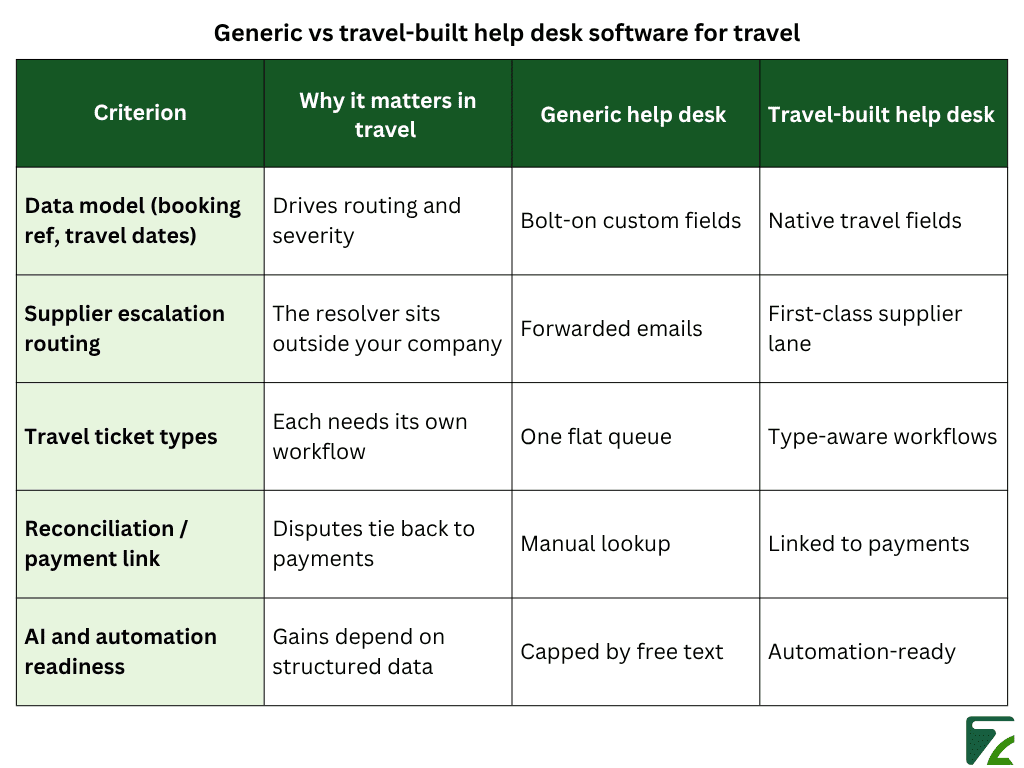
You can configure a generic tool to imitate each row, but every workaround adds a tax. Custom fields need upkeep. Forwarded-email escalations lose their thread. Free-text inboxes cap what automation can deliver. So, the real gap is not the license price; it is the recurring labor a generic tool quietly demands.
What to look for in the best help desk software for travel
Once you see how travel tickets behave, what separates a strong tool from a generic one becomes clear. The best help desk software for travel usually shares three traits: it runs on travel-native fields, it sits on structured data, so automation works, and it holds up against a real travel scenario rather than a sandbox demo.
When you draw up a travel help desk software list to weigh options, five criteria tell you most of what you need:
- Data model are the booking reference, travel date, supplier, and ticket type native fields?
- Supplier routing is there a real escalation lane, or just forwarded email?
- Ticket-type workflows, does the tool treat cancellations, reissues, and disputes as distinct?
- Reconciliation links can a payment dispute tie back to the transaction without a manual lookup?
- AI readiness can automation act on structured fields, or is it capped by free text?
Does a travel help desk need AI?
AI features only pay off on structured data. According to Phocuswright (2026), 61% of travel businesses are experimenting with or scaling agentic AI. But a tool can promise automation and still under-deliver on a free-text inbox. Three things make the difference: consistent classification, reliable travel-date and supplier tagging, and standardized fields across channels. With that foundation, AI acts on real travel tickets; without it, even the smartest model has nothing dependable to read.
Zeal Desk: help desk software built for travel operations
Everything above describes what a travel-built tool should be. Zeal Desk is one example built to those criteria from the ground up. It is an AI-powered ticketing system made specifically for travel operations, and it treats travel workflows as first-class rather than edge cases.
In practice, Zeal Desk automates work a generic queue pushes onto people. It summarizes long operational threads, classifies tickets by type and intent, and tags travel data like check-in and check-out dates, so a ticket ranks by how close its deadline is. On top of that, custom workflows let teams codify repetitive tasks reconfirmations, supplier follow-ups, amendments, and escalations so routine handling runs itself and agents focus on the cases that need judgment. The contrast is simple: generic platforms manage tickets, while a travel-built system orchestrates the operation behind them.
Conclusion
The thread of this guide is simple. Help desk software for travel is, at heart, a ticketing system built for travel operations. It captures the booking reference, travel date, supplier, and ticket type as native fields, and routes work against those facts. Generic tools do not, no matter how many custom fields a team bolts on.
The markers of a travel-ready help desk are concrete: native travel fields instead of bolt-on custom ones, a real supplier lane instead of forwarded email, type-aware workflows instead of one flat queue, and automation that runs on structured data. The closer a tool sits to how travel operates, the less of the work falls back onto people, and the fewer tickets, like the cancellation from the opening, slip past before anyone notices.