



TL;DR
This article explains what help desk automation for travel is, how it works, and which tickets to automate first and which to leave to people. You’ll get a clear definition, the best first automation for OTAs, tour operators, DMCs, TMCs, and payment firms, benchmarks worth trusting, a look at how a travel-built tool like Zeal Desk handles it, and a simple model the Automate-First Quadrant for ranking your own queue by readiness and risk.
A storm grounds flights on a Friday afternoon. Within an hour, the support queue triples. Refunds, rebooking requests, and “where is my voucher?” messages arrive across email, WhatsApp, and the OTA inbox. Most travel teams already know automation can help with weeks like this. The harder question is where to start. If you automate the wrong task, an automatic refund can break a fare rule, or a chargeback can turn into a loss. If you automate the right tasks, the routine work takes far less time, and agents can focus on the cases that need a person. This article explains how to decide what to automate first.
Why Should Travel Companies Automate Their Help Desk?
Travel support does not arrive at a steady pace. It comes in sudden spikes; it often depends on suppliers you do not control, and a large share of it involves money and rules, not just customer satisfaction. That is why “automate more” is not enough on its own. If you automate everything at once, you will automate tasks that should never run without a human, while the simplest tasks are left undone. The better approach is to automate in the right order, starting with the work that is safe and repetitive and leaving the rest for later.
Key Terms Worth Knowing
Deflection rate : The share of support queries a customer resolves without an agent handling a ticket, usually through self-service such as a help center or answers to common questions.
FRT & AHT: First Response Time and Average Handle Time, the two core service-level metrics travel support teams track to gauge speed and efficiency.
Smart classification : The automatic sorting of an incoming ticket by type, priority, or sub-vertical, so it routes to the correct queue without manual triage.
Data tagging: The automatic extraction of structured fields from a ticket, such as PNR, check-in and check-out dates, or supplier reference, for faster handling.
What Happens to a Travel Queue During a Disruption Spike?
During a disruption, the queue can triple within an hour. A team that handles a few hundred tickets a day suddenly faces more than a thousand, and most of them ask the same few questions. Automation is most useful during these busy periods rather than on quiet days. Disruption is common now: nearly 8 in 10 (78%) business travelers had a travel disruption in 2024 (TravelPerk, 2024). After adding AI to its support workflow, TravelPerk now handles twice the query volume it did in 2023 with the same number of agents. Automation lets a team get through its busiest weeks without hiring for them all year
Why Do Travel Tickets Carry Money and Compliance Risk?
Most support tickets are about customer satisfaction. Many travel tickets are also about money. A refund has to follow fare rules. A chargeback follows the card network’s deadlines. An ADM can arrive weeks after the error that caused it. So, the risk is not the same for every ticket. Getting a “where is my booking?” answer wrong costs little. Getting a refund wrong can cost real money and break a rule. For each ticket type, consider two things: how often it occurs, and how much is at stake if the automation is wrong. Both matter before you decide.
Automation in travel is most valuable during disruption spikes, when ticket volume is highest.
What Is Help Desk Automation for Travel?
It helps to define the term clearly, because “automation” is used to mean many things. Help desk automation for travel is not a single feature. It is a set of tools working on travel data some simple rules, and some AI that reads unstructured text and makes sense of it. Knowing which tool does which job is the difference between a smooth rollout and one that stalls. The goal is ambitious: 75% of CX leaders expect 80% of customer interactions to be resolved without a human in the next few years (Zendesk, 2024). Reaching that in travel depends on matching the right tool to the right task.
What Exactly Does Help Desk Automation for Travel Do?
Help desk automation for travel uses rules and AI to handle repetitive support work routing, drafting replies, summarizing, classifying, and tagging tickets across the channels and suppliers a travel business uses so agents can focus on harder cases. But there is an important limit. Only the predictable input can be automated cleanly. How a ticket is resolved depends on the response that comes back, from the traveler or the supplier. So, most automation helps the agent rather than replacing them. It handles the input. A person still acts on the response.
Rules vs. AI: How Does an Automated Ticketing System for Travel Split the Work?
An automated ticketing system for travel uses two types of automation. Rules handle clear, fixed logic: send the confirmation, route refunds to the finance queue, escalate when an SLA timer is breached. AI handles the harder parts: summarizing a long supplier email thread into one line, classifying a ticket by type, and tagging fields like PNR, check-in and check-out dates, or supplier reference. Industry coverage from PhocusWire (2025) calls these task-specific “micro-agents “small tools that triage and draft, then pass the ticket to a person to finish.
What Does Ticket Deflection Cover in Automated Customer Service in Travel?
Deflection is a common metric, and it is often misunderstood. In automated customer service in travel, deflection means a customer gets the answer they need without an agent having to handle a ticket usually through self-service, such as a help center article or an answer to a common question. It works best on high-volume, structured questions, and AI now resolves more than 45% of incoming queries this way, with travel companies often passing 50% (Freshworks, 2025). One point is important here: no AI reply is sent to a customer on its own. When AI helps with a reply, it only drafts the message, and the agent reviews it, edits it, and sends it. Deflection also does not cover negotiation, exceptions, or disputes, so counting those as deflectable sets a target you cannot reach.
You can automate the predictable input. How a ticket is resolved depends on the response you get.
How Does Help Desk Automation for Travel Differ Across Travel Businesses?
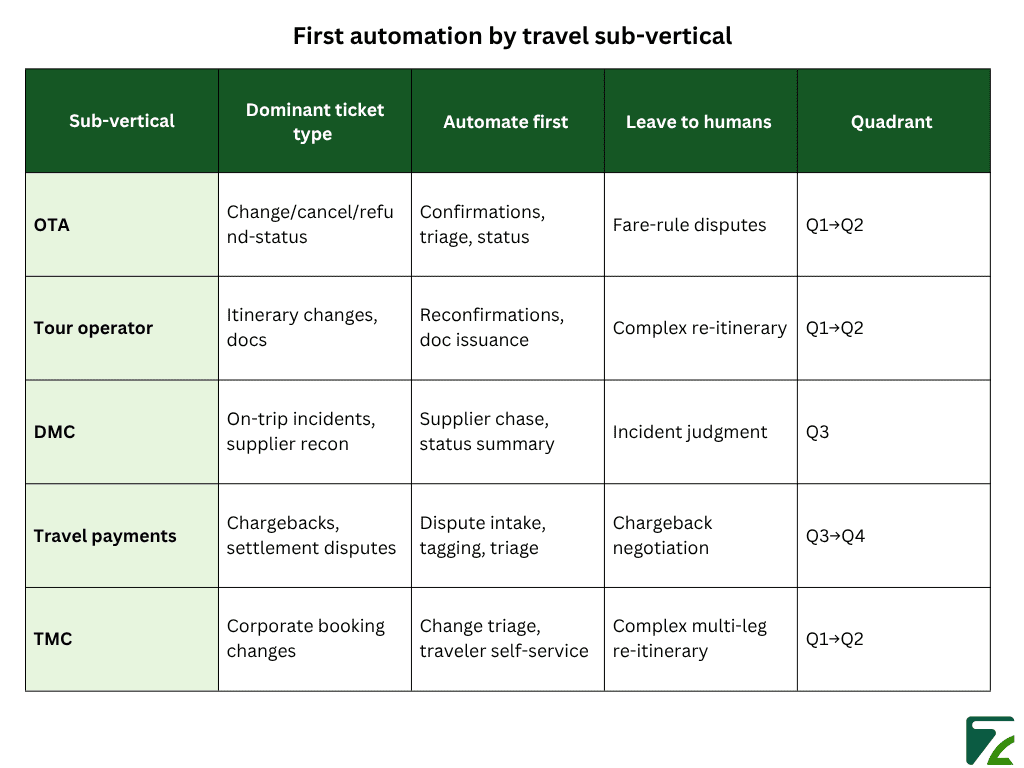
There is no single “automate this first,” because different travel businesses face different tickets. An OTA deals mostly with changes and cancellations. A DMC handles on-trip incidents and supplier reconciliation. A payments company deals with chargebacks. The best first automation is different for each and matching it to your business is what makes the advice useful. The trend is the same across all of them: service teams say AI handles about 30% of cases today and expect 50% by 2027 (Salesforce, 2024). The starting point is what changes.
How Should OTAs and Tour Operators Automate the Change-and-Cancel Queue?
For an OTA, the first step is clear: start where the volume is. That means changes, cancellations, and “has my refund been processed?” These repeat thousands of times in the same form, which makes them a good fit for automation. Auto-acknowledge them, sort them by type, pull the booking reference, and let customers check status through self-service. Document issuance and reconfirmations follow the same pattern. Much of this already runs through the back-office systems OTAs use to manage refunds and cancellations across channels, so automation mostly moves the routine handling earlier in the process. The judgment cases fare-rule disputes and goodwill exceptions stay with people.
How Should DMCs Automate the Supplier Chase, Not the Judgment?
For a DMC, the biggest delay is the time spent waiting on suppliers, and agent reply speed is rarely the problem. The first thing to automate is the chasing: let the system send follow-ups to suppliers, summarize each reply as it arrives, and keep a short status line so agents do not have to re-read the thread. The decision stays with the agent whether to accept an alternative, how to handle an on-trip incident, and when to escalate. Automation removes the manual chasing. It should not make the operational decision, which needs local knowledge.
How Should Payment Firms and TMCs Automate Intake First?
Payments teams and TMCs are similar: the resolution is high-stakes, but the intake is repetitive and easy to automate. For a payments team, a chargeback should not be decided by a bot, but capturing the dispute, tagging the transaction, and triaging by reason code can all be automated. Humans handle the dispute itself. TMCs work the same way with corporate booking changes automate the triage and status updates, and leave complex multi-leg changes and policy exceptions to a person. In both cases, you speed up the intake without touching the part that needs judgment.
Match the first automation to your business before you build it. The best starting task is not the same for an OTA as it is for a payments team.
Which Help Desk Tasks Should Travel Companies Automate First?
Knowing the differences by business type helps, but teams still need a repeatable method. They need a simple way to look at any ticket type and decide whether to automate it now, automate it with a check, only assist, or leave it to people. That is what the Automate-First Quadrant does. It scores each task on two factors and gives you the answer. The benefit is large: according to McKinsey (2023), generative AI could improve customer-operations productivity by 30 to 45% of current costs. That benefit depends on automating the right tasks in the right order. Automating everything at once does not deliver it.
How Does the Automate-First Quadrant Work?

Two questions decide it. First, how ready is the task? How often does it happen, how predictable is it, and can it be resolved without a supplier? Together, these give you its readiness. Second, what is at stake if the automation gets wrong: money, compliance, or a decision you cannot undo? That is its risk. For example, a status update is high readiness and low risk. A chargeback decision is high risk and low readiness. Plot a task on these two factors, and it falls into one of four boxes, and the box tells you what to do.
Which Travel Tickets Should You Automate Now and With Guardrails?
The safest tasks to automate are high readiness and low risk: booking confirmations, itinerary questions, status updates, FAQ deflection, and data tagging. Automate these now to reduce the routine load. The next group is high readiness but high risk: refunds within policy, voucher issuance, and rebooking within fare rules. These can be automated, but with a check let the AI draft the action and have a person approve it before it is sent. Most teams get the fastest safe results by automating the low-risk group first, then adding the higher-risk group with approval steps.
Where Is the Line Your Travel Help Desk Software Shouldn't Cross?
In short: automate the low-risk tasks, add an approval step to the high-risk ones, and keep the most difficult cases with people.
The order in which you automate matters more than how much you automate.
How Does Zeal Desk Automate Travel Help Desk Tickets?
This is easier with a tool built for travel, and most are not. Zendesk, Zoho Desk, and Freshdesk are built for every industry, so a travel team spends time adjusting generic fields and categories to fit travel data. Zeal Desk is built only for travel operations, so travel ticket types, booking fields, and supplier workflows are included by default. That focus makes the Automate-First Quadrant easier to put into practice.
What Makes Zeal Desk Different from Zendesk, Zoho Desk, and Freshdesk?
Zeal Desk is travel-specific, while Zendesk, Zoho Desk, and Freshdesk are general help desks for any industry. The difference shows in the setup. Fields like PNR, check-in and check-out dates, and supplier reference are built in, not custom add-ons. Categories match real travel work change, cancel, refund-status, supplier incident, and chargeback. Because the system already understands travel, there is less setup before a team can run its first automation.
How Does Zeal Desk's Classification Engine Work?
Zeal Desk’s classification engine sorts each incoming ticket into a category automatically. The categories are not fixed each business creates its own, and the AI is trained on them, so routing matches how that business works. As volume grows, the engine keeps learning. This is Quadrant 1 automation: classification on high-volume, repetitive, supplier-independent tickets. Accurate routing at intake is what lets the next steps SLA timers, assignment, and follow-ups run without manual sorting.
How Do Smart Field Extraction and Smart Summary Help Agents?
Smart field extraction and smart summary do the reading and the first draft for the agent. Field extraction pulls structured details check-in and check-out dates, PNR, and supplier reference from the ticket. Smart summary uses the original query to turn a long thread into a short brief, then drafts a reply the agent can edit, correct, and send. The agent stays in control, which is the check that higher-risk tickets need. Custom workflows then handle the repetitive operational steps around each case.
Conclusion
It is easy to measure automation by how much of the queue it covers, but the order matters more. Travel support comes in spikes, depends on suppliers, and involves money and rules. So, the main question is which tasks to automate first. Separate the predictable tasks from the ones that need judgment. Match the first task to your business, whether that is an OTA’s change-and-cancel queue or a payments team’s dispute intake. Then use the Automate-First Quadrant. Automate the low-risk group now, add a check to the high-risk group, assist where work waits on a supplier, and leave the difficult cases to people. Those cases affect customer trust the most, so they are worth keeping with agents.