




TL;DR
- This article explains what a help desk portal for travel companies is, what the guest does versus what the support team does, and how to set one up.
- It is written for ops and support leaders at OTAs, TMCs, DMCs, and travel payment companies managing tickets at scale.
- You will get a working definition, a map of what guests expect against the capabilities that deliver it, a decision table for what to automate, and a checklist for choosing a portal.
Travelers judge support on two things: how fast they get an answer, and whether it is the right one. They expect help on the channel they already use, no need to repeat booking details they have already given, and resolution that holds up during a schedule meltdown. Meeting that is harder in travel than in most industries, since a single ticket can wait on a hotel, an airline, and a fare rule before it closes. A help desk portal for travel companies is what lets a support team hit those expectations at scale. This guide covers what guests expect, how the portal delivers it on the agent side, how that shifts across OTAs, TMCs, DMCs, and payment companies, and how to decide what to automate.
Why Do Travel Companies Need a Help Desk Portal Now?
Travel support has always been seasonal, but the swings have grown sharper and harder to staff for. A quiet Tuesday can turn into a flood when a storm grounds flights or a supplier system goes down. Queries arrive across email, chat, WhatsApp, phone, and OTA messaging at the same time, and they often reference the same booking. Without a single portal to turn them into trackable tickets, agents lose time hunting for context instead of resolving issues. A help desk portal matters now because the volume is less predictable, and the expectations are higher than they were even two years ago.
Key Terms Worth Knowing
Deflection:A guest finding the answer themselves through self-service, so the query never becomes a ticket. The guest resolves it, not an AI replying on the company’s behalf.
First Response Time (FRT) and Average Handle Time (AHT) : The two speed metrics support leaders track most. FRT is how long until the first reply; AHT is how long a ticket takes to work overall.
Ticket classification : Automatically sorting each incoming ticket by type and sub-vertical so it routes to the right queue or workflow without manual triage.
Chargeback and ADM: Financial disputes that ride inside support tickets. A chargeback is a card-payment reversal; an ADM (Agency Debit Memo) is an airline-issued charge for an agency error.
Why is ticket volume in travel so unpredictable?
Travel demand does not arrive evenly, and neither do support queries. A single disruption event can turn a few hundred tickets a day into more than a thousand within hours. According to SAP Concur (2024), 88% of business travelers were forced to make last-minute changes in the past year because of delays, cancellations, or re-routing. Each of those changes can become a ticket. The underlying pressure is also rising: a majority of airline and airport executives, 52% in an Amadeus study (2024), say they face more disruption than they did in 2019. Fixed staffing models struggle with spikes like these.
Why do generic support tools fall short for travel companies?
Generic help desks assume the agent is the bottleneck, but in travel the bottleneck is usually the supplier. A horizontal tool measures how fast an agent replies and treats that as a resolution. Travel does not work that way. To close a ticket, an agent often has to chase a hotel, an airline, or a ground operator, then wait for an answer. Meanwhile, the clock keeps running and the guest keeps messaging. A tool that has no concept of supplier-dependent waiting, structured travel fields, or fare-rule logic leaves agents to track all of it by hand.
In travel, the supplier's response time, not the agent's, usually decides how fast a ticket closes.
What does weak help desk support cost a travel company?
Weak support shows up directly in how travelers rate you. Across 14,000 airline passenger reviews, 67% reported a negative customer-service experience, per a Clootrack analysis covering 2022 to 2023. Reporting from Retail Customer Experience (2023) ties that frustration to long wait times and chat lines that cannot actually help. For a travel brand, that dissatisfaction is expensive, because a delayed refund or a missed amendment often means a lost repeat booking and a public review.
What Is a Help Desk Portal for Travel Companies, and How Does It Work?
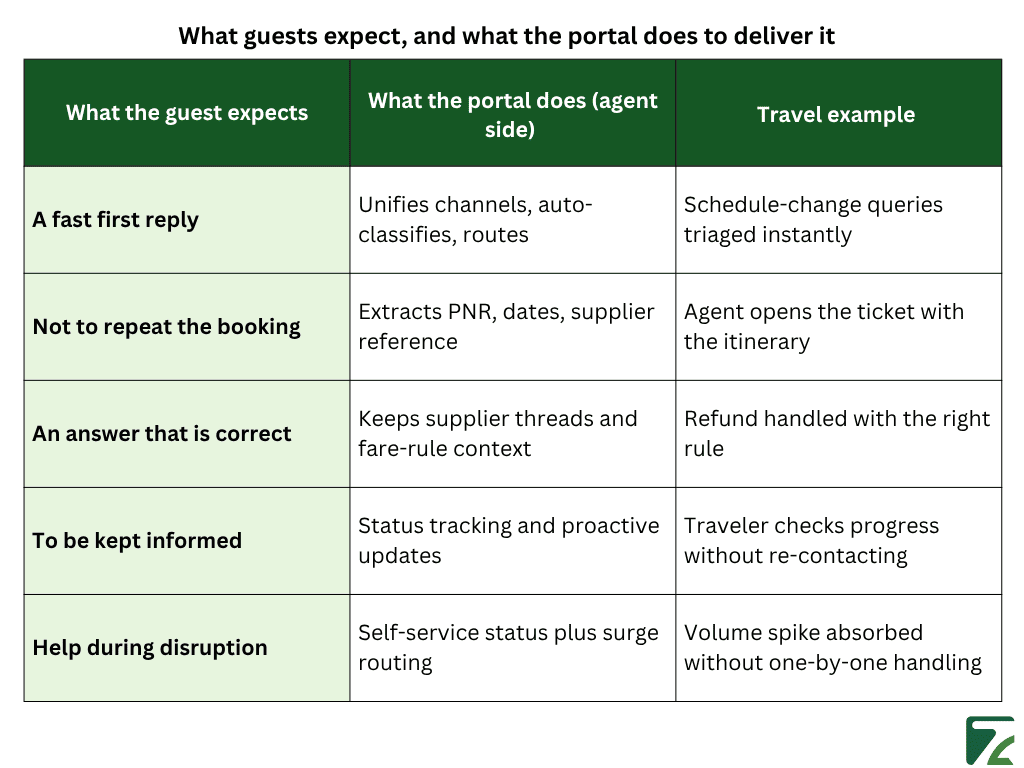
A help desk portal is the system a support team uses to turn incoming queries into resolved tickets, quickly and with full booking context. The useful way to judge one is to start from what guests expect, then work backward to what the portal has to do to deliver it. Most of that work never shows up for the traveler classification, field extraction, supplier coordination, yet it is what makes a fast, accurate answer possible. Each expectation a guest brings lines up with a specific capability the portal has to provide behind the scenes.
Every guest expectation in travel support maps to a capability the portal has to provide behind the scenes.
What is a help desk portal for travel companies?
A help desk portal for travel companies is the system a support team uses to receive guest queries across channels and resolve them as tracked tickets. It unifies email, chat, WhatsApp, phone, and OTA messages, attaches booking context to each ticket, and gives travelers a way to check status or find simple answers on their own. The portal is where support does the work, and that work is mostly invisible to the guest.
What do guests expect from travel support today?
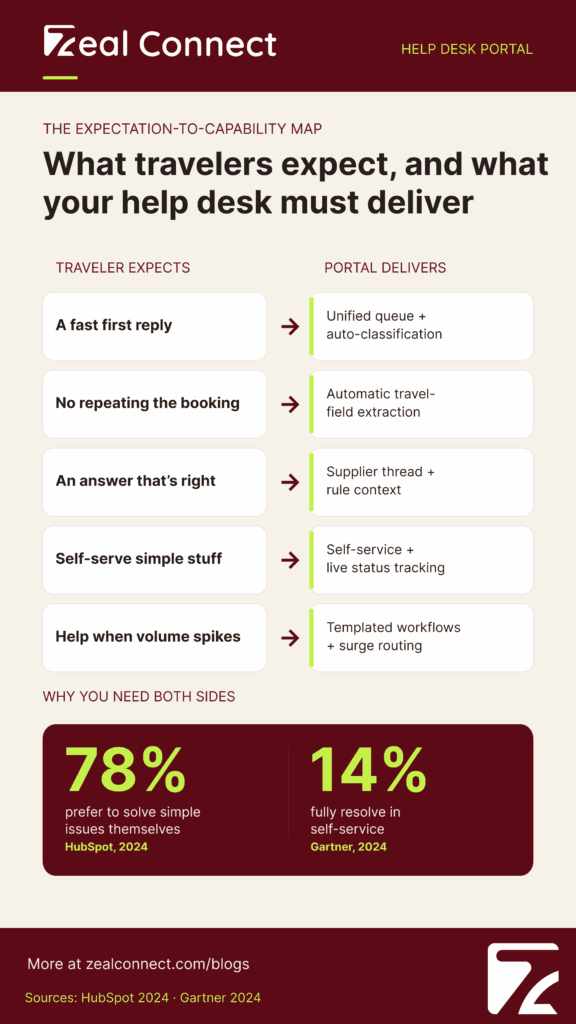
Travelers expect speed, accuracy, and continuity, and the bar keeps rising. They want a fast first reply on the channel they already use, an answer that is correct the first time, and no need to repeat booking details they have already given. According to Zendesk’s CX Trends 2026, 88% of customers now expect faster responses than a year ago. They also want to handle the simple things themselves, since 78% of service leaders say customers prefer to solve issues on their own, per HubSpot’s 2024 State of Service.
How does a help desk portal meet those expectations?
It meets them by doing the operational work that sits between a query and a good answer. A unified queue pulls every channel into one place, so nothing slips. Classification and routing send each ticket to the right agent without manual triage. Field extraction pulls the PNR, dates, and supplier reference, so the guest never re-explains the booking and the agent opens with full context. Supplier threads and status tracking keep the answer accurate and the traveler informed. The mapping below pairs each expectation with the capability behind it.
How Does a Travel Help Desk Portal Work Across OTAs, TMCs, DMCs, and Payment Companies?
The Ticket Lifecycle stays the same across travel, but where the load falls shifts by sub-vertical. An OTA needs the system to absorb sheer query volume. A DMC needs it to track resolution that depends on ground suppliers. A payment company needs every ticket to hold up as a compliance record. Knowing where your business sits tells you which part of the portal to invest in first, and which workflows actually move your numbers.
What do OTAs and airlines need from a help desk portal?
OTAs and airlines need the system to absorb volume, because their query counts swing the most. Change, cancel, and refund requests dominate the queue, and many are repetitive enough that classification and routing can move them without manual triage. When a schedule change hits thousands of bookings at once, a self-service layer that lets travelers check status on their own keeps a share of those queries from ever becoming tickets. The agents then focus on the exceptions, where fare rules or supplier confirmations need a human decision.
What do TMCs and DMCs need from a help desk portal?
TMCs and DMCs need the portal to manage resolution that depends on other people. Their tickets rarely close on first contact, because a hotel, a transfer operator, or a local supplier has to respond first. Consider a mid-size DMC handling 300 bookings a week; on a Monday it can sit on 150 to 200 open supplier emails, each tied to a different booking. Without a portal that tracks supplier-dependent waiting as its own state, agents end up managing that backlog from their inboxes. The portal has to make that waiting visible instead of hiding it inside an open ticket.
What do travel payment companies need from a help desk portal?
Travel payment companies need a portal that treats tickets as financial and regulatory events, not just service requests. Chargebacks, settlement disputes, and fraud reviews carry money and deadlines, so the workflow has to capture evidence and route to the right reviewer. The exposure is real: travel carries one of the highest chargeback rates of any sector, around 4.68% on average, with the industry seeing roughly $25 billion in chargebacks in 2023, per PayCompass.
For a payment company, every support ticket is also a compliance record.
How Do You Set Up and Evaluate a Help Desk Portal for Your Travel Company?
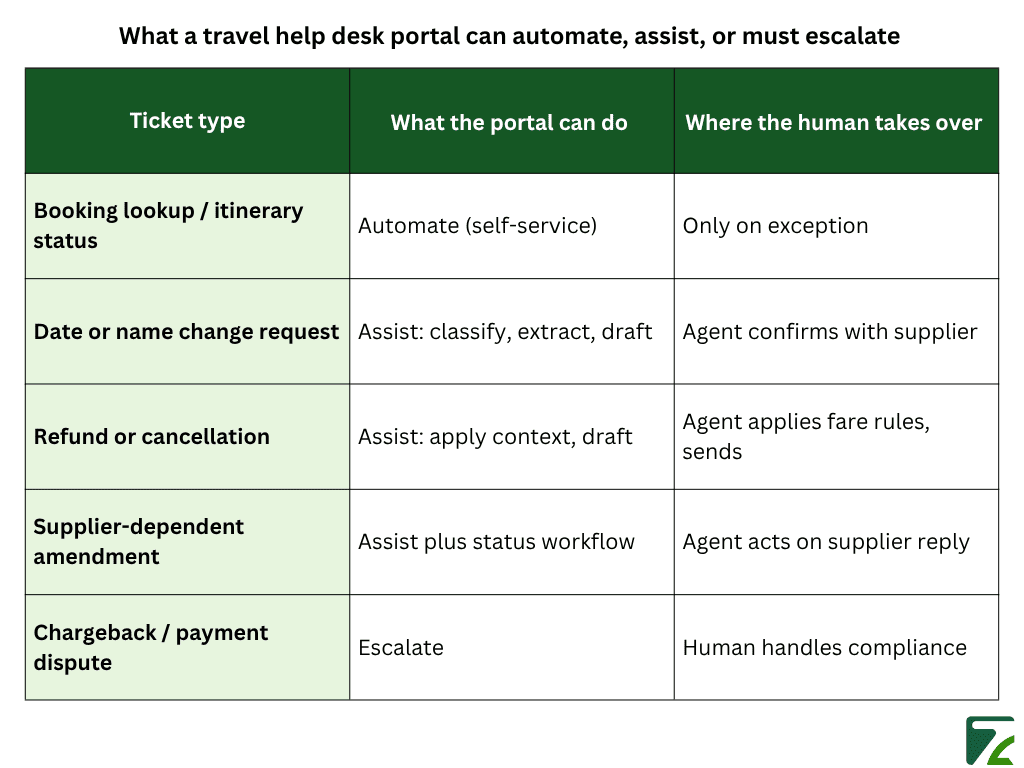
Setting up a help desk portal starts with deciding what the system should own versus what an agent must handle. The mistake is trying to automate everything or nothing. The better approach sorts tickets by how much the portal can safely handle on its own, how much it can assist an agent with, and what must go straight to a person. That sorting is also how you keep automation honest, since in travel the outcome usually depends on a reply from a supplier or a traveler that no system controls.
Which travel help desk tickets are safe to automate?
How should you design SLAs when resolution depends on a supplier?
Design your SLAs by splitting the clock into time you control and time you do not. The agent controls the first response, triage, and the quality of the draft sent to a supplier. The supplier controls how fast they reply. If you measure both against one blended target, you will punish agents for delays they cannot fix. Instead, track supplier-wait time as its own metric and set status rules that pause the agent clock while a ticket waits externally. That keeps the team accountable for first response and triage, which is where the rising speed expectations can realistically be met.
What should you look for when choosing a help desk portal?
Look for travel-native handling first, then the basics every help desk needs. The portal should capture travel fields automatically, classify tickets by sub-vertical, and support supplier-dependent workflows out of the box rather than as custom builds. After that, check multi-channel intake, a self-service layer guests can actually use, compliance-ready records for disputes, and reporting that separates agent-controlled metrics from supplier-wait time. When you compare travel help desk tools, test them against your real ticket mix, not a generic demo, because the difference shows up in the exceptions.
How Does Zeal Desk Run the Ticketing System Behind a Travel Help Desk Portal?
Zeal Desk is an AI ticketing system built specifically for travel operations, and it focuses on the part of the lifecycle where most operational time goes turning a query into a resolved ticket. Rather than adding travel features onto a generic tool, it treats travel tickets as the default case. That shows up in how it classifies, summarizes, and tags work, and in how it keeps the agent in control of every customer reply.
How is Zeal Desk different from horizontal help desks like Zendesk, Zoho Desk, and Freshdesk?
Zendesk, Zoho Desk, and Freshdesk are horizontal help desks built for any industry, so travel logic has to be configured as custom add-ons. Zeal Desk is built only for travel, which means travel fields, ticket categories, and supplier-aware workflows are native. For the agent, that difference is practical: nobody has to rebuild PNR capture or refund routing from scratch, because the system already expects them. The travel-specific structure is what makes its automation reliable instead of noisy.
How does Zeal Desk classify, summarize, and tag travel tickets?
Zeal Desk classifies each incoming ticket into categories that are created per business and trained by AI, so routing matches how your operation actually works. It extracts structured fields such as check-in and check-out dates, PNR, and supplier reference straight from the ticket. It also summarizes long supplier email chains into a short brief, so an agent picking up a thread sees its state in one line. These features cover the core portal capabilities that meet guest expectations: classification, field capture, and context.
How does Zeal Desk keep agents in control of customer replies?
Zeal Desk drafts a reply using the original query context, then the agent reviews, edits, and sends it. No AI-generated reply goes to a customer on its own. That design fits the Automate–Assist–Escalate ladder, where most travel tickets sit in the assist tier rather than full automation. The agent stays the decision-maker on anything customer-facing, while the system removes the repetitive work of summarizing, classifying, and drafting. Custom workflows then handle recurring operational tasks that follow a consistent pattern.
Conclusion
A help desk portal for travel companies earns its place by letting a support team meet rising guest expectations under conditions most tools ignore. Travelers want speed and a correct answer on their own channel, and travel makes that hard, because resolution often waits on a supplier and spikes with disruption. The portal closes that gap with the work guests never see unifying channels, classifying tickets, extracting booking fields, and tracking supplier-dependent waiting. Start from the expectations you have to meet, match each one to a portal capability, then use the Automate–Assist–Escalate ladder to decide what the system handles and what an agent must own. Match that to your sub-vertical, and both the traveler experience and your cost per ticket improve at once.