





TL;DR
This article explains what help desk SaaS for travel operations is, how cloud, on-premises, and hybrid deployments differ, and how the choice plays out for OTAs, DMCs, TMCs, and travel-payment teams. You’ll get a working definition, a three-way comparison, a sub-vertical fit guide, and the Travel Help Desk Deployment Test, a four-factor scorecard for choosing your model. It’s written for operations and support leaders revisiting the platform their ticket queue runs on.
Choosing help desk SaaS for travel operations usually lands on an ops leader at an awkward moment: a renewal is due, or the team has outgrown a shared inbox, and suddenly everyone has an opinion. Vendors say go clouds. Your IT or security lead says keep control. Both are partly right, and neither answer is built for how travel support actually runs. Ticket volume swings with disruption. Refund and chargeback tickets carry card data. Agents sit in different cities. Resolution waits on a supplier halfway across the world. So the deployment model is an operational choice, not just an IT one. This article gives you a way to score it rather than a slogan to repeat.
Why Does the Cloud vs On-Premise Choice Matter for Help Desk SaaS in Travel Operations?
The choice matters because the model you pick shapes how your team handles its worst days, not its average ones. A help desk that copes with a quiet Tuesday can still buckle when a storm grounds flights, and the queue triples in an hour. Travel runs on those spikes, and the deployment model either absorbs them or makes them worse. First, see how far the move to cloud has gone and why travel volume behaves this way.
Key Terms Worth Knowing
Help desk SaaS : ticketing software delivered over the internet on a subscription, hosted and maintained by the vendor rather than on your own servers.
On-premise deployment : software installed and run on servers you own and maintain in-house, usually for a one-time licence plus hardware and staffing costs.
Hybrid deployment : a split setup that keeps most of the help desk in the cloud while sensitive data stays in a store you control
TCO (CapEx vs OpEx) : total cost of ownership, comparing upfront capital spend on hardware against recurring operating spend on a subscription.
How big is the shift to cloud and SaaS that travel operations are part of?
The shift is now the default, not the experiment. According to Gartner (2024), worldwide end-user spending on public cloud services is forecast to total $723.4 billion in 2025, up 21.5% in a single year, with SaaS the largest segment. Most of the tools your agents already use email, chat, booking sit in the cloud, so running the help desk elsewhere works against the rest of your stack
Why does travel ticket volume make the help desk deployment choice harder than in other industries?
Fixed on-premise capacity is sized for a normal day; cloud capacity flexes with the surge.
What is travel itself already doing about cloud help desk software?
Travel is moving the same direction, and spending to get there. According to SITA (2025), airline IT spends reached an estimated $37 billion in 2024, with about half of airlines starting their digital work by moving to the cloud, and 74% forecasting higher IT spend over the next two years. The trend is set, but it doesn’t settle your decision. Adoption numbers won’t tell you whether your refund desk should keep card data in a system you control. For that, you need to know what each model is.
What Is Help Desk SaaS for Travel Operations, and How Do Cloud, On-Premise, and Hybrid Differ?
Help desk SaaS for travel operations is ticketing software delivered over the internet on a subscription, built around travel work rather than generic support. It captures the booking reference, the travel date, and the supplier on each ticket, then routes and ranks the queue against real travel deadlines. The deployment question sits underneath that: where does the software run, and who keeps it running? There are three answers, and the differences are concrete.
What does "help desk SaaS for travel operations" actually mean?
It means the vendor hosts and maintains the software, and you reach it through a browser on a per-agent subscription. You don’t buy servers or run updates, and new features arrive without a project. That model is now the norm for business software. For travel teams, the practical question is fit: pick a help desk that handles travel work natively instead of stacking generic add-ons onto a horizontal tool.
Cloud vs on-premise vs hybrid: what's the real difference for a travel help desk?
Cloud runs on the vendor’s infrastructure and reaches anywhere with a connection. On-premise runs on servers you own full control, but fixed capacity and an in-house maintenance load. Hybrid splits the two, usually a cloud front end with sensitive data kept in a store you manage. Uptime is part of the stake: according to ITIC (2024), a single hour of downtime now costs more than $300,000 for over 90% of mid-size and large enterprises.
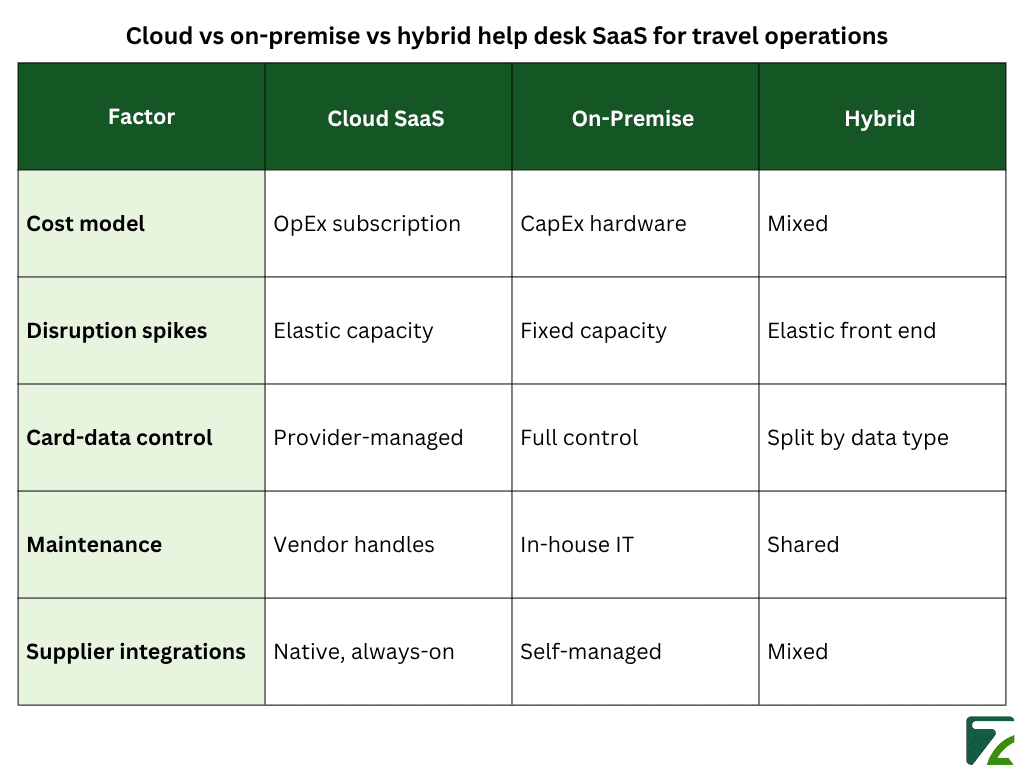
Cloud, on-premise, and hybrid differ on four things: how you access the help desk, how it scales for spikes, who controls the data, and who handles maintenance.
When is a hybrid travel help desk the honest answer?
Hybrid is the honest answer when most of your work suits cloud, but one slice of data does not. A payments team might run ticketing, routing, and agent collaboration in the cloud while keeping raw card data in a controlled store that meets its residency rules. You get elastic capacity for the queue and tight control where regulators are watching. The trade-off is complexity: two environments to integrate and secure instead of one. Many mid-size travel firms land here, because it answers the compliance worry without giving up responsiveness.
How Does the Cloud vs On-Premise Help Desk Decision Play Out Across Travel Sub-Verticals?
The decision plays out differently depending on what kind of travel business you run, because the four pressures behind it spikes, compliance, geography, and integrations land unevenly. An OTA and a payments company can read the same comparison table and walk away with opposite answers, because their operations are genuinely different. Here is how the choice breaks for the main sub-verticals Zeal Desk serves.
Why do OTAs and high-volume travel help desks lean cloud?
OTAs lean cloud because their work is high-volume, spike-prone, and spread across distributed agents. A change in airline schedules or a weather event sends thousands of change-and-cancel tickets into the queue within hours; more than a fixed capacity can absorb. OTAs also run support teams across several cities, so agents need the same live booking data without sync lag. For most online agencies, the generic decision factors that favour cloud flexibility, remote access, and low upfront cost point the same way their operations already do.
When do payment and compliance push a travel operation toward on-premise or hybrid?
Payment and compliance push you the other way when tickets carry regulated data, and the penalties are steep. Travel-payment companies deal with card numbers, chargebacks, and settlement records, all under PCI-DSS and data-residency rules, and the cost of getting it wrong is real. According to IBM (2024), the global average cost of a data breach reached $4.88 million in 2024, and regulators are active: DLA Piper (2025) reports that GDPR fines across Europe totalled €1.2 billion in 2024.
When residency mandates are hard, regulated card data is what pulls a travel operation back toward on-premise or hybrid.
How should DMCs and TMCs weigh control against convenience?
DMCs and TMCs usually tilt toward cloud, with eyes open. Both run distributed teams ground handlers across destinations, corporate desks across regions on tickets that depend on several suppliers at once. A DMC ticket can stay open for days while a hotel, a transfer company, and a guide all respond, so always-on access and reliable integrations matter more than raw control. Neither usually carries the card-data exposure of a payments firm, so the compliance pull toward on-premise is weaker.
How Do You Decide Between Cloud and On-Premise? The Travel Help Desk Deployment Test
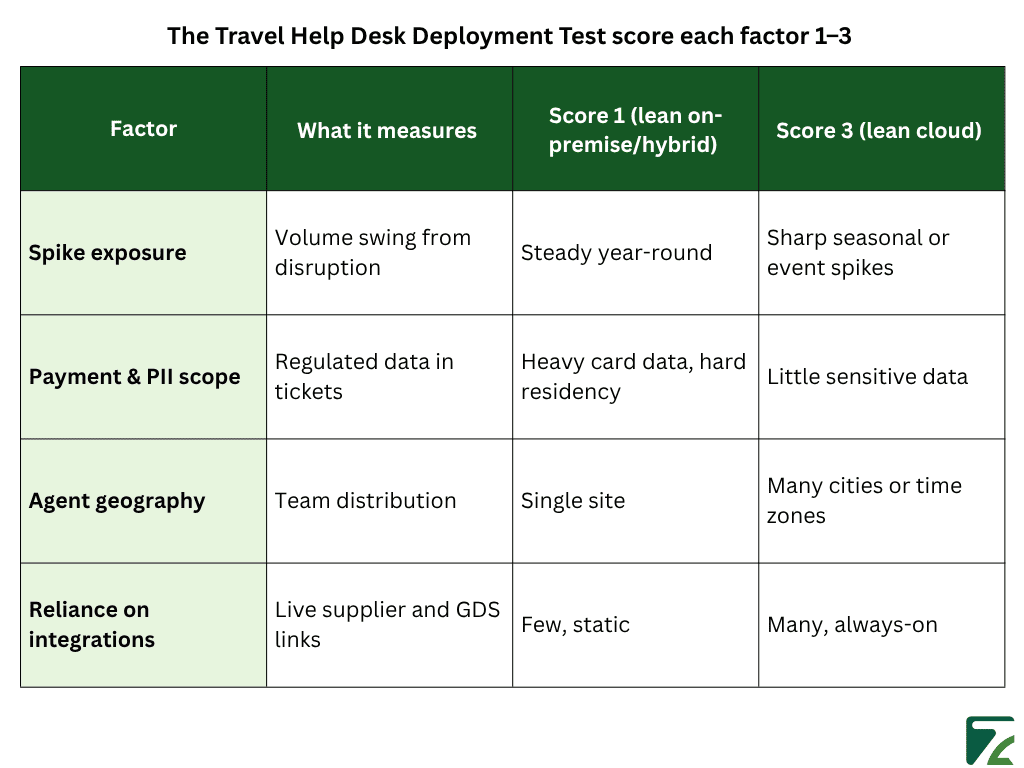
You decide by scoring your own operation against the four factors that move this choice, instead of trusting a vendor’s default or a generic checklist. The Travel Help Desk Deployment Test turns the decision into four numbers. Score each factor from 1 to 3, then read the lean: high spike exposure, wide agent geography, and heavy integration reliance push you toward cloud, while heavy payment and PII scope with hard residency rules pull you toward on-premise or hybrid.
What are the four factors in the Travel Help Desk Deployment Test?
The four factors are spike exposure, payment and PII scope, agent geography, and reliance on live integrations. Spike exposure tracks how sharply disruption and seasonality swing your volume. Payment and PII scope covers how much regulated data your tickets carry, while agent geography reflects how spread out your team is. The last factor counts how many live supplier, GDS, and channel links each ticket depends on.
How do you build an honest TCO comparison for travel help desk software?
You build it by counting everything, not just the sticker price, because cloud is not automatically cheaper over a long, steady horizon. A real comparison weighs subscription fees, in-house IT staff, peak-season headcount, and migration effort against the upfront hardware cost of self-hosting. According to Spacelift (2026), a cloud compute instance can reach break-even against a comparable owned server after about 15 months, after which the owned hardware is cheaper for stable workloads. Cloud carries its own discipline problem too: Flexera (2025) found 84% of organizations say managing cloud spend is their top cloud challenge. Some teams even move workloads back, a pattern some call cloud repatriation.
What happens to your tickets and SLAs during a migration?
A migration moves your open tickets, history, and SLA clocks, so the real question is how cleanly. Done well, history and attachments transfer; open tickets keep their status and assignee, and SLA timers carry over. Done badly, you lose context mid-conversation and agents restart replies from scratch. Plan the cutover for a low-volume window, never the start of peak season, and confirm the vendor preserves custom travel fields like booking reference and supplier. Ask for a test migration first; the switching cost is mostly preparation, not technology.
How Does Zeal Desk Fit a Cloud Help Desk for Travel Operations?
If your scores point to cloud, the next question is which cloud help desk actually fits travel work. This is where Zeal Desk comes in. Built only for travel rather than as a generic tool with a travel skin, it handles the same spike and integration pressures the Deployment Test measures, so the reasons you chose cloud are answered inside the product.
What makes Zeal Desk travel-specific?
Travel fields, ticket categories, and supplier-aware workflows come native, where Zendesk, Zoho Desk, and Freshdesk leave that setup to you. Zeal Desk classifies each ticket with an AI-trained engine and reads details like check-in dates, PNR, and supplier reference straight off the ticket, so the multi-supplier work behind your integration score sorts itself instead of being retyped.
Conclusion
Cloud is the right default for most travel operations, for operational reasons rather than fashion. Ticket volume spikes with disruption, agents work from scattered locations, and tickets depend on suppliers you don’t control, so elastic capacity and always-on access do real work. The honest exception is regulated data. When card numbers and traveler PII sit inside your tickets under hard residency rules, an on-premise pocket or a hybrid split can be the better call. The Travel Help Desk Deployment Test lets you weigh those pressures for your own business instead of inheriting someone else’s answer. Score your spike exposure, payment and PII scope, agent geography, and integration reliance, and the numbers will point you toward cloud, hybrid, or on-premise with reasoning that holds up when finance or security asks why.