




TL;DR
This article explains what a help desk management system for travel operations is, why managing tickets differs from tracking them, and how a travel-built system handles supplier-dependent SLAs and disruption surges. You’ll get a plain definition, the key terms, a sub-vertical table, and the Travel Help Desk Fit Test a five-check rubric for judging whether a system fits your operation.
Plenty of tools are sold as travel help desks, and most only track tickets you log a request, assign it, close it. That works until a refund stall waiting on a hotel, or a schedule change drops a thousand tickets into the queue overnight. Then you need a system that manages the work, not just records it. This article explains what a help desk management system for travel operations does, how it differs from a generic tool, and how to judge whether one fits your OTA, TMC, DMC, tour operator, or payments team.
Why Do Travel Operations Need a Help Desk Management System, Not Just Ticket Tracking?
Travel operations need a help desk management system because the work rarely ends when a ticket is logged. An agent sits between the traveller and a hotel, airline, or DMC, and most tickets can’t close until someone outside responds. Volume swings hard, and nearly every ticket carries money a refund, a chargeback, an ADM. That makes weak support expensive: according to Qualtrics (2024), bad experiences put $3.8 trillion in global sales at risk, and 53% of consumers cut spending after one.
Key Terms Worth Knowing
PNR (Passenger Name Record): the booking record holding a traveller’s itinerary and reference code; it drives how agents group related tickets.
SLA / FRT / AHT : A service level agreement, first response time, and average handle time: the metrics support leaders manage their queues to.
IROPS (irregular operations) : disruption events like weather, strikes, or outages that cause sudden ticket surges and reaccommodation work.
ADM (Agency Debit Memo) : A charge an airline issues to an agency for a booking error; a time-sensitive financial task.
What makes travel operations tickets hard for a generic help desk management system to handle?
Travel tickets are hard to manage because the details that decide urgency live inside the ticket, not on its label. A booking reference, travel date, supplier, and ticket type all change how fast something moves and who owns it. A guest flying tomorrow outranks one travelling next month. Generic tools store these as plain text fields that do nothing, so an agent reads each ticket and routes it by hand the manual work a help desk built for travel companies
A travel ticket's urgency is set by its data: travel date, supplier, ticket type which a generic help desk ignores.
How does a disruption surge expose a help desk with no management system behind it?
A disruption surge exposes a weak help desk because volume arrives faster than people can triage it. When flights cancel in bulk, every affected traveler contacts you at once across email, chat, and phone. During the July 2024 CrowdStrike outage, airlines cancelled 16,896 of 411,009 scheduled flights in 72 hours double the prior week’s 1.9% rate (Cirium, 2024). A system that only tracks tickets just hands you a longer list. But one that manages them prioritises by departure time and routes automatically.
What Is a Help Desk Management System for Travel Operations, and What Does It Manage?
A help desk management system for travel operations is software that captures, classifies, prioritises, routes, and resolves every support ticket a travel business handles, using travel-specific data: booking reference, travel date, supplier, ticket type to manage the work automatically rather than only storing it.
The difference between tracking and managing is the whole point. Tracking tells you a ticket exists; managing decides where it goes, how urgent it is, and what runs next without an agent steering each step.
A help desk management system for travel operations acts on each ticket’s data; a shared inbox or spreadsheet only stores it.
What does a help desk management system for travel operations manage beyond logging a ticket?
Beyond logging a ticket, a help desk management system manages five things at once. Intake pulls requests from email, chat, web forms, and messaging into one queue and enriches each with travel data. Classification sorts tickets by type and sub-vertical. Prioritisation ranks them by deadline, not arrival order. Routing sends each one to the agent who should own it. Reporting shows where the queue stalls. A shared inbox gives you none of this just message in a list.
Which metrics does a travel help desk management system improve?
A travel help desk management system exists to move four numbers: first response time, average handle time, deflection, and cost per ticket. Faster routing cuts response time, while cleaner classification cuts handle time, and better self-service raises deflection. Adoption is already wide, according to Roland Berger (2025), 95% of travel and transport service centres use AI, though a large share only for routine tasks. The gap now is depth of use.
How Does a Help Desk Management System Handle Supplier-Dependent Travel Tickets?
How does a help desk management system run SLAs around supplier response time?
How do help desk management system priorities differ across OTAs, TMCs, DMCs, and payment companies?
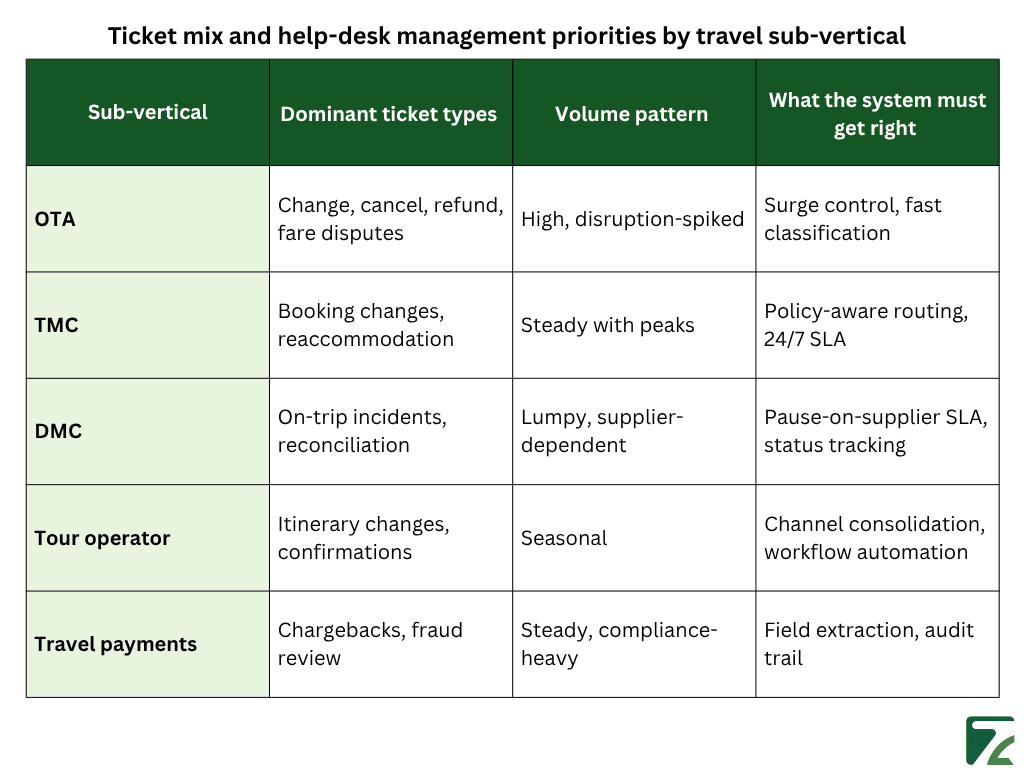
Priorities differ by sub-vertical because each one’s ticket mix is different. An OTA fights a high-volume flood of change, cancel, and refund requests that spikes with every disruption. TMCs handle corporate booking changes and reaccommodation under policy rules. For a DMC, the work is on-trip incidents and supplier reconciliation. Payment companies run chargebacks and fraud review, where one queue carries compliance weight air-transport fraud ran at 0.25% of bookings in early 2025, about one attempt per 400
How Do You Evaluate a Help Desk Management System for Travel Operations?
You evaluate a help desk management system by testing how well it fits your operation, not by counting features. Most vendors show the same checklist omnichannel, automation, SLAs which won’t tell you whether the system models your tickets, suppliers, or busy season. So, judge it against how your team works. The five checks below turn a vague “is this any good?” into specific questions for any vendor. I call the set the Travel Help Desk Fit Test.
What are the five checks in the Travel Help Desk Fit Test?
The Travel Help Desk Fit Test is five questions, each answered yes, partial, or no:
- Fields Does it treat PNR, travel date, supplier, and ticket type as native fields that drive routing?
- Routing Can it auto-classify and route by ticket type and sub-vertical without manual sorting?
- SLA against suppliers Can it pause the clock on supplier waits and chase on its own?
- Surge Does it hold up when volume spikes five to ten times during a disruption?
- Automation-fit Does it automate the predictable input and leave the reply to an agent?
Score any system across the five, and the gaps show where it will cost you later.
Fit beats feature count when you choose a help desk management system for travel operations.
What should a travel help desk management system automate, and what targets are realistic?
A travel help desk management system should automate the predictable input classifying a ticket, extracting the PNR and dates, summarising a supplier thread, drafting a first reply and leave the judgment to people. According to NBER (2023), AI assistance raised agent productivity 14% on average, and 34% for newer agents, across 5,179 agents. Set targets against travel’s reality, though, and measure them on cloud help desk software for travel you can actually track. Zendesk (2024) reports 75% of CX leaders expect 80% of interactions resolved without humans soon an aspiration most travel teams won’t hit. Broader work on agentic AI in travel agrees assist first, keep people on the decisions.
How Does Zeal Desk Manage Travel Help Desk Tickets on the Agent Side?
Zeal Desk builds the travel logic in rather than leaving it to configuration. It’s an AI-powered ticketing system made only for travel operations, so its fields, categories, and workflows match how travel teams work. Here’s how it maps to the Fit Test.
How is Zeal Desk different from horizontal help desks like Zendesk, Zoho Desk, and Freshdesk?
Zeal Desk is a travel-native, not a horizontal tool adapted for travel. Zendesk, Zoho Desk, and Freshdesk serve any industry, so travel fields and supplier-aware workflows have to be custom-built and maintained. In Zeal Desk they’re already there, which covers the Fields and Routing checks it reads a PNR or supplier reference as what it is, not a generic custom field.
How does Zeal Desk classify travel help desk tickets and speed up agents?
Zeal Desk classifies each ticket into categories your business defines, and its AI is trained on, and extracts the fields travel runs on check-in and check-out dates, PNR, supplier reference from the ticket. So, a request arrives already sorted and routed. It also summarises long supplier chains and drafts a reply the agent edits and sends no message goes to a customer automatically. That covers the Automation-fit and Surge checks, while the agent stays in control of every reply.
Conclusion
A help desk that only tracks tickets holds up on a calm day and fails on a hard one. Travel support is harder than that: most tickets wait on an outside party; volume spikes without warning, and nearly every request carries money or compliance. A help desk management system for travel operations manages that reality it reads each ticket’s travel data, routes and prioritises on its own, runs SLAs that separate your time from a suppliers, and absorbs a surge. The work also differs by sub-vertical, so fit matters more than feature counts. Before you buy, run the Travel Help Desk Fit Test Fields, Routing, SLA against suppliers, Surge, and Automation-fit.