

- This article walks through how customer support automation handles an online travel agency (OTA) refund request, from matching the booking and reading the fare rule to calculating the amount, paying out and reconciling with the airline or hotel.
- It is written for OTA support and operations leaders deciding how far refund automation should go and where an agent must stay in charge.
Refund requests look like the easiest work to automate. Every one follows a written rule, the amounts are numbers, and travelers ask the same question in the same words. Yet customer support automation reaches few OTA refund queues. Most still run by hand, with agents reading fare rules, checking hotel policies and calculating penalties one ticket at a time. The reason is simple: an OTA sells rules it doesn't write. This article walks the refund workflow step by step, shows what each step reads, and explains how to set the limits that decide which refunds process on their own.
Why Do So Few OTA Refunds Run on Customer Support Automation?
Few OTA refunds run automatically because the OTA sits between the traveler and the supplier. The traveler asks the OTA for the money back, but the airline or hotel decides whether any money is owed. So refund automation at an OTA has to read another company's rules and apply them to a booking it doesn't fully control. Then it waits for that company to agree. That chain explains most of the manual work still sitting in refund queues today.
Customer Support Automation at an OTA Works With Someone Else's Refund Rules
An airline files its fare rules, and a hotel sets its own cancellation policy. The OTA applies both. It also matters who charged the traveler's card. In the US, the Department of Transportation (DOT) refund rule covers this case. The airline must pass funds to the ticket agent when the agent is the merchant of record for the ticket. The same split exists in hotels, where an OTA may collect payment or leave it to the property. For air, the money moves through agency settlement at scale: in 2025, the International Air Transport Association's (IATA) settlement system processed US$242.3 billion net of US$19.7 billion in refunds (IATA, 2026).
Only About 5% of Airline Refunds Were Automated in 2023
Air refunds show the gap clearly. According to ATPCO (2024), the airline industry's fare filing body, nearly 5% of airline tickets were refunded in 2023, but only about 5% of those refunds were processed with automation. The main cause is data. Automated refund calculation needs the airline to file its refund conditions in a machine readable form. When that data is missing, the request falls back to manual work. Since June 2024, ATPCO applies default industry guidelines instead, which helps, but defaults still need checking against the specific fare before money moves.
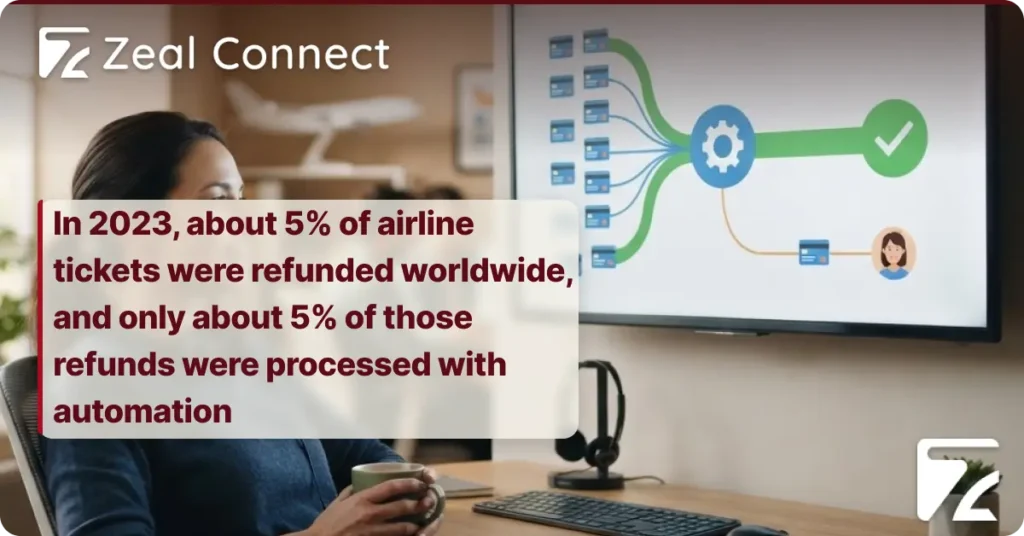
In 2023, about 5% of airline tickets were refunded worldwide, and only about 5% of those refunds were processed with automation (ATPCO, 2024).
What Does a Wrong Automated Refund Cost an OTA?
A wrong refund costs more than the difference. Airlines issue an Agency Debit Memo (ADM) when an agency gets the amount wrong. Virgin Atlantic's policy, for example, lists "incorrect refund calculated, based on applicable fare rule" as an ADM reason, plus an admin charge. A slow refund carries its own cost. In an Outpayce from Amadeus survey (2023), 62% of airline and travel agency chargeback leaders said travelers find a chargeback easier than asking for a refund. Speed and accuracy both matter.
What Is Customer Support Automation for OTA Refund Requests?
Customer support automation for OTA refund requests is the use of rules, integrations and AI inside the support workflow to identify the booking, read the supplier's refund rule, calculate the amount, and either process the refund within limits you set or hand a prepared case to an agent. It runs inside the help desk and booking systems a team already uses.
What AI, the Rules Engine and the Agent Each Do in Customer Service Automation
Each part has its own job. AI reads the traveler's message, picks out the reason and pulls the booking reference onto the ticket. A rules engine does the math. For air tickets, that is usually the global distribution system's (GDS) automated refund, which reads the airline's filed conditions. Delta said Amadeus automated refunds save agencies up to five minutes per transaction. The workflow then applies your limits. Finally, an agent owns everything the limits send their way.
Voluntary and Involuntary Refunds Follow Different Rules
A voluntary refund starts with the traveler changing plans, so the fare rule decides the amount. An involuntary refund starts with the airline, and regulation can override the fare rule. In the US, a flight counts as significantly changed if departure moves 3 or more hours earlier on a domestic trip or 6 or more on an international one, among other triggers. Under the EU's EU261 rules, a cancelled flight's refund is due within seven days, with vouchers only if the passenger agrees in writing. Canada's Air Passenger Protection Regulations (APPR) add a refund when the rebooking offered doesn't meet the passenger's needs.
A voluntary refund follows the fare rule, while an involuntary refund can follow the regulation of the market where the flight operates.
Customer Support Automation Terms Worth Knowing
A few terms come up throughout this article. Here is what each one means.
- Merchant of record: the company that charged the traveler's card, and so the one that can return money to it. At an OTA this may be the OTA or the supplier.
- Category 16 and Category 33: ATPCO fare rule categories. Category 16 holds a fare's penalties; Category 33 holds the coded refund conditions that let a GDS calculate a refund automatically.
- Involuntary refund: a refund owed because the airline cancelled or significantly changed the flight, often regardless of the fare's own refund rule.
- BSP and ARC: the Billing and Settlement Plan run by IATA, and the Airlines Reporting Corporation in the US, where agency sales and refunds settle.
- Agency Debit Memo (ADM): a charge an airline raises against an agency for an incorrect sale, change or refund.
- Shadow mode: a setup where automation calculates and recommends but doesn't act, so an agent can compare its answer with their own before approving.
How Customer Support Automation Handles an OTA Refund in Eight Steps
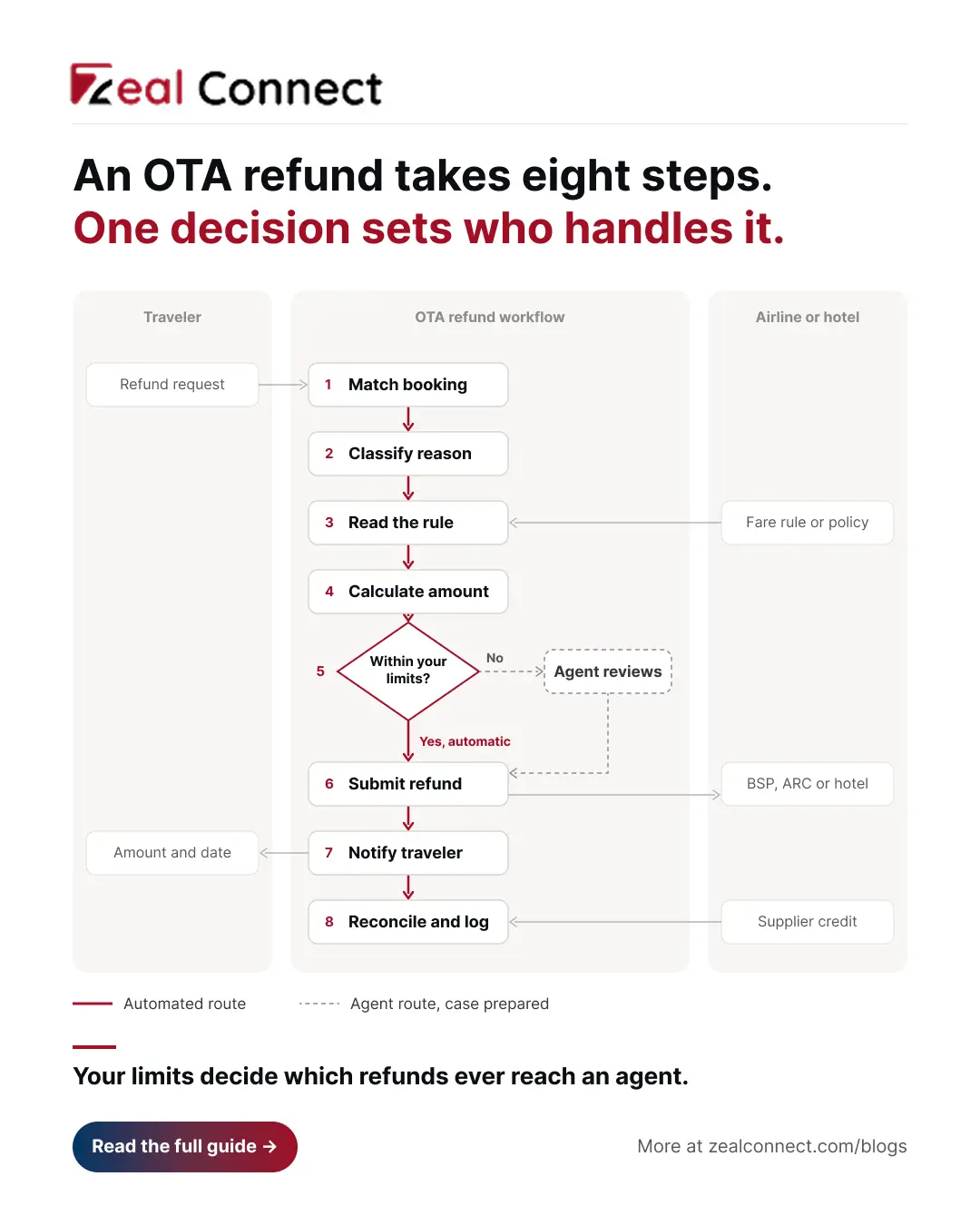
A refund request moves through eight steps whether a person or a workflow handles it. Automation changes who does each step and how fast, while the order stays the same. Think of the steps in three groups: understanding the request, deciding the amount, and moving the money. Each group needs different data, and each fails in its own way when that data is missing.
An OTA refund has eight steps whether a person or a workflow runs them; automation changes who does each step and how fast.
Steps 1 to 3: Match the Booking, Name the Reason, Fetch the Rule
First, the workflow matches the request to a booking and checks for duplicates, such as an open chargeback or a refund the airline already paid directly. Second, it names the reason: traveler cancellation, airline cancellation or schedule change, duplicate charge, or a hotel problem. Third, it fetches the rule that governs that reason. That means the fare rule, the hotel's cancellation policy or the package terms. For an involuntary case, it also checks which market's regulation applies to the flight.
Steps 4 and 5: Calculate the Refund and Apply the Guardrails
Step four is the calculation. Take an illustrative example: a UK OTA sells an economy return from London to Singapore. The fare is £620, the fare rule sets a £150 cancellation penalty, and £110 in taxes is refundable because the trip was never flown. The traveler gets £580, less any service fee your terms allow. Step five applies your guardrails. These are the settings that decide whether this refund processes alone, waits for review or goes to an agent.
Steps 6 to 8: Submit, Tell the Traveler, Reconcile
Step six submits the refund to the supplier. For air, that runs through the GDS and settles in BSP or ARC; for hotels, it goes through the supplier connection. The traveler is then refunded to the original payment method. Step seven sends the traveler the amount, the method and when to expect the money. Finally, step eight matches the supplier's credit against what you paid out and keeps the record. That record is what you'll need if an airline raises an ADM months later.
Customer Support Automation Guardrails: Which OTA Refunds Process Without an Agent
Guardrails are where the ops lead's judgment goes into the workflow. Each one checks a single condition and sends the refund to automatic processing, review or an agent. Start strict, then relax each guardrail only when the numbers show the automation agrees with your agents. The table below lists six guardrails most OTA refund workflows need, with a safe place to start.
Table: Refund guardrails for an automated OTA refund workflow
Start Every Refund Workflow in Shadow Mode
In shadow mode, the workflow calculates every refund and an agent approves or corrects it. Track one number per refund type: how often the agent accepts the automated amount unchanged. A Dubai OTA, for example, might find that voluntary airline refunds with coded rules match almost every time. Hotel refunds on nonrefundable rates, by contrast, need judgment. That tells you which refund type to switch on first and which stays with agents.
Switch a refund type to automatic processing only when agents accept the automated amount unchanged on almost every case.
When Should Customer Support Automation Get a Higher Refund Limit?
Raise the limit only after a full cycle of evidence, such as a month that includes a peak period. Check four signals: agreement rate, refunds reversed, ADMs received and chargebacks filed after a refund. If all four stay flat, raise the limit one step. Keep a human route open at every level, because travelers expect one. According to Gartner (2026), 87% of customers say a company using GenAI for service must offer a way to reach a human agent.
Conclusion: Start Customer Support Automation With One Refund Type
Refunds follow rules, yet an OTA rarely owns those rules, and that is why so few refunds run automatically today. Automation narrows that gap when each part does its own job. AI reads the request, a rules engine calculates from the supplier's filed conditions, and your guardrails decide what happens next. The eight steps stay the same whether a person or a workflow does them. What changes is how much of the work the workflow does safely. So pick one refund type with coded rules, usually voluntary airline refunds, and run it in shadow mode. Measure how often the automated amount matches your agents. Then widen the limits one guardrail at a time, keeping duplicate claims and unclear bookings with a person.
Frequently Asked Questions About Customer Support Automation for OTA Refunds
Can customer support automation process a refund without an agent?
Yes, within limits you set. A refund can process automatically when the booking matches exactly, the reason is voluntary, the supplier's refund rule is machine readable, the amount is under your limit, and no chargeback or direct airline refund is open. Anything outside those conditions should go to review or to an agent.
What happens when the airline hasn't filed automated refund data?
Without coded refund conditions, the GDS can't calculate the refund from the airline's own data. Since June 2024, ATPCO applies default industry guidelines in that case instead of sending everything to manual processing. Treat those refunds as review cases until your agents confirm the default result matches the fare.
Do refund rules differ between the US, Europe, Canada and India?
Yes, for involuntary refunds. The US DOT, the EU's EU261 rules, Canada's APPR and India's Directorate General of Civil Aviation (DGCA) each define when a refund is owed after a cancellation or schedule change. Voluntary refunds follow the fare rule everywhere. So the involuntary branch of your workflow must check which market's rules apply.
Is customer service automation software the same as a refund chatbot?
No. A chatbot collects the request and answers questions about its status. Customer service automation software runs the workflow behind it: matching the booking, reading the rule, calculating the amount, applying guardrails and recording every action. Many OTAs use both, with the chatbot feeding the refund workflow.
What should a customer service automation platform log for each refund?
Log the refund reason, the rule applied, the calculation, who or what approved it, the payout reference and the supplier's credit. That record lets finance reconcile each refund and lets you answer an airline ADM. Keep it exportable, because ADMs and disputes can arrive months after the refund.