


This article explains what an omnichannel ticketing system for travel is, how it differs from simply running many inboxes, and how requests from email, chat, and API events converge into one booking aware ticket. It's written for support and operations leaders at OTAs, TMCs, DMCs, and bedbanks. You'll get a plain definition, the Channel Intake Map (a five channel reference table), and a practical way to set channel appropriate SLAs and routing.
A traveler emails to move a hotel date. An hour later they chase it on WhatsApp because no one replied. Meanwhile the supplier's system fires a cancellation event into a booking feed nobody is watching. Three signals, one booking, and in most travel teams they land in three separate tools as three unrelated items. An omnichannel ticketing system for travel exists to stop that. This article explains what it is, how email, chat, and API requests fold into one booking aware ticket, and how to route them without simply adding another inbox.
Why Fragmented Channels Break a Travel Ticketing System
Travel support rarely fails because agents are slow. It fails because the same request arrives through several doors at once, and nothing links those doors together. A booking change might start on email, continue on chat, and trigger a supplier event in the background. When each channel writes to its own tool, your team ends up working one booking as if it were three separate problems.
How a Fragmented Travel Ticketing System Creates Duplicate Work
Duplicate work starts the moment one booking touches two channels. Say an OTA customer emails to cancel a room, then messages on WhatsApp two hours later because no one replied. Two agents pick up two tickets. Both open the booking, both draft a response, and the traveler receives two different answers. The work doubled, and the customer trusts you less.
When channels don't share one record, a single booking becomes three tickets.
What Broken Channels Cost a Travel Support Team
The cost shows up as churn, not just wasted minutes. A conflicting or slow reply is exactly the kind of stumble travelers remember. According to Zendesk (2025), 63% of consumers are willing to switch to a competitor after a single bad experience. In travel, that bad experience is often a booking handled twice, or a supplier event no one saw until the traveler was already at the airport. Teams that handle disruption spikes well tend to catch these before the customer does.
Why Adding a Channel Without One System Means More Work
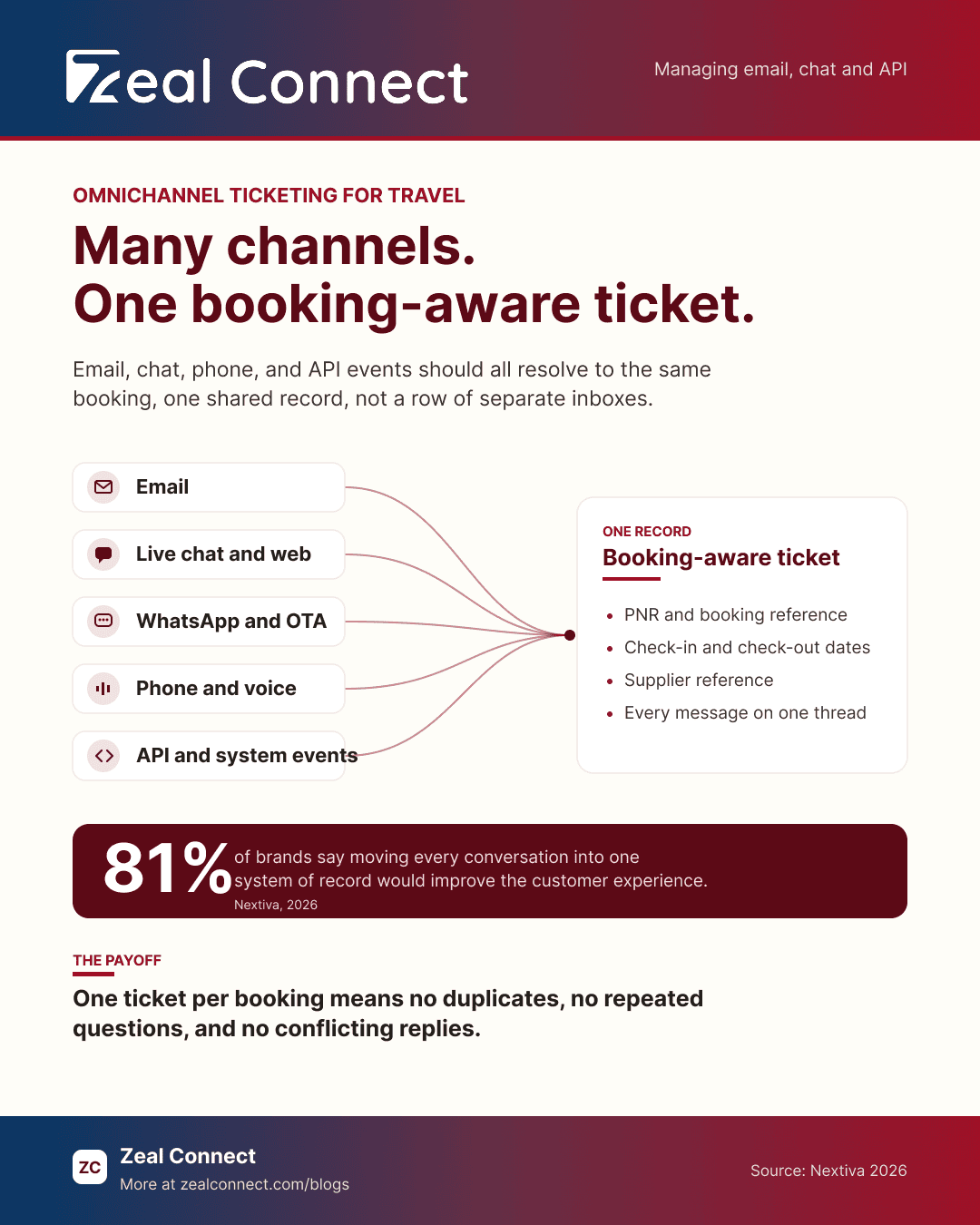
Adding WhatsApp or a web chat widget feels like better service. Yet without a shared record, it just adds another inbox to check. Most teams already sense this. According to Nextiva (2026), 81% of brands say the customer experience would be a lot better if they could consolidate all conversations into one system of record.
More channels help only when they meet on one ticket.
What Is an Omnichannel Ticketing System for Travel?
An omnichannel ticketing system for travel is a support platform where every intake channel, email, chat, messaging, phone, and API events from booking and supplier systems, writes to one booking aware record. Instead of separate inboxes, each request resolves to the same ticket, tied to the booking it concerns.
Omnichannel vs Multichannel: One Ticketing Record, Not Many Inboxes
The difference between the two comes down to whether the channels share context. In a multichannel setup, you offer email, chat, and social, but each runs on its own and none can see the others. An omnichannel model connects them, so a conversation started on chat continues on email without the traveler repeating themselves. As Freshworks puts it, multichannel channels sit side by side, while omnichannel channels actually talk to each other.
Multichannel offers many channels. Omnichannel makes them share one record.
How the System Turns Messages Into One Ticket
The mechanism that makes this work is identity resolution. When a message arrives, the system matches its sender to a person and, more importantly, to a booking. An email address, a WhatsApp number, and a PNR can all point to the same trip. Once matched, new messages thread into the existing ticket instead of spawning a fresh one. That single step, match and then thread, is what separates one clean case from five duplicates. A desk built to keep a booking and its messages together does this by default.
Is the API a Channel in a Travel Ticketing System?
Yes, and in travel it may be the busiest one. An API channel lets other systems open and update tickets without a person typing anything. A supplier's platform can report a cancellation, a payment gateway can flag a chargeback, and an OTA's messaging API can pass a guest thread straight into your queue. These are inbound requests like any email, except they arrive as structured events. The next section walks through how each channel folds in.
Key Terms Worth Knowing
A few terms used throughout this article:
- Omnichannel vs multichannel: Multichannel means offering many channels that run separately. Omnichannel means those channels share one record, so context follows the traveler across email, chat, and messaging.
- Identity resolution (booking match): The step that links a sender's email, phone number, or chat session to a single traveler and the specific booking their request is about.
- API / webhook intake: A way for booking, supplier, or payment systems to create and update tickets automatically by sending structured events, instead of a person writing in.
- PNR: The Passenger Name Record, the booking reference that identifies a trip across airlines and systems. It is often the key used to match a request to the right booking.
- SLA / First Response Time (FRT): The response time targets a support team commits to. Different channels imply different clocks, so one target rarely fits them all.
How Email, Chat, and API Requests Flow Into One Omnichannel Ticketing System
Once every channel resolves to a booking, the day to day question becomes practical: what does each channel actually need to become one ticket? Email carries long threads. Chat is fast and short. API events arrive as data, not sentences. Each one demands slightly different handling on the way in, yet they all end in the same place, one ticket, attached to one booking, visible to whoever picks it up.
The Channel Intake Map: What Each Channel Needs to Become One Ticket
Every channel has to answer two questions before it becomes a useful ticket: who is this, and which booking is it about? The map below lays out how each one gets there. Read it as a checklist for any channel you plan to add or consolidate.
Table: The Channel Intake Map, what each channel needs to become one ticket
| Channel | What arrives | Speed and implied SLA | How it identifies the booking | What unify requires |
|---|---|---|---|---|
| Long threads, supplier chains | Async, hours | Sender address, ref in body | Parse and match, thread replies | |
| Live chat / web form | Short real time queries | Sync, minutes | Session or form fields | Attach to booking, carry context |
| Messaging (WhatsApp, OTA, SMS) | Short, mobile, informal | Near sync, minutes | Phone number, OTA thread ID | Map identifier to the booking |
| Voice / phone | Spoken, unstructured | Sync, live | Caller ID, IVR lookup | Log the call, link to ticket |
| API / system events | Structured events (cancel, chargeback) | Machine speed, seconds | PNR, supplier ref, transaction ID | Auto create, prioritize, enrich |
The API Channel: When a System Event Becomes a Ticket
The API channel matters most when things go wrong at scale. A schedule change, a supplier cancellation, or a failed payment can each open a ticket automatically, tagged to the booking, before the traveler even notices.
A supplier cancellation is a ticket the traveler hasn't reported yet.
That head start is valuable because disruption clusters. According to EUROCONTROL (2025), en route delays in Europe hit a record 5.7 minutes per flight in July 2024, up from 3.3 minutes a year earlier. When one storm cancels forty rooms, you want forty tickets already waiting, not forty emails to sort by hand. Some travel platforms now feed booking actions and messages into one view for this reason, as PhocusWire (2024) reported of CWT's in platform messaging. This is also where a system built to chase supplier responses earns its place.
Email and Chat in a Travel Ticketing System: Same Booking, Different Clocks
Email and chat are the channels travelers use most, and they behave differently. Email is patient and detailed, while chat is quick and expects a fast reply. Both, though, are often about the same booking. According to eviivo (2025), 58% of travelers prefer to reach a provider by SMS, WhatsApp, or email links rather than phone. Messaging in particular has become a primary travel channel, as PhocusWire (2025) has documented across major airlines. An omnichannel system keeps both threads on one ticket, so the chat agent sees what the email already said.
How Do You Build Omnichannel Ticketing for Travel Without Adding Inboxes?
Building omnichannel ticketing is less about buying every channel and more about deciding how requests move once they arrive. The goal is convergence: one ticket per booking, routed to the right person, on a clock that fits the channel. Three decisions carry most of the weight, how you route, what you consolidate first, and how you measure whether it worked.
Route by Channel and Event Type, Not One Queue
One queue with one SLA treats a chat and a chargeback the same, which serves neither. Route instead by channel and event type, and give each its own response target. Chat expects minutes, email can take hours, and a disruption event may need an automated action in seconds. Traveler preferences also shift, so no single channel dominates. According to Perk (2025), among the 89% of business travelers disrupted in 2025, rebooking preferences split across phone at 33%, online self service at 30%, and human chat or SMS at just 4%. Routing has to reflect that spread, which is easier once you set response time targets per channel.
Which Channels to Consolidate First in a Travel Ticketing System
Start with the channels that carry the most volume and the most overlap. For most travel teams, that means email and the top messaging channel first, because those two collide constantly on the same bookings. Add the highest volume API event next, usually schedule changes or cancellations, since those drive the urgent tickets. Voice and niche social channels can follow. Consolidating everything at once tends to stall, whereas a channel at a time keeps the queue stable while agents adjust.
How to Tell Omnichannel Ticketing Is Working: The Metrics That Move
You will know it is working when three numbers fall together. Duplicate ticket rate drops first, because messages now thread onto existing bookings instead of spawning copies. Repeat contacts fall next, since travelers stop explaining themselves again across channels. First response time by channel then steadies, because each channel has its own target. Watch those three together rather than a single blended figure. A blended average can look healthy while chat quietly misses its window every afternoon.
Judge omnichannel ticketing by duplicate ticket rate, not channel count.
Conclusion
An omnichannel ticketing system for travel is not measured by how many channels you offer. It is measured by whether they all resolve to one booking aware record. Email, chat, and the API channel each arrive differently, but they should end on the same ticket, matched to the same trip. The part most teams overlook is that API channel, the schedule changes, cancellations, and chargebacks that arrive as system events and often matter most during disruption. Identity resolution ties everything together, and channel appropriate routing keeps each request on the right clock. Before you bolt on another inbox, map your own channels against the intake checklist above. Then consolidate the busiest two, and watch your duplicate ticket rate for proof it is working.
Frequently Asked Questions
What's the difference between an omnichannel ticketing system and just having many inboxes?
An omnichannel system links every channel to one shared, booking aware record, so context follows the traveler. Many inboxes is multichannel: the channels exist but stay separate, so agents copy details between tools and travelers repeat themselves on each new message.
Is an API really a channel in a travel ticketing system?
Yes. An API lets booking, supplier, and payment systems open and update tickets automatically. A schedule change, cancellation, or chargeback arrives as a structured event and becomes a ticket, tied to the booking, without anyone typing it in by hand.
How does the system link an email, a WhatsApp message, and a booking to one ticket?
Through identity resolution. The system matches the sender's email address or phone number, plus the booking reference or PNR, to a single traveler and trip. New messages then thread onto that existing ticket instead of creating duplicates.
Should email, chat, and disruption events use the same SLA?
No. Each carries a different urgency. Chat expects a reply in minutes, email can take hours, and a disruption event may need an automated action in seconds. Set a response target per channel and event type rather than one blended clock.