



- This article explains which help desk best practices matter for a travel support team and the order to put them in place over 30 days.
- It is written for operations and support leaders at travel agencies, OTAs, bedbanks, DMCs and TMCs.
- It suits teams setting up a help desk, or rebuilding one that grew out of shared inboxes and personal WhatsApp numbers.
A travel team switches on new help desk software, copies a list of fifteen help desk best practices, and turns them all on in week one. A month later, half the tickets sit under "General". Response timers fire on requests filed in the wrong place, and agents still open the old reservations inbox to find the booking. Nothing on the list was wrong. What was missing is the order, and the few changes travel needs. This guide puts the practices on a 30 day calendar.
Where Generic Help Desk Best Practices Fall Short in Travel
Most guides to help desk best practices are written with IT or ecommerce support in mind. Their advice is sound: one queue, clear categories, response targets, saved replies and a knowledge base. Trouble starts when a travel team applies all of it at once. In travel, urgency depends on a trip date, and the answer often sits with a supplier.
Help desk best practices only work in the right order
The usual list gives 15 or 17 practices equal weight, with no sequence. In practice, they stack. Response targets need categories, because a refund and a voucher request can't share one target. Saved replies need known contact reasons, and automation needs a few weeks of clean, well sorted tickets. So when everything goes live together, each practice copies the mistakes of the one beneath it. A wrong category leads to a wrong priority, and then to a missed target nobody can explain.
Two things generic help desk tips leave out: the travel date and the supplier
Generic help desk tips sort work by when a request arrived. In travel, urgency comes from when the trip starts, so a transfer change for tomorrow outranks a hotel question for May. The second gap is the supplier. Many answers sit with a hotel, an airline or a DMC, so the desk often waits on someone else. Luxury Travel Advisor's 2026 survey ranked supplier service failures landing on the advisor's desk among the top stressors. It also found that more than a third of advisors work over 50 hours a week.
What is a right first time help desk worth in travel?
A request handled right the first time needs one contact. One handled badly comes back, often more than once. The bar is already high. According to the Institute of Customer Service, 83.2% of UK customer experiences were right first time in January 2026, the highest the index has recorded. For a travel desk, right first time is mostly a setup result. The request lands in the right category, reaches the right person and arrives with the booking attached.
What Are Help Desk Best Practices for a Travel Support Team?
Help desk best practices are the working rules that get every request to the right person, with its booking attached, a promised response time and a clear next step. In travel, those rules also have to hold when a supplier owns part of the answer and when a disruption sends hundreds of requests at once.
The seven help desk best practices every travel desk needs
Seven practices cover most of what a travel support team needs in its first month:
- One queue for every channel: email, chat and WhatsApp land in one place.
- Categories built from real contacts: reports match what people actually ask.
- A booking reference on every ticket: agents never hunt for the reservation.
- Priority and response targets per category: set by travel date as well as arrival time.
- A written escalation and complaint path: serious cases get an owner and a deadline.
- Saved replies and a knowledge base: written for your top contact reasons.
- A review loop: check the setup after 30 days and fix what drifted.
How each help desk practice depends on the one before it
The seven practices form a chain. You count demand first, then turn it into categories. Categories decide the required fields and the priority, and priorities decide response targets. Saved replies follow the top categories, and automation comes last, once the data under it is clean. Reversing the chain causes predictable trouble. For example, if you set a four hour target before a "refund" category exists, refund requests filed under "General" miss the target while agents work on easier tickets.
Help desk best practices form a chain: demand, then categories, then required fields and priority, then response targets, then saved replies, with automation last.
Which help desk practices can wait until after day 30?
Automation beyond basic assignment, AI classification and reply drafting, survey tuning and detailed reports can all wait. Each needs two to four weeks of clean, categorized tickets, or its rules fire on the wrong requests. When you do add AI, keep its job clear. It can sort requests, pull booking details into fields and draft replies, while the agent reviews, sends and closes.
Key Terms Worth Knowing
A few terms come up throughout this article on setting up a travel help desk. Here is what each one means.
- SLA (service level agreement): The response and resolution times your team promises for each type of request. Many travel desks add a third promise: when the next update will arrive.
- Pending (waiting on supplier) status: A ticket status showing that the next step belongs to someone outside your team, such as a hotel or a ground handler.
- Macro (saved reply): A prewritten reply that also sets the ticket's status, tags or owner in one click, used for common requests such as voucher resends.
- Parallel run: A short period when the old inboxes and the new help desk both stay open while the team checks that no request is lost.
- Escalation path: The written route a ticket follows when its first owner can't settle it, from team lead to manager to a formal complaint response.
Three Help Desk Best Practices Travel Teams Must Set Up Differently
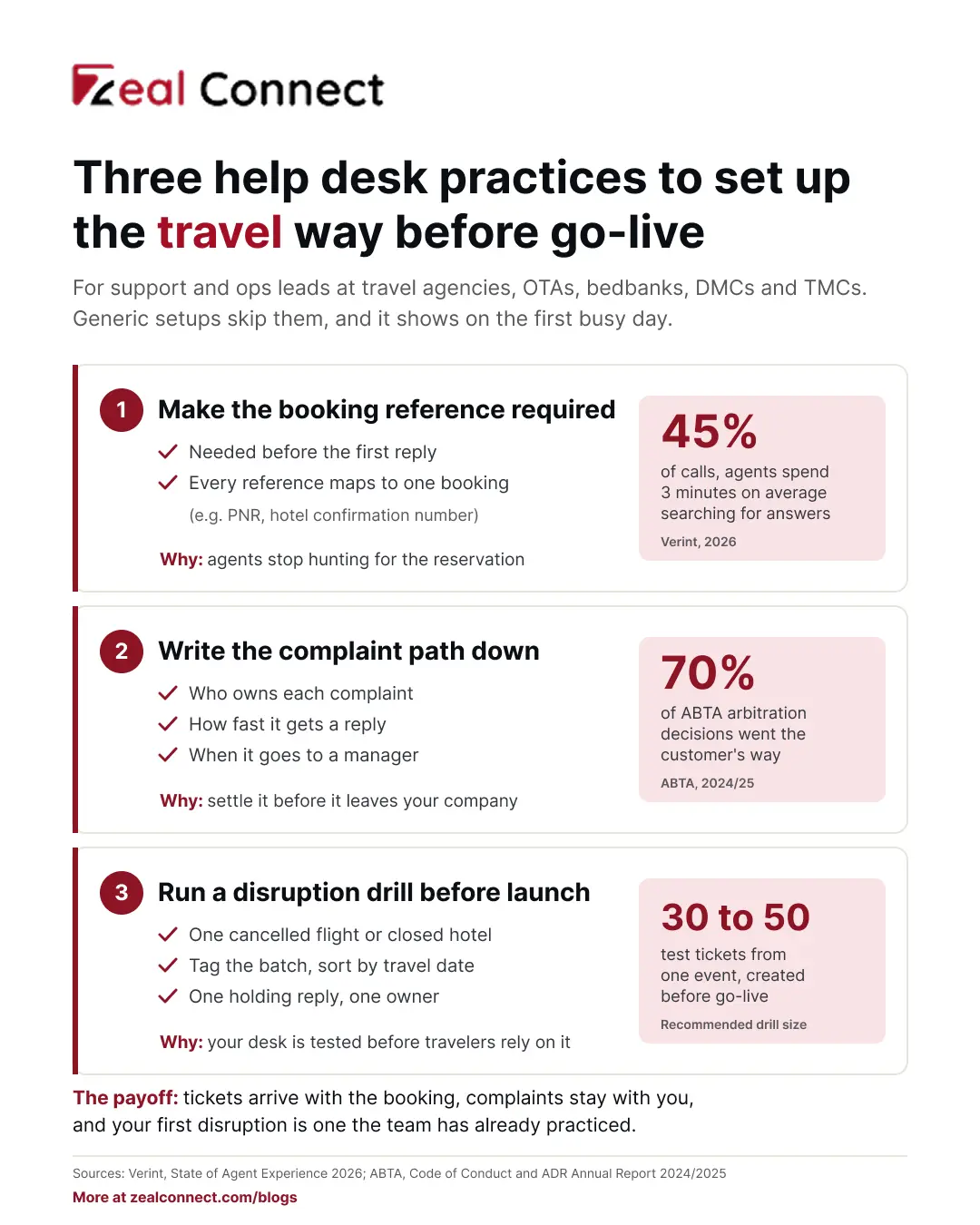
Most help desk best practices work in travel as written. Three need a travel version before go live. They cover how a ticket finds its booking, where unsettled complaints go, and how the desk copes when one event creates many requests. Complaints travel further than many teams expect. In Spain, transport made up 40.3% of complaints to the European Consumer Centre in 2025, the largest share of any sector.
Make the booking reference a required help desk field
Every ticket should carry a booking reference before an agent replies. One booking means one case, and amendments link back to it. A request may quote a PNR, a hotel confirmation number or a partner's own reference, so map them all to the same booking. Booking.com's developer guidance asks partners to match every guest message to its reservation identifiers for the same reason. Skipping this costs search time: Verint's 2026 survey found that in 45% of calls, agents spend an average of three minutes searching for answers.
Write the help desk escalation and complaint path before go live
Decide early who owns a complaint, how fast it gets a reply, when it moves to a manager, and who signs the final written response. Complaints your team can't settle often leave the company. In the UK, they can go to an industry dispute scheme, where outcomes tend to favor travelers. According to ABTA's 2024/25 report, 70% of complaints decided at arbitration went the customer's way. A clear path gives your team the first real chance to settle the case.
How do you test a help desk against a travel disruption before launch?
Run a drill before go live. Take one realistic event, such as a cancelled flight or a closed hotel, and create 30 to 50 test tickets for the bookings it touches. Then check four things. Can agents tag the batch to one event? Does priority follow the travel date? Is a holding reply ready? Does one person own the batch? Travel technology firms are building tools for deciding which travelers to prioritize when service volumes surge. Your desk still needs a working manual answer first.
How Do You Set Up a Help Desk in 30 Days? A Week by Week Plan for Travel Teams
Thirty days is enough for the core rules if each week finishes its job before the next one starts. The table shows the build order and the travel setting to get right at each stage. It also gives the check that tells you a week is done.
A travel help desk is ready for go live when test tickets reach the right queue, every top contact reason has a saved answer, and a disruption drill has passed.
Table: The 30 day help desk build order for a travel support team
Week 1 (days 1 to 7): Measure demand before you configure the help desk
Pull 200 to 300 recent requests from email, chat and WhatsApp. Tag each with a reason, such as amendment, voucher, cancellation, refund, supplier problem, payment or complaint. Also tag the sender: traveler, agent or partner, or supplier. Next, list every inbox and phone number that receives requests and give each an owner. Then decide the structure. One queue suits most teams at first, while desks for air, hotel, transfer and partners make sense once volume justifies them. Done when: the top reasons and every intake point fit on one page.
Week 2 (days 8 to 14): Build categories, fields, priorities and SLAs in your help desk software
Turn the week 1 reasons into 8 to 12 categories, plus "Other". Make the booking reference a required field. Raise priority by travel date, for example for anything traveling within 48 hours. Then set response targets per priority, with business hours, an after hours path and a waiting on supplier status. Add the complaint path. Done when: test tickets reach the right queue with the right priority and target.
In Zeal Desk, this week maps to departments such as Flight, Hotel and Transfer, each with its own SLA policies, business hours and assignment. The integration hub pulls the booking record onto the ticket, and AI classifies requests into your categories and extracts booking references. Travel onboarding packs, such as hotel reconfirmation, preload starting rules and saved replies. Agents send and close every reply.
Week 3 (days 15 to 21): Write the help desk macros and first knowledge articles
Write one macro and one short article for each top reason from week 1. Each answer should say whose rule applies (yours, the hotel's or the airline's) and when the customer will hear next. After launch, add answers from real tickets as they come up, the habit at the core of knowledge centered service. Name an owner, too: Gartner found that 58% of service leaders aim to upskill agents into knowledge management specialists. Done when: every top reason has a macro, an article and an owner.
Week 4 (days 22 to 30): Test the help desk on a disruption drill, then go live
Run the disruption drill and fix what it exposes. Then go live with one group or channel first. First in Service Travel did this when it opened its 24/7 line to advisors before clients. Keep the old inboxes open in parallel for a few days, then set them to auto reply with the new contact route. On day 30, run four setup checks:
- Share of tickets carrying a booking reference (fix week 2 settings)
- Share filed under "Other" (fix week 1 categories)
- Reopened tickets (fix week 3 answers)
- Requests still reaching old inboxes (fix the week 4 cutover)
Conclusion
Most teams already know the help desk best practices on the list. What makes them work in travel is the order. Three travel settings matter too: the booking on every ticket, a written complaint path, and a desk tested on a disruption burst. Start this week with the demand sample, because every later rule copies it. Hold each week to its "done when" check, even if that moves go live back a few days. By day 30, tickets should carry the booking, sit in a real category and reach an owner with a ready answer. Nobody should still be checking the old reservations inbox. Add automation after that, on clean data, and repeat the four setup checks every month.
Frequently Asked Questions
What are the most important help desk best practices?
For a travel team, seven matter most: one queue for every channel, categories built from real contacts, a booking reference on every ticket, priority and response targets per category, a written complaint path, saved replies with a knowledge base, and a regular review. Put them in that order, because each depends on the one before.
How long does it take to set up a help desk for a travel company?
About 30 days for the core rules, if each week finishes its job. Expect longer if you migrate old ticket history or connect booking systems through an API. The step teams skip most often is the first one, sampling real requests before building categories, and that usually leads to rework.
How many ticket categories should a travel help desk start with?
Start with 8 to 12 categories drawn from a sample of real requests, plus "Other". If "Other" keeps growing, review what lands there and add or merge categories. Fewer, clearer categories make response targets, reports and later automation easier to trust and to explain to your team.
Should a travel help desk run one queue or separate desks?
Start with one intake queue so nothing is missed. Split into desks, such as air, hotel, transfer and partners, once volume and skills justify it. Each desk then needs its own owner, response targets and business hours, plus a clear rule for tickets that touch more than one desk.
When should you add automation or AI to a new help desk?
Add it after two to four weeks of clean, categorized tickets. That history shows which requests repeat and which rules would help. AI can then classify requests, extract booking details and draft replies for agents. The agent still reviews each reply, sends it to the customer and closes the ticket.