


- This article explains how to evaluate customer support ticketing software for a travel operation, stage by stage, so the tool you choose fits your bookings, suppliers, and disruption workflows rather than just passing a generic feature checklist.
- You will get four travel specific evaluation criteria, the Evaluation Stage Criteria Table (a reference for what to test at each procurement stage), and a 90 day success scorecard.
- Written for operations and support leaders at OTAs, TMCs, DMCs, tour operators, and travel payment companies.
You sat through the demos. You compared feature lists. You ran a free trial. Then, three months in, your team was copying booking data by hand, chasing suppliers in a separate inbox, and building workarounds for every workflow the system could not handle. The problem was not the product you chose as your customer support ticketing software for travel. It was the evaluation. Feature checklists built for retail and SaaS miss the criteria that matter in travel: booking awareness, supplier dependency, disruption capacity, and integration with the four to seven booking systems your team already uses. This guide closes that gap with a structured, travel specific evaluation process you can run before you commit.
Why Standard Software Evaluations Fail When You Are Choosing Customer Support Ticketing Software for Travel
Most travel companies pick a ticketing system the same way any business does: they list features, request demos, compare pricing, and run a free trial. That process works when a support ticket is a conversation between a customer and an agent. In travel, a support ticket is rarely just a conversation. It carries a booking, depends on a supplier, has a deadline tied to a departure date, and often involves money (refunds, chargebacks, settlement disputes). Standard evaluation methods were not built for that.
What Makes a Travel Support Ticket Structurally Different From a Generic One?
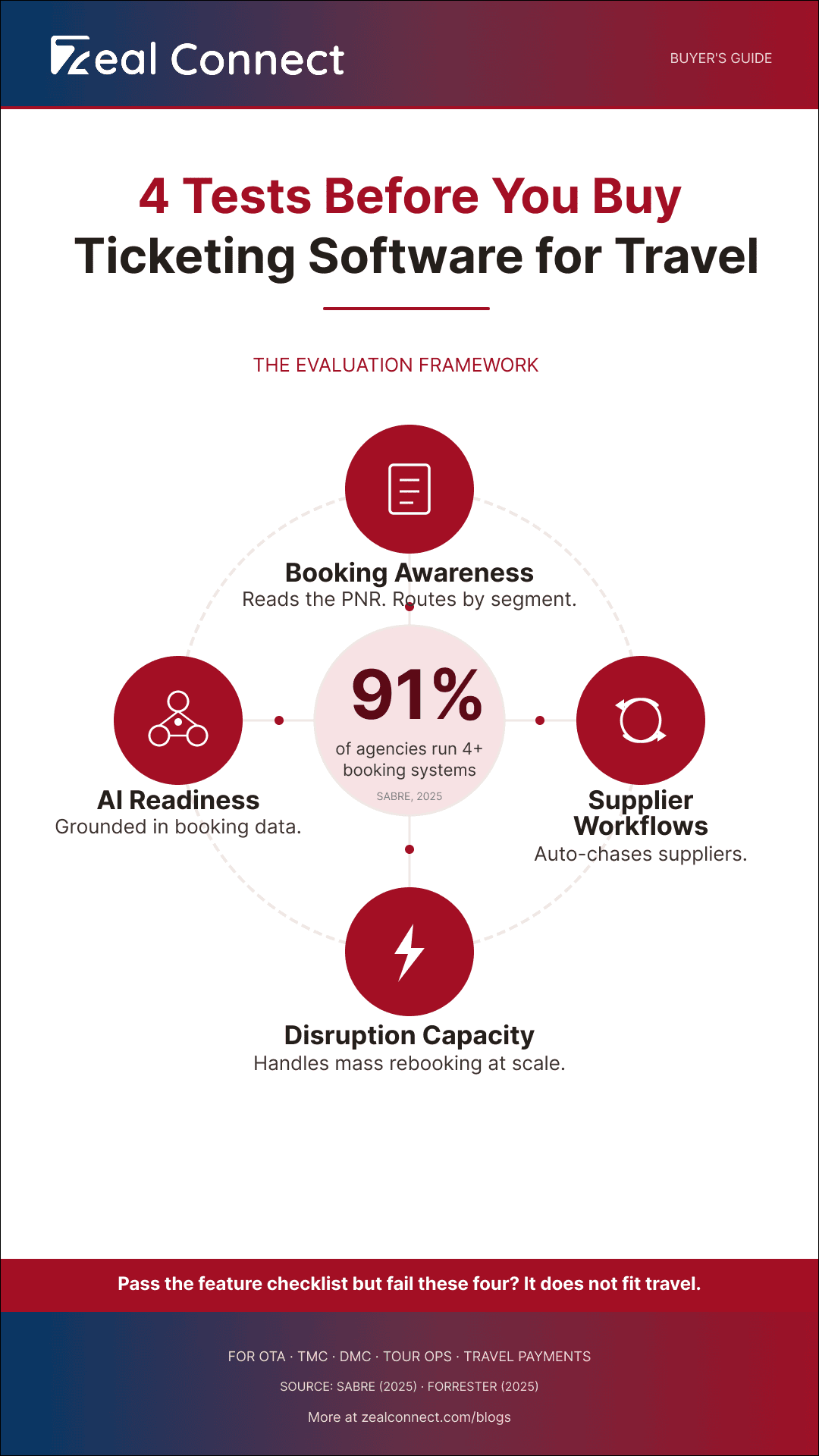
A travel support ticket has four traits that a retail or SaaS ticket does not. First, it depends on multiple parties: the traveler, the agent, and at least one supplier who must respond before the ticket moves. Second, the booking is the unit of work, not the conversation. Third, it carries time pressure tied to departure dates, not just SLA clocks. Fourth, many travel tickets are financial: refunds, chargebacks, ADMs, and settlement disputes all run through the support queue. According to Sabre (2025), more than 91% of travel agencies operate with four or more booking systems, and over half manage seven or more. Every one of those systems generates tickets the support desk must handle.
The Commodity Problem With Feature Checklists for Customer Support Ticketing Software
Every vendor on the market offers routing, SLA management, automation, AI, and reporting. The checklist tells you whether a feature exists, not whether it works on a booking dependent travel ticket. Routing on a generic system assigns by queue or agent skill. Routing on a travel aware system can assign by booking type, supplier, or departure urgency. The feature is the same; the behavior is not. Because the checklist looks identical across vendors, demos feel interchangeable. According to HubSpot (2024), 75% of customer service representatives reported their highest ticket volume ever. At that volume, the gap between "has the feature" and "feature works on your tickets" surfaces fast.
A feature checklist tells you whether a capability exists. It never tells you whether it works on a booking dependent travel ticket.
The Cost of a Failed Customer Support Ticketing Software Evaluation in Travel
A wrong choice means six to twelve months on a system that forces workarounds on every travel workflow, followed by a second evaluation, a second migration, and retraining. Meanwhile, customer satisfaction across U.S. travel sectors declined in 2025 (ACSI, 2025). Satisfaction is already falling. The wrong support tool accelerates the decline because it slows your team down precisely when travelers expect faster answers.
Key Terms Worth Knowing
A few terms come up throughout this article on customer support ticketing software for travel. Here is what each one means.
- Booking centric ticketing: A ticketing model where work is organized around the reservation (booking reference, supplier, traveler, departure date), not around a standalone conversation thread.
- Supplier dependency: The operational reality that resolving a travel ticket often requires a third party supplier to respond or act before the agent can move the ticket forward.
- Amendment cascade: A single booking change (date, name, room type) that triggers a chain of downstream re confirmations, re pricing, and supplier re issuance across one or more linked bookings.
- Agentic AI: AI that takes multi step actions on a ticket (fetching booking data, classifying by travel category, drafting a supplier email) rather than only answering questions from a knowledge base.
- SLA prediction: The ability of a system to forecast whether a ticket will breach its service level deadline based on current queue state, supplier response patterns, and workflow complexity.
Four Criteria That Separate Customer Support Ticketing Software Built for Travel From a Generic Help Desk
Customer support ticketing software for travel is a platform that manages traveler, agent, and supplier interactions around the booking as the unit of work, with native support for travel workflows (amendments, supplier chasing, disruption triage, refund chains) and integration with the booking systems the operation already runs. Once you see why standard evaluations miss the mark, the next question is what to evaluate instead. Four travel specific criteria separate ticketing software that fits from a tool that merely has the right features on paper.
How Do You Test Whether Customer Support Ticketing Software Is Booking Aware or Just Field Customizable?
Booking awareness means the system treats the reservation as a first class object: it pulls live data from the booking source, links it to the ticket, and keeps related requests (an amendment and its parent booking) connected as one case. The alternative is a generic system where your team creates custom fields labeled "PNR" and "Check in Date," then copies data into them manually. The test is straightforward: send an amendment cascade that touches three linked bookings. A booking aware system keeps them as one case. A generic system creates three separate, unlinked tickets. The software categories a travel agency navigates (AltexSoft, 2024) already include booking engines, mid office systems, and channel managers. The support ticketing tool must read from these, not sit beside them.
Supplier Workflow Support as a Selection Criterion for Travel Support Ticketing Solutions
Thirty to fifty percent of travel support tickets depend on a supplier response before the agent can act. A system without supplier side workflows (chasing timers, escalation rules, per supplier SLA tracking) forces the team to manage that leg in email or WhatsApp, outside the ticketing system entirely. The result: the ticket shows "waiting on supplier" for days, with no visibility into whether anyone followed up. Complaints against U.S. airlines rose 9% in 2024 while passenger volume grew only 4% (U.S. PIRG / DOT, 2025). Complaint growth outpacing traffic is a signal that the supplier leg, where resolution actually stalls, is under more pressure than ever.
What Role Does AI Readiness Play When Evaluating Customer Support Ticketing Software for Travel?
AI readiness is an evaluation criterion at the workflow level, not a checkbox. The question is not "does it have AI?" but "can the AI read your booking data, classify tickets by travel categories (amendment, disruption, supplier escalation), extract operational fields (PNR, HCN, departure date), and draft supplier responses grounded in your knowledge base?" A generic chatbot trained on FAQs is not the same as AI grounded in your booking and supplier data. According to Forrester (2025), 30% of enterprises will create parallel AI functions that mirror human service roles by end of 2026. AI readiness is now a procurement question, not a future wish. When evaluating, ask the vendor to run the AI on one of your real amendment tickets. If it cannot extract the booking reference and draft a grounded response, it is conversation grade AI, not travel grade.
The test for AI readiness in customer support ticketing software for travel: if the AI cannot extract a booking reference and draft a grounded supplier response from your real ticket, it is conversation grade, not travel grade.
The Evaluation Stage Criteria Table: How to Test Customer Support Ticketing Software for Travel at Every Stage of Your Procurement
Knowing the four criteria is the starting point. Applying them at the right stage of your procurement is what prevents the evaluation from collapsing back into a feature comparison. The table below maps four procurement stages to the travel specific criterion each stage should test. Most buyers check the generic column and skip the travel column. That is where evaluations fail.
Table: Evaluation Stage Criteria Table: What to Test at Each Stage When Selecting Customer Support Ticketing Software for Travel
| Evaluation stage | What most buyers check | The travel specific criterion to test instead | What skipping it costs you |
|---|---|---|---|
| Requirements definition | Feature wishlist or RFP template | Your actual ticket mix by travel workflow (amendments, supplier chasing, disruptions, refunds) | Requirements that miss your operation; you buy for features you do not need |
| Vendor shortlisting | Demo, pricing, reviews | Four travel criteria: booking awareness, supplier workflows, disruption capacity, integration depth | A shortlist of tools that break on your first disruption week |
| Live workflow test | Free trial on the vendor's sample data | Replay your own amendment cascade, supplier chasing ticket, and disruption batch | You discover workflow gaps after you have signed and migrated |
| AI readiness and total cost | "Does it have AI?" plus license price | Can the AI read your booking data? Plus total cost: license, integration, configuration, training | You pay for conversation grade AI and underbudget by 30 to 50 percent |
How Do You Build Requirements From Your Travel Ticket Mix Instead of a Generic Wishlist?
Most evaluations start with a feature wishlist or an RFP template pulled from a procurement library. The travel specific move: pull your last 30 days of tickets and categorize them by workflow. How many are amendments? How many depend on a supplier response? How many came from a disruption event? Let the mix define your requirements. A DMC with 60% supplier chasing tickets needs different capabilities than an OTA with 40% amendment cascades, and both differ from a travel payment company where chargebacks and settlement disputes dominate the queue.
Stages 2 and 3: Shortlisting and Live Testing Customer Support Ticketing Software Against Travel Workflows
Filter your vendor shortlist by the four criteria from the previous section. Then run a live test using your own real tickets, not the vendor's demo script. Replay an amendment cascade, a supplier chasing ticket, and a disruption event batch through the system. If the system forces manual workarounds on any of those workflows, it fails the evaluation regardless of what the feature list says. Half of customers cut spending after a poor service experience, putting $3.7 trillion of global sales at risk (Qualtrics, 2024). The cost of choosing the wrong support ticketing tool is not theoretical; it compounds with every ticket your team works around instead of inside.
If the system forces a manual workaround on an amendment cascade, a supplier chasing ticket, or a disruption batch in your live test, it fails, regardless of the feature list.
Stage 4: Evaluating AI Readiness and Total Cost Before You Commit to Customer Support Ticketing Software
The final stage has two parts. First, the AI readiness check: can the system's AI read your booking data, or does it work only on the conversation thread? Ask the vendor to classify a real amendment ticket, extract the PNR and departure date, and draft a supplier chasing email grounded in your knowledge base. If it cannot, the AI is not travel grade. Second, total cost: license plus implementation plus integration (connecting your GDS, mid office, or channel manager) plus configuration (building travel specific workflows and automation rules) plus training. According to Deloitte (2026), 48% of companies with mature service capabilities already use agentic AI, compared to 24% of low maturity peers. The maturity gap means evaluating AI depth, not just AI presence.
What Travel Companies Get Wrong When Buying Customer Support Ticketing Software, and How to Avoid It
The evaluation criteria and the stage by stage process exist to prevent three mistakes that travel companies make repeatedly. Each mistake traces back to evaluating customer support ticketing software the way any industry does, instead of the way travel demands.
Why Do Travel Companies Keep Choosing Customer Support Ticketing Software That Does Not Fit?
Three patterns recur. First, buyers evaluate by feature checklist instead of by travel workflow, so every vendor passes. Second, they accept the vendor's demo scenario instead of running their own tickets through the system, so problems surface only after go live. Third, they budget only the license fee and discover integration and configuration costs after signing. The global help desk software market is projected to grow from $1.74 billion in 2026 to $4.17 billion by 2035 at a 10.2% CAGR (Business Research Insights, 2025). A growing market means more vendors and more noise for the buyer. A structured evaluation protects you from that noise.
Building a 90 Day Success Scorecard for Your New Customer Support Ticketing Software
Before you sign, define three to four KPIs you will measure in the first 90 days. Workaround count: how many workflows does your team still run outside the system? Agent time in external tools: are agents still toggling to email or WhatsApp for supplier communication? SLA compliance on supplier dependent tickets: are tickets that depend on a supplier response meeting their deadlines? Duplicate ticket rate: is the system creating separate tickets for related requests on the same booking? If these numbers do not improve within 90 days, the tool does not fit your operation, regardless of what the sales team promised during the demo.
Four 90 day KPIs: workaround count, agent time in external tools, SLA compliance on supplier dependent tickets, and duplicate ticket rate.
How Does Zeal Desk Score Against the Travel Specific Evaluation Criteria in This Guide?
Zeal Desk is built only for travel operations. Unlike Zendesk, Freshdesk, or Zoho Desk, which are general purpose help desks adapted to travel through custom fields and third party integrations, Zeal Desk treats bookings, suppliers, and travel workflows as native architecture, not add ons. Here is how it meets the four evaluation criteria this guide defined.
Booking Awareness and Supplier Workflows in Zeal Desk
Zeal Desk's integration hub connects to your booking systems and pulls live reservation data into the ticket. Agents and AI work from the actual booking, not a re typed summary. Parent/child linking keeps a booking and its amendments, or a group with many travelers, connected as one case. Supplier coordination runs inside the system: chasing timers, escalation rules, and per supplier SLA tracking are built in workflows, not manual processes running in a separate inbox.
AI Readiness and Disruption Surge Capacity in Zeal Desk
Zeal Desk's AI layer reads live booking data, classifies tickets by travel specific categories (amendment, disruption, supplier escalation), and extracts operational fields (PNR, HCN, departure date). AI playbooks encode your operation's travel policies so the AI reasons from your rules, not generic training data. During disruption surges, AI triages the spike, drafts bulk responses grounded in the knowledge base, and routes complex cases to agents with full booking context. The agent reviews, edits, and sends every customer reply. AI assists the resolution; the agent stays in control.
How Does Zeal Desk Perform on the 90 Day Scorecard?
On the four 90 day KPIs: workaround count drops because travel workflows (amendments, supplier chasing, disruption triage, refund chains) run inside the system, not beside it. Agent time in external tools decreases because booking data is in the ticket and supplier communication happens in platform. SLA compliance on supplier dependent tickets improves because built in escalation timers track the supplier leg automatically. Duplicate ticket rate falls because booking centric linking groups related requests by reservation.
Conclusion
The right customer support ticketing software for travel is the one that passes your evaluation when you test it on your own tickets, against travel specific criteria, at every procurement stage. Four criteria separate a system built for travel from one that merely has the features: booking awareness, supplier workflow support, disruption surge capacity, and integration depth with your existing booking systems. The Evaluation Stage Criteria Table gives you a reference for what to test at each stage. The 90 day success scorecard gives you a post purchase safeguard. If a system cannot handle an amendment cascade, a supplier chasing loop, and a disruption surge when you replay your real tickets through it, the feature checklist it passed is irrelevant.
Frequently Asked Questions
How long does it take a travel company to evaluate and implement customer support ticketing software?
A structured evaluation typically takes four to eight weeks if you follow the four stages: requirements from your ticket mix, vendor shortlisting by travel criteria, live workflow testing, and AI readiness and cost assessment. Implementation (migration, integration with booking systems, workflow configuration, and agent training) adds six to twelve weeks depending on integration complexity and team size. Planning for a total timeline of three to five months is realistic for most mid size travel operations.
What happens to in flight tickets and historical data when you switch ticketing systems?
Most travel companies run both systems in parallel during cutover, with new tickets entering the new system while in flight tickets close out in the old one. Historical data (past tickets, SLA records, customer history) can be imported, but workflow context like supplier threads and escalation history often does not migrate cleanly. A step by step help desk migration process (Hiver, 2026) can reduce data loss, but expect to lose some operational context from the old system.
Does a travel payment company need different customer support ticketing software than an OTA or tour operator?
Yes. A travel payment company's ticket mix is dominated by chargebacks, settlement disputes, fraud review, virtual card reconciliation, and PCI compliance workflows, not itineraries and supplier chasing. The evaluation criteria shift toward financial workflow support, compliance audit trails, and integration with payment processing systems rather than booking engines and GDS platforms.
What KPIs should you track in the first 90 days after switching customer support ticketing software?
Four KPIs matter most: workaround count (workflows your team still runs outside the system), agent time in external tools (email, WhatsApp, spreadsheets used alongside the ticketing system), SLA compliance on supplier dependent tickets (the tickets that depend on a third party to respond), and duplicate ticket rate (separate tickets created for related requests on the same booking). If these do not improve, the tool does not fit.
How do you evaluate whether a ticketing system's AI can actually handle travel specific workflows?
Run a concrete test: give the AI a real amendment ticket from your operation. Ask it to classify the ticket by travel category, extract the booking reference and departure date, and draft a supplier chasing email grounded in your knowledge base. If the AI can do all three, it is grounded in booking and operational data. If it can only summarize the conversation or suggest a canned response, it is conversation grade AI, not travel grade.