


This article explains what an email ticketing system in travel is, how it turns a shared support inbox into owned, trackable tickets, and when a travel team has outgrown booking@. You get a plain definition, a shared inbox versus ticketing comparison, a breakdown of where a travel email's response hours actually go, and setup guidance on SLAs, routing, and what to automate. It is written for operations and support leaders at agencies, DMCs, TMCs, and bedbanks.
Picture the Monday after a weekend schedule change. Your booking@ inbox holds hundreds of unread emails, and no one is sure who owns which. Two agents reply to the same traveler. A supplier's confirmation sits buried under newer mail. Email is still where travel's highest stakes requests land. Yet a shared mailbox gives you no way to assign, track, or measure any of them. An email ticketing system in travel fixes the part of that problem you created yourself. This article shows what actually changes when you switch, and what doesn't.
When the Shared Inbox Breaks: Signs a Travel Team Has Outgrown It
Most travel support starts in a shared mailbox, and for a two person team it works fine. The trouble comes with growth. As volume climbs, the same inbox that felt simple starts losing emails, doubling replies, and hiding the requests that matter most. A dropped email is not a minor delay in travel, because the customer often has a trip in motion. More than half of consumers switch to a competitor after just one bad experience (Zendesk, 2026). After several, that number climbs to 73%.
What breaks first when a travel team runs support from booking@?
Ownership breaks first. In a shared inbox, no message is assigned to anyone. So a hard ticket gets skipped while easy ones get answered twice. Support teams call this agent collision: two people working the same email without knowing it. Then supplier threads get buried, since a hotel's reply lands below newer mail and drops out of view. Finally, you lose all sight of how long anything has waited, because a mailbox has no clock.
The volume and disruption signals you need an email ticketing system
A few clear signals tell you the shared inbox has run out of room. The first is headcount: once more than three or four agents work the same mailbox, collisions and missed emails climb fast. The second is the second mailbox. If you have started adding support2@ or a country specific address to cope, you are managing the workaround instead of the work. The third is a disruption week. The queue swells, and the oldest, most urgent emails sink to the bottom just when speed matters most.
Once support runs past three or four agents on one mailbox, the shared inbox is already the bottleneck.
Why adding another shared mailbox makes travel support slower
Adding a mailbox feels like relief, but it splits the problem in two. Now an agent has to check two or three inboxes to find a traveler's history. A supplier reply can land in whichever address the thread started from. Context scatters across accounts, and no single view shows what is overdue. A purpose built travel help desk handles this differently, by keeping every request in one tracked queue rather than several mailboxes nobody fully owns.
What an Email Ticketing System in Travel Actually Does to an Inbound Email
An email ticketing system in travel is software that turns each inbound email into a tracked, owned, status carrying ticket. Instead of a message sitting in a shared mailbox, every email becomes a record with a unique ID, an assigned agent, a status, and a full history. The mailbox does not disappear; it becomes structured. It is the same email to ticket conversion any email based ticketing system performs. Here it applies to travel work like amendments, refunds, and supplier chasing.
Email is not a channel you can simply switch off, either. It remains the top choice for reaching a brand, with 69% of consumers worldwide naming it their preferred channel (Emarsys via eMarketer, 2024). In travel, email also carries the contractual record, so it needs structure rather than deflection.
How does an email ticketing system turn a message into a tracked ticket?
The system captures the email the moment it arrives and creates a ticket automatically. It assigns a unique reference and sets a status like open or pending. Then it either routes the ticket to an agent or waits for one to claim it. From then on, every reply, internal note, and status change lives on that one ticket. The result is a clear audit trail, so anyone can see who touched the request and what happened, without forwarding a thread around.
Email ticketing vs. shared inbox vs. a full help desk: what a travel team needs
Start with the channel that carries your highest stakes requests, then expand. A shared inbox versus a ticketing system is a question of ownership and tracking, while a full help desk adds other channels like chat and phone on top. Many travel teams do not need every channel at once. They need the email queue under control first, because that is where bookings, amendments, and supplier replies already flow.
Table: Shared inbox vs. an email ticketing system for a travel support operation
| Operational signal | In a shared inbox (booking@) | In an email ticketing system | Why it hits harder in travel |
|---|---|---|---|
| Ownership of the next reply | No assignment, agent collision | Owned, assigned ticket | Supplier waits can sit for days with no owner |
| A long supplier email chain | Buried in the thread | Threaded into one ticket | One booking can involve three suppliers |
| Booking or PNR context | Re typed or lost | Attached to the ticket | Agents work the reservation, not a summary |
| SLA visibility | Invisible until escalation | First response and resolution clocks | Travel replies are time sensitive and contractual |
| Disruption week surge | Oldest emails buried | Routing and priority hold | One schedule change can 5 to 10x the queue |
How the email ticket stays linked to the booking, PNR, or supplier reference
A travel ticket is only useful when it carries the booking it is about. Good systems attach the booking reference, PNR, travel dates, and supplier reference as fields on the ticket, so an agent sees the reservation without re typing it from the email. That linkage matters because travel questions are rarely generic. "Where is my refund" means nothing without the booking behind it, and keeping the two together saves the agent a search on every reply.
A ticket that carries its booking turns "where is my refund" into a question an agent can answer on the first read.
Key Terms Worth Knowing
Email ticketing system: software that turns each inbound email into a tracked, owned, status carrying ticket, replacing a shared mailbox with a structured queue.
Shared inbox: one mailbox such as booking@ or support@ that several people open, with no assignment, tracking, or ownership built in.
Agent collision: when two agents unknowingly work or reply to the same email, producing duplicate or conflicting responses to one customer.
SLA (first response vs. resolution): the two separate clocks on a ticket. First response is the time to the first reply, which you control. Resolution is the time to close, which a supplier can affect.
Booking linked ticket: a ticket that carries the booking reference or PNR and travel dates as fields, so agents work the reservation rather than a re typed summary.
Where the 15 Hours Go: Why Travel Email Is Structurally Slow
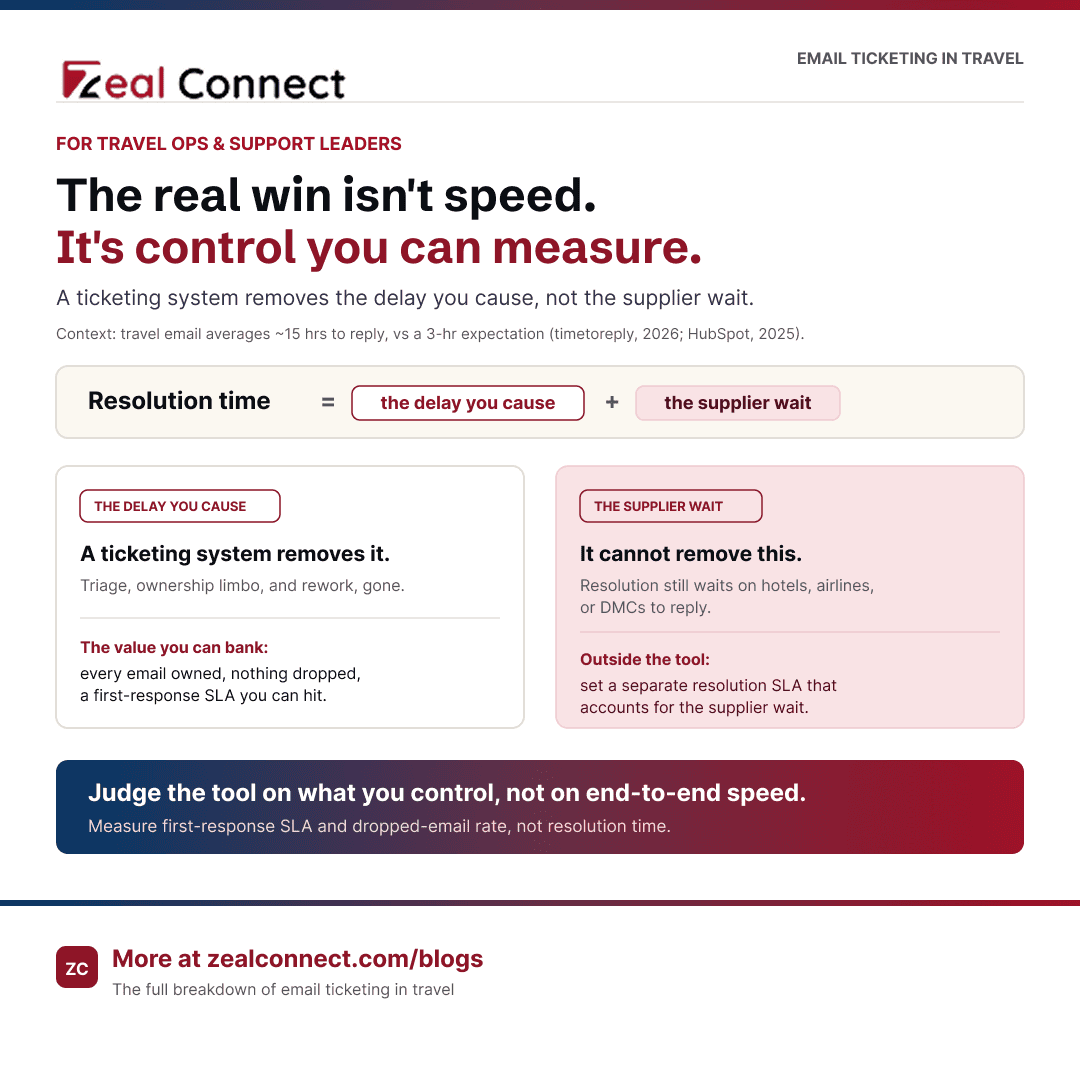
Travel is slower than average on email, and the gap is measurable. The travel sector averages just under 15 hours to answer an email, against a 12 hour 10 minute cross industry average (timetoreply, 2026). That lands badly against expectations. After all, 67% of consumers expect a support ticket resolved within three hours (HubSpot, 2025). Knowing where those 15 hours go tells you what a ticketing system can fix and what it cannot.
The four places a travel email loses time
A slow travel email usually loses time in four places. First is triage: the email sits unread while someone works out what it is. Second is ownership limbo, where the request waits because no one has claimed it. Third is the supplier wait, the hours or days spent waiting for a hotel, airline, or DMC to reply. Fourth is rework, when duplicate or conflicting replies force the thread to restart. Three of those four are self inflicted, and those are the ones a system removes.
An email ticketing system removes the triage, ownership, and rework delay. It cannot shorten the time a supplier takes to reply.
How multi supplier dependency stretches an email ticket's clock
The supplier wait is the part most tools ignore. Resolving one travel ticket often means chasing a hotel, an airline, and a ground handler. Each has its own response time. The agent is rarely the bottleneck; the supplier who has not replied usually is. A ticketing system helps by making the wait visible and chase able, so a stalled supplier thread surfaces instead of hiding. It does not make the supplier answer faster, which is why honest resolution SLAs account for that dependency. This is the reality behind supplier chasing and escalation in travel operations.
What a disruption week does to the email queue
One disruption event can turn a normal queue into a flood. A single July 2024 IT outage hit Delta hard. The airline cancelled about 7,000 flights and disrupted travel for 1.4 million passengers, at a cost of roughly $550 million (Reuters, 2025). Events like that produce a 5 to 10x email surge overnight. A shared inbox buries the oldest, most urgent messages under the newest, while proactive, disruption ready service depends on routing that keeps the queue moving by priority.
Setting Up an Email Ticketing System in Travel: SLAs, Routing, and the Automation Line
Getting value from the system is a setup decision, not just a purchase. The three choices that matter most are how you set SLAs, how you route and assign tickets, and where you draw the automation line. Handled well, these turn a tracked queue into a faster one. Handled poorly, they recreate the shared inbox chaos with more dashboards. Poor customer experiences already put an estimated $3.7 trillion in sales at risk worldwide (Qualtrics XM Institute via HubSpot, 2024). The setup earns the attention.
How do you set an email SLA when the answer depends on a supplier?
Split the SLA into two clocks and measure them apart. Set a first response SLA you fully control, such as acknowledging every email within one hour and giving the traveler a real update. Then set a separate resolution SLA that accounts for supplier dependency. You cannot promise a refund is done when a supplier has not confirmed it. Reporting the two separately shows where delay really comes from, and stops a slow supplier from making your team look slow.
Routing and ownership rules that hold up on a disruption day
Routing rules should hold up on your worst day, not your average one. Assign every ticket an owner automatically, whether by round robin, by queue, or by skill, so nothing lands in limbo. Prioritise by trip date and disruption tag, so a traveler flying tomorrow jumps ahead of a request about a trip next month. Build a clear escalation path for tickets that breach their first response SLA. Those rules are what keep the queue moving when volume spikes, and they are central to handling disruption driven volume.
What to automate on email in travel, and what to leave to an agent
Automate the predictable input, and leave the judgment to a person. A system can classify an incoming email by type, tag it with the booking reference, send an instant acknowledgement, and extract dates and PNRs into ticket fields. Those steps are deterministic, so they automate cleanly. What should not be automated is the supplier dependent decision or the customer facing reply. The agent reviews the draft, applies judgment, and sends the response, because a travel answer often turns on a detail only a person should weigh.
Automate the deterministic input of a travel email. Keep the supplier judgment and the customer reply with a person.
Conclusion
A shared inbox gives a travel team no way to assign, track, or measure email, and that gap turns into churn the moment a disruption week hits. An email ticketing system gives every message an owner, a clock, and its booking context, which removes the triage, ownership, and rework delay that teams create for themselves. It will not shorten a supplier's reply, so set your SLAs and expectations around what you actually control. The practical signal is simple: if support already runs past three or four agents on booking@, the move off the shared inbox is overdue. Start with the email queue, get ownership and SLAs right, and automate only the predictable input.
Frequently Asked Questions
What is the difference between a shared inbox and an email ticketing system?
A shared inbox is one mailbox several people open, with no assignment or tracking. An email ticketing system turns each email into an owned ticket with a unique ID, a status, and an SLA clock. The first offers shared access; the second adds ownership, accountability, and reporting.
At what point does a travel team need an email ticketing system?
When ownership starts slipping. The practical triggers are more than three or four agents on one mailbox, a second support inbox added as a workaround, and disruption weeks that bury urgent emails. If any of those sound familiar, the shared inbox has already become the bottleneck.
Can an email ticketing system speed up replies if we depend on suppliers?
Partly, and it helps to be honest about which part. The system removes the delay you create yourself, such as triage, unclaimed tickets, and duplicate replies. It cannot make a hotel or airline answer faster. What it does is make the supplier wait visible, so a stalled thread gets chased instead of forgotten.
Do we need a full omnichannel help desk, or just email ticketing?
Start with email if that is where your highest stakes requests land. Email carries bookings, amendments, and supplier replies for most travel teams, and it is the channel 69% of consumers prefer. You can add chat, phone, and messaging later, once the email queue is under control and measured.
How do you set an email SLA in travel when resolution depends on a third party?
Use two clocks. Set a first response SLA you control, like acknowledging and updating within an hour. Set a separate resolution SLA that accounts for supplier response time. Measuring them apart shows whether a delay is yours or a supplier's, and keeps your reporting fair.