


- This article explains what happens on your support desk after a traveler starts a WhatsApp live chat from your website or a booking email.
- It is written for support and operations leads at OTAs, bedbanks, tour operators, DMCs and TMCs who run WhatsApp beside website chat and email.
- It covers which chats should become tickets, which desk rules change for WhatsApp, and how to set owners, reply clocks and identity checks.
It's 08:00 and the night's WhatsApp chats are still on the screen. Three travelers got answers from whoever saw their message first, and one of them got two different answers. Two never got a reply at all. Another was a refund request that nobody logged. Every one of these chats started from the WhatsApp live chat button on your website, and the button worked fine. The trouble is that the desk ran these chats like website chats. This article covers the desk side: which WhatsApp chats need an owned ticket, and which rules need to change.
Why Does WhatsApp Live Chat Need Its Own Rules on the Support Desk?
Adding a WhatsApp button to your website takes an afternoon. Running what comes through it takes desk rules. These chats arrive at any hour, from a phone number instead of a login. They also stay open long after the traveler has left your site. So before setting those rules, it helps to see how the volume arrives and where it slips through.
Travelers pick WhatsApp live chat, so it reaches your desk whether you plan for it or not
Messaging is now the way most people prefer to reach a business. A Kantar study commissioned by Meta and published in 2026 found that over 73% of surveyed online adults prefer messaging to contact a business. Travel adds its own reasons. A traveler can send a photo of the wrong room, or reply between gates instead of waiting on hold. So once the button is live, WhatsApp volume grows by itself. If the desk has no rule for it, chats end up wherever someone happens to be watching, often on an agent's own phone.
What goes wrong when a WhatsApp live chat is handled like a website chat?
The chat loses its owner and its clock. A website chat has a clear start and end, and an agent picks it up while the traveler waits on the page. On WhatsApp, the first message may arrive at 02:00 before the traveler puts the phone away. The next reply then lands hours later with whoever is on shift. That gets worse when several agents answer from one shared WhatsApp number. Meanwhile, nobody can see how long the traveler has waited. Travel technology providers now build for this. The Business Travel Magazine (2026) covered one TMC platform that turns traveler WhatsApp chats into structured, trackable and prioritised work items beside email and phone.
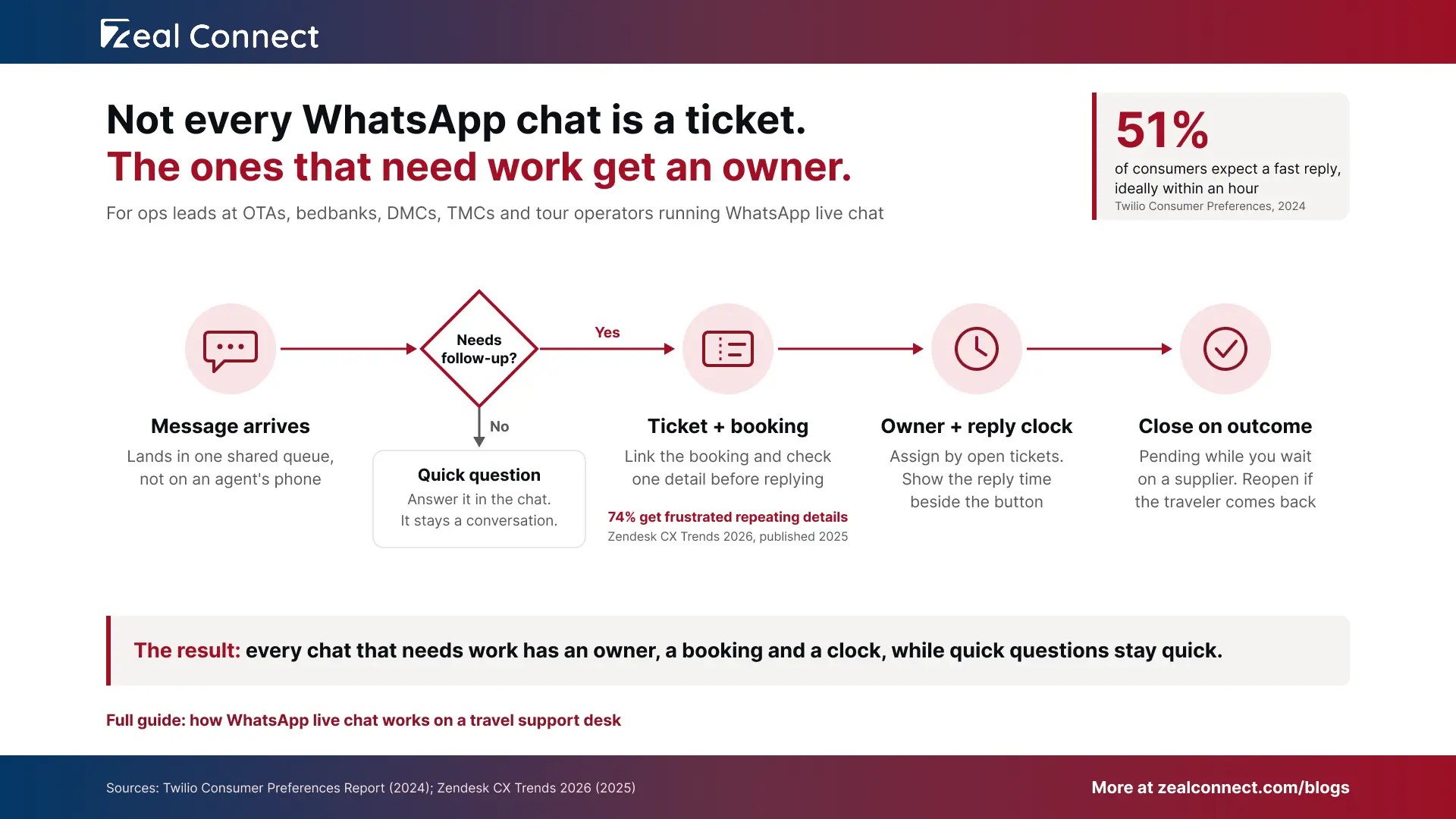
A WhatsApp chat that needs follow up but has no ticket has no owner and no clock, so nobody can see the traveler waiting.
What Is WhatsApp Live Chat on a Support Desk?
WhatsApp live chat on a travel support desk is real time support over WhatsApp, started from a button on your website or in booking emails and answered by agents from a shared desk, where any conversation that needs follow up becomes a ticket with an owner, a linked booking and a reply clock.
How does a WhatsApp live chat become a ticket on the desk?
A chat becomes a ticket when it needs work that someone has to own. When a traveler taps the button, WhatsApp opens on their phone, and your button can pre type a line such as "Booking BKK30517. I need help with:" using a click to chat link with a prefilled message. If the message is a quick question, such as baggage allowance or office hours, the agent answers and it stays a conversation. If it needs follow up, such as a change, a refund or a supplier check, it becomes a ticket, and later messages join it. The booking is then linked, and the ticket is routed and assigned to an owner.
WhatsApp live chat runs on the traveler's time, so the desk sets the pace
A WhatsApp thread doesn't end when the traveler puts the phone away. It stays open for days, and replies come in gaps, so the channel itself never makes a chat live. Your staffing does. Expectations are high, though: Twilio's 2024 survey of 3,900 consumers found that 51% expect fast replies, ideally within an hour. Click Travel, a UK travel management company, sends WhatsApp chats to its live chat team. Travelers are promised the same support and response times as live chat. Once a thread has been quiet for a day, WhatsApp's 24 hour customer service window also limits what agents can send.
WhatsApp live chat is only as live as the reply time your desk staffs and publishes.
Key Terms Worth Knowing
A few terms come up throughout this article. Here is what each one means for a travel support desk.
- Click to chat link: A wa.me web address that opens a WhatsApp chat with your business number, from a website button, an email or a QR code.
- Prefilled message: Text placed in the traveler's WhatsApp text box when the chat opens. The traveler can edit it and must press send.
- Open ticket: A case that stays with one owner until its problem is solved, however long the thread goes quiet. A live session, by contrast, ends when the chat window closes.
- Auto linking: Attaching a new ticket to its booking using the booking reference in the traveler's message.
- Pending status: A ticket state that pauses the reply clock while the desk waits on the traveler or a supplier.
- Customer service window: The 24 hours after a traveler's last WhatsApp message, during which agents can reply freely. After that, an approved template is needed.
Running WhatsApp and Website Live Chat on One Support Desk
Most travel desks run WhatsApp beside website chat, with the same team. That works well, as long as the desk keeps separate rules where the two channels behave differently. Identity shows the gap most clearly. On your website, the traveler is often logged in. On WhatsApp, the desk sees only a phone number, which may not be on the booking at all. Yet Zendesk's CX Trends 2026 research found that 74% of consumers get frustrated when they have to repeat information (Zendesk, 2025).
Desk rules for WhatsApp live chat next to website chat
The table sets out six desk rules and the WhatsApp version of each. Read the last column as a setup list for your desk.
Table: Desk rules for website live chat and WhatsApp live chat
On the Beach shows the identity rule at work: it checks the booking before connecting a WhatsApp chat from a customer on holiday.
Example: one WhatsApp live chat from click to close
Here is one chat moving through a desk that uses these rules (the example is illustrative). At 23:10, a traveler at a Bangkok hotel front desk taps the WhatsApp link in the arrival email. The hotel can't find the booking, which an OTA sold with a room sourced from a bedbank. The first message, "ON TRIP. Booking BKK30517. Need help now:", clearly needs action, so it becomes a ticket linked to the booking and marked on trip.
At 23:12 the night agent takes the ticket and confirms the lead traveler's surname. By 23:14 the agent is calling the hotel with the supplier's confirmation number. At 23:31 the room is found, the traveler gets an update, and the agent sets the ticket to pending overnight. At 09:05 the traveler confirms check in, so the agent closes the ticket with the outcome noted.
Setting Up Your Desk for WhatsApp Support Live Chat
Most of this can be set up within a week. Three things decide whether the 08:00 backlog comes back: ownership and reply times, identity checks, and a desk that turns chats needing follow up into tickets.
Give every WhatsApp live chat an owner and a reply clock
Assign WhatsApp tickets by how many open tickets each agent holds, because one agent can carry several quiet threads at once. Name a night cover for on trip chats, so a stranded traveler never waits for the morning shift. Then print the reply time next to the button, by hour band: "We reply within 15 minutes, 08:00 to 20:00 GST. Travelling now? We answer on trip messages around the clock." Thomas Cook does a version of this, listing chat hours of 10:00 to 17:45 UK time plus a separate 24/7 route for customers on holiday. Outside staffed hours, an auto reply should repeat the promise and ask for the booking reference.
Every WhatsApp ticket needs a named owner and a reply time the traveler can see.
How should agents verify a WhatsApp live chat before discussing a booking?
Agents should match the booking reference plus one more detail, such as the lead traveler's surname or the travel date, before sharing anything. A prefilled reference proves very little, because anyone can type or forward it. Jet2holidays, for example, tells WhatsApp users its team will ask for personal information to verify identity. Keep the button's link lean, too. A booking reference is enough, while names, passport numbers and card details never belong in a URL. That follows the data minimisation principle of holding only what a purpose needs.
What Zeal Desk handles on the desk side of WhatsApp live chat
Zeal Desk, a support desk built for travel companies, runs email, WhatsApp and live chat in one queue. WhatsApp conversations land in that queue, where they can create or update tickets and contacts. Website chats can become tickets too, with pre chat questions and an email follow up when a traveler misses a reply. Tickets can go round robin or to the agent with the fewest active tickets, under SLA policies. AI extracts booking references and summarises threads, the integration hub pulls the booking onto the ticket, and agents send and close every case.
Conclusion
Back to the 08:00 backlog. None of those chats went wrong because of WhatsApp. They went wrong because the desk expected every chat to finish inside one sitting, the way a website chat does. The fix is a short set of desk rules: a ticket for every chat that needs follow up, a verified booking, a named owner, a reply time the traveler can see, and a close based on the outcome. Start this week by listing the rules you already run for website chat. Mark the ones that break on WhatsApp, then write the WhatsApp version of each. After a month, check how many WhatsApp tickets had an owner within your promised reply time.
Frequently Asked Questions
Should WhatsApp live chat and website chat go to the same support team?
Yes, for most travel companies. One team can answer both from a single queue, as Click Travel does with its live chat team. The rules should differ, though. WhatsApp tickets need a longer reply clock and pending status while the traveler is away. They should also close on the outcome, not when the chat goes quiet.
How many WhatsApp chats can one agent handle at once?
More than live website sessions, because WhatsApp replies arrive in gaps instead of seconds apart. There is no single right number. Track open tickets per agent and how often replies beat your published promise. Start with a cap that keeps every traveler inside that promise, then adjust it from a month of your own data.
When should a WhatsApp live chat ticket be closed?
Close it when the traveler's problem is solved, not when the thread goes quiet. While you wait on the traveler or a supplier, set the ticket to pending so the clock stops but the owner stays. If the traveler writes again about the same problem, reopen the ticket instead of starting a new one.
What happens when a traveler taps the WhatsApp button at night?
The message still arrives, because WhatsApp delivers it whether or not anyone is online. Set an out of hours auto reply that repeats your reply promise and asks for the booking reference. Then route on trip chats to whoever covers nights, and leave pre trip questions in the queue for the morning team.
Do we need the WhatsApp Business API to run WhatsApp live chat on a support desk?
Not for the button itself, since a wa.me link works with any WhatsApp number. You need the WhatsApp Business Platform once several agents answer the same number and chats that need follow up must become tickets in a support desk. At that point, a provider connects WhatsApp to your desk so those chats can be ticketed.