


- This article explains what a WhatsApp shared inbox is and how a travel support team uses one to answer a single WhatsApp number together.
- It's written for ops and support leads at agencies, OTAs, bedbanks, DMCs and TMCs whose team shares one number, or soon will.
- It covers the WhatsApp Business app's own multi agent option, the rules for splitting one long thread into separate cases, and the shift habits that keep travelers getting one answer.
It's 7:40 am and a traveler writes from a hotel lobby in Singapore: the airport pickup hasn't arrived. Two agents open the chat at the same moment. Further up the same thread sits a question from last year's trip. Meanwhile, the travel manager who booked this one is asking about it from a different number. Setting up a WhatsApp shared inbox for one number takes an afternoon. Knowing which message belongs to which case, and whose job it is, takes rules. This guide covers both.
Where a Shared WhatsApp Number Breaks Down on a Travel Desk
Most travel companies never plan to share one WhatsApp number. The number is simply already out there: printed on vouchers and booking emails, saved by drivers and hotels, and written into partner contracts. Once enough travelers use it, one person can't keep up, and the phone starts passing between desks. The trouble shows up later, inside the thread itself.
Why the whole team ends up answering one WhatsApp number
WhatsApp now carries real volume in travel, even where companies still run it as a side channel. At Almosafer, the Saudi OTA, the WhatsApp sales and service channel drives up to 10% of daily bookings (Skift, 2025). Yet a BCG study presented by Meta found 83% of people open to useful, relevant messages, while companies often treat WhatsApp as secondary to email or phone (Travolution, 2026). That gap explains the shared phone. The number is busy enough to need a team, but it's still set up like a side channel.
What goes wrong when five agents answer one WhatsApp thread?
Travelers get two answers, or none. Two agents see the same pickup question and both reply, with different times. Or everyone assumes a colleague has it, and the chat waits. Older messages make it worse, because a traveler's thread holds every trip they've booked with you, so an agent can answer about the wrong booking. Meanwhile, these channels are moving to the centre of service. In a Gartner survey of 265 service leaders, digital first technologies were set to overtake phone and email as their most valuable tools within two years (Gartner, 2025). Passing one phone between desks won't cope with that.
What Is a WhatsApp Shared Inbox?
A WhatsApp shared inbox is one workspace where several agents read, claim and answer messages sent to the same WhatsApp business number, each from their own login. It adds what a single phone can't: assignment, internal notes, a named owner on every chat, and a history the next agent can read.
Vendors also call it a WhatsApp team inbox. Either way, the traveler sees one business, and your team sees who is doing what. There are two ways to get there, and they stop at different points.
The WhatsApp Business app's multi agent option, and where it stops
The free WhatsApp Business app now has its own team feature. The WhatsApp Help Center page on multi agent says you can connect four devices as standard, or up to 10 with a Meta Verified or Meta One subscription. You can then assign chats to agents and see which agent sent each message. Travelers don't see who replied. Linked devices drop off if the main phone goes unused for 14 days. For a small office, that may be enough. However, it's still a chat list. The feature list has no internal notes, nothing ties a chat to a booking, and the device cap is fixed.
What does "WhatsApp multi agent" mean in a travel shared inbox?
On a travel desk, multi agent means four things working together. Several agents work the number at once. Every case has one named owner. Agents can leave notes the traveler never sees, such as a supplier's net rate. The record also stays after the shift ends, so the next agent starts where the last one stopped. For the traveler, it should still feel like one company. Salesforce found that 79% of customers expect consistent interactions across departments (Salesforce, 2023). On WhatsApp, that expectation runs across agents and shifts.
A shared inbox gives every agent the number. Written case rules decide which message belongs to which case.
Key Terms Worth Knowing
A few terms come up throughout this article on running a WhatsApp shared inbox. Here is what each one means.
- Shared inbox (team inbox): One workspace where several agents answer the same WhatsApp business number, each from their own login.
- Multi agent: Several people answering one WhatsApp number at the same time, each identified inside your team, while the traveler sees one business.
- Case: One traveler request with one owner and one clock. On WhatsApp, a case usually covers part of a longer thread.
- Collision: Two agents answering, or drafting answers to, the same chat at once. The traveler then gets two different replies.
- Internal note: A message inside the case that only your team sees. Use it for supplier details, net rates and handover context.
- Reopen: Sending a closed case back to work because the same problem came back, instead of opening a new case.
Case Boundaries: How a WhatsApp Shared Inbox Splits One Endless Thread Into Cases
Every chat now has an owner, but nothing yet tells agents where one case ends and the next begins. That call comes up dozens of times a day on a travel desk, so it needs a written rule rather than each agent's judgment.
A WhatsApp thread has no subject line, and the phone number isn't a safe key
Email at least arrives with a subject line. WhatsApp gives each traveler one chat with your business, and it never closes. A repeat traveler's thread can hold three trips, and a family booking can have four people writing from four phones. Matching by phone number is also getting less reliable. Meta's developer guide to WhatsApp usernames says usernames roll out gradually in 2026. A traveler who turns one on may reach you without their phone number showing, unless you've talked before.
One WhatsApp thread can hold several trips and several people, so the case rules need writing down before a second agent joins the number.
Case boundary rules for a WhatsApp shared inbox
Write these rules down once, so every agent on every shift makes the same call on the next message.
Table: Case boundary rules for a WhatsApp shared inbox
Seven days is a sensible starting reopen window, and a "thanks" or thumbs up after closing gets logged, not reopened. When a partner, PA, travel manager or sub agent writes from a new number, ask for the booking reference before sharing any details.
Example: one Singapore trip, three WhatsApp numbers, two cases
For TMCs, messaging is already a main support channel. CWT says its messaging service became the preferred support channel for many travelers, with satisfaction scores over 90% (Travel Weekly, 2023). Take one such trip. A London TMC books a director's five day trip to Singapore. During it, the director, their PA and the client's travel manager send 26 messages from three numbers. The director's and the PA's messages about a flight change join one case with one owner. The travel manager's request for an extra hotel night becomes a second case, linked to the same booking. That's 26 messages, three numbers, one booking and two cases, and nobody hears two different flight times.
Running a WhatsApp Team Inbox Across Agents and Shifts
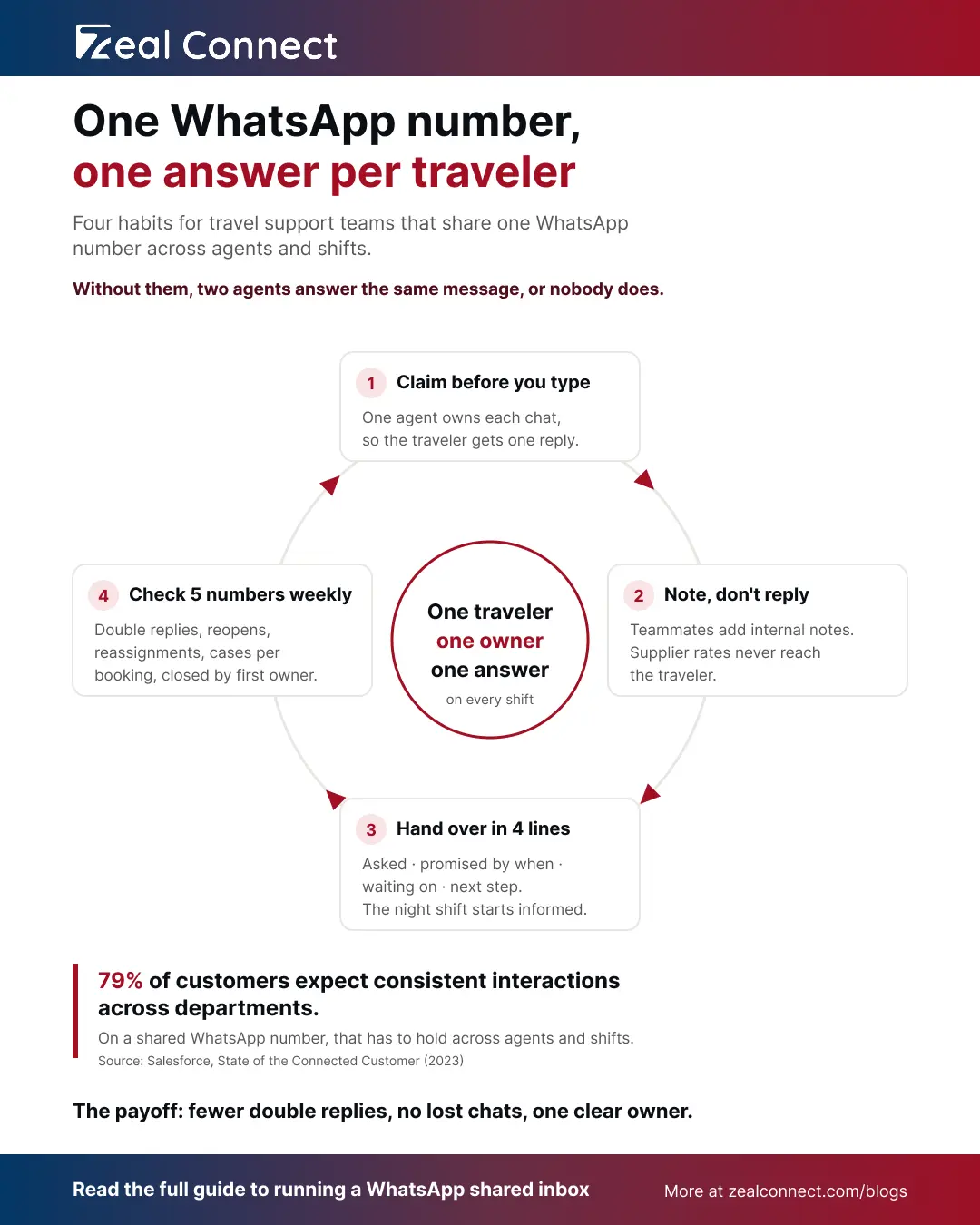
Rules on paper only help if agents follow them at 2 am as well as 2 pm. Three habits carry them into daily work: claiming before typing, handing over cleanly at shift change, and checking a few numbers each week.
Collision rules for a WhatsApp shared inbox: claim before you type
Claim the chat before you start typing, every time. If a teammate already owns it, add an internal note instead of replying. Supervisors should reassign a chat rather than jump into it, so the owner always knows it's still theirs. Keep the two boxes apart as well. Supplier rates, net prices and comments about the traveler belong in notes, never in the reply box. Some inboxes show who is viewing or typing in a chat. If yours doesn't, the claim rule does the same job.
How should a chat in a WhatsApp team inbox pass from one shift to the next?
Overnight, pass chats from travelers already on their trip to the duty agent, and leave everything else with its owner until they're back. Then write a four line handover note: what the traveler asked, what you promised and by when, what you're waiting on, and the next step. Hospitals use the same idea, because the SBAR handover format gives every shift change a fixed structure. Watch the clock too. If the hotel answers after WhatsApp's 24 hour customer service window has closed, the next agent needs an approved template to reach the traveler.
Five numbers that show your WhatsApp shared inbox is working
Response time tells you how fast the team is. These five tell you whether sharing the number works:
- Double replies: messages that got answers from two agents.
- Reopen rate: including how many reopens were only a "thanks".
- Reassignments per case: how often a case changes hands.
- Cases per booking: a high number points to duplicate cases.
- Closed by the first owner: the share of cases finished by the agent who claimed them.
If cases per booking keeps rising, agents are opening new cases where the rules say join. Check all five weekly for the first month.
How Does Zeal Desk Turn a WhatsApp Shared Inbox Into Owned Cases Linked to Bookings?
Zeal Desk is a support desk built only for travel. WhatsApp messages land in one shared queue with email and live chat, as tickets with an owner, assigned manually, round robin or to the least busy agent. Parent and child tickets keep a booking and its changes together. AI pulls booking references onto the ticket and summarizes each thread for the next shift, while your agents send every reply and close every case.
Conclusion
Sharing a WhatsApp number is a login problem, and a shared inbox fixes it quickly. Sharing a thread is harder, because one traveler's chat can hold several trips, and several people can write about one booking. That part needs written rules. Start this week with three: the case boundary rules, the claim rule and a four line handover note. Then watch double replies and cases per booking for a month, since those two numbers show whether agents follow the rules or work around them. The traveler in the hotel lobby at 7:40 am should get one reply, from one owner, about the right booking, on every shift.
Frequently Asked Questions
Can multiple agents use the same WhatsApp number at the same time?
Yes. The WhatsApp Business app's multi agent feature lets up to 10 devices share one number with a Meta Verified or Meta One subscription, and four without it. Larger teams connect the number to a shared inbox through the WhatsApp Business Platform, so every agent works from their own login, with notes and case history.
How many devices can share one WhatsApp Business app number?
Four devices as standard. With multi agent, the limit rises to 10, set by your Meta Verified or Meta One subscription. If you cancel, only your four most recently active devices stay linked. Linked devices also disconnect if the main phone goes unused for more than 14 days.
Can travelers see which agent replied on WhatsApp?
No, not on the WhatsApp Business app. WhatsApp says customers can't see which agent or device sent a message, or who their chat was assigned to. In a shared inbox, messages also arrive under your business name. Whether agents sign replies with their first name is a decision for your team.
What's the difference between a WhatsApp shared inbox and a WhatsApp team inbox?
There's no real difference. Vendors use both names for one workspace where several agents answer the same WhatsApp number. What matters more is what the inbox does: assignment, internal notes, a named owner on every chat, and a history that lets your team apply written rules for splitting threads into cases.
What should happen when a traveler messages again after their case is closed?
It depends on the message. If the same problem has come back within your reopen window, reopen the case with its original owner. If it's a new request on the same booking, open a new case linked to that booking. A simple thank you gets logged on the closed case, without reopening it.