



- This article explains how a travel company can run customer service on WhatsApp: which setup to choose, how to handle the everyday situations travelers, partner agents and suppliers bring to it, and what it costs since Meta changed its pricing in October 2026.
- It is written for operations and support leaders at travel agencies, OTAs, DMCs, bedbanks and TMCs.
A guest lands in Dubai at 23:10 and can't find the transfer driver. They don't email or call. They send a WhatsApp message to the number on their voucher, or sometimes to an agent's personal phone. For most travel teams, WhatsApp customer service started exactly like this: travelers and partners chose the channel, and the team kept up as best it could. This guide looks at it from the support desk's side: how to set it up properly, how to run the daily work, and what it costs today.
Travelers and Trade Partners Already Expect WhatsApp Customer Service
Ask any travel support lead where urgent messages arrive, and WhatsApp is usually the first answer. It is the app travelers already have open, at home and abroad. Partner agents and suppliers use it for the same reason, because it is fast and personal. That speed helps, but on most desks the channel grew without a plan.
Travelers expect WhatsApp customer service before and during a trip
Travelers reach for WhatsApp because it fits how they travel. It works on hotel Wi-Fi, it keeps the whole conversation in one thread, and it lets them send a photo of a voucher or a long check-in queue. In a Kantar study commissioned by Meta, 73.3% of consumers across 22 markets prefer messaging when they contact a business. Those markets include the UAE, Saudi Arabia, India, the UK and Germany. Large travel brands see the volume too: Air France exchanged more than 33 million WhatsApp messages with customers in a single year.
Partner agents, hotels and drivers work on WhatsApp too
For bedbanks, DMCs and TMCs, a large part of WhatsApp traffic is B2B. A sub-agent asks whether a booking is confirmed, a hotel sends a reservation number, and a driver posts a photo from the arrivals hall. Much of this happens in WhatsApp groups, and it moves quickly. These conversations decide whether a traveler is looked after, so they need the same care as a traveler's message, even though nobody calls them customer service.
The problem is where WhatsApp conversations live
On many desks, WhatsApp still runs on a few phones: a team lead's personal number, a shared handset in the office, a supplier group only two people can see. That works until someone is off shift, leaves the company or misses a message at night. Then there's no owner, no reply target and no record a manager can check.
The aim of a proper setup is simple: keep WhatsApp, and give every conversation an owner and a history.
What Does a WhatsApp Customer Service Setup Look Like for a Travel Company?
WhatsApp customer service is the support your team gives travelers and partners over WhatsApp, using either the free WhatsApp Business app or the WhatsApp Business Platform connected to your support desk. Done well, every message reaches the right agent, gets an answer within an agreed time and stays on record with the booking.
Most travel companies sit at one of three levels. The right one depends on how many people answer and how many messages arrive each day.
Three ways to run WhatsApp customer service
Table: Three ways travel companies run WhatsApp customer service
| Setup | Who it suits | What it costs | Where it falls short |
|---|---|---|---|
| Staff's personal WhatsApp | Owner-run agencies | Nothing upfront | No company record; it leaves with the person |
| WhatsApp Business app on a shared number | One small office team | Free app | Every device sees every chat; no assignment |
| WhatsApp Business Platform with a support desk | Teams with several agents or desks | Desk subscription plus Meta message charges | Needs setup time and approved templates |
The Business app is a sensible start, but a growing desk hits its limits quickly. It runs on one phone and a few linked devices, and nobody can be assigned a chat or tracked against a reply time. The Business Platform is the WhatsApp business customer service option larger teams use. A messaging provider or your support desk connects your number to it, so messages arrive in one shared queue that several agents can work at once.
The 24-hour reply window, in plain terms
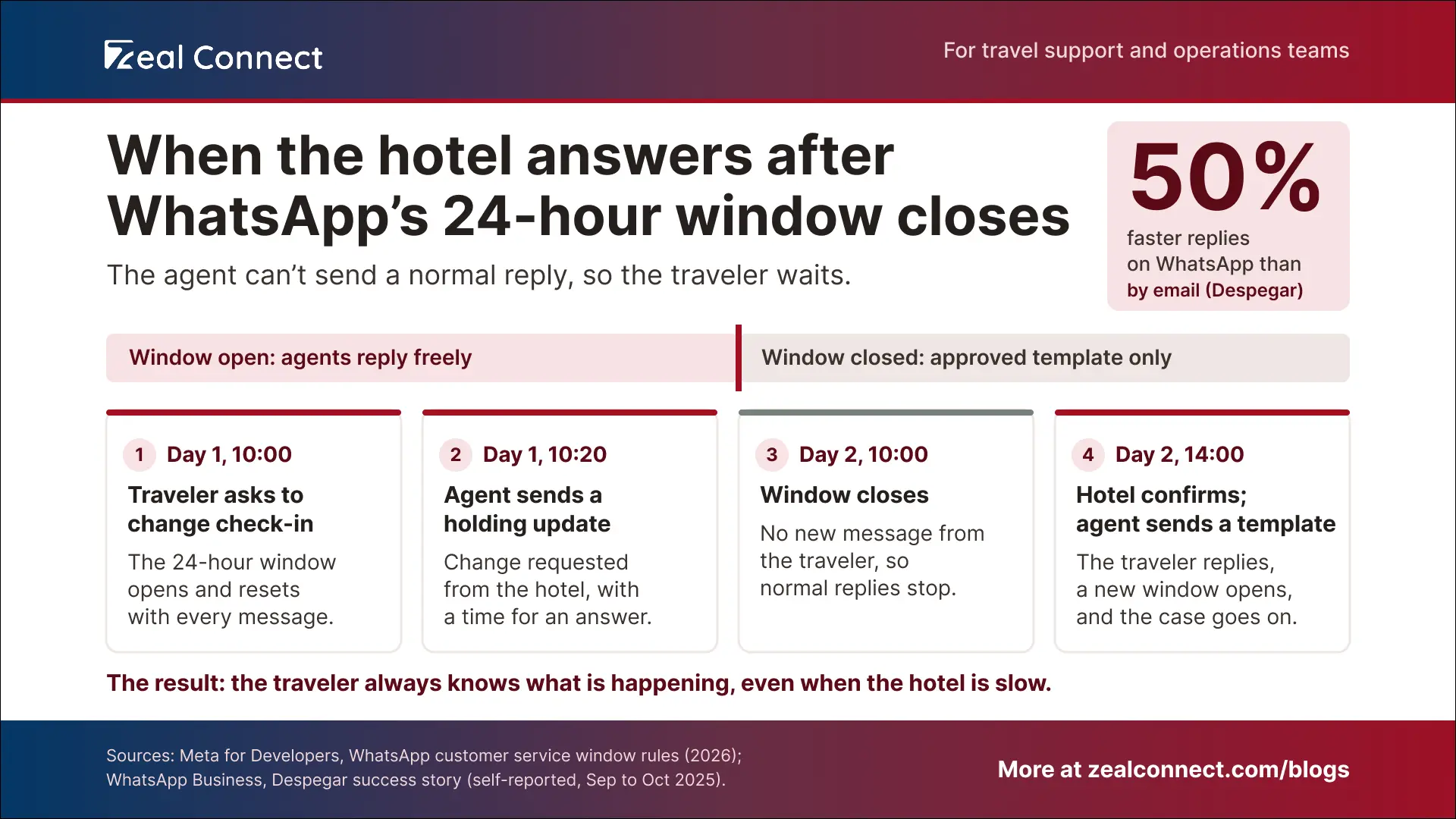
The Business Platform has one rule every agent should know. When a traveler messages you, a 24-hour window opens and resets each time they write again. Inside that window, agents can reply freely with text, photos or a voucher PDF. Once it closes, you can only send a pre-approved template message, such as a booking update.
In travel, the answer a traveler is waiting for often arrives after the 24-hour window has closed.
Key Terms Worth Knowing
A few terms come up throughout this article on WhatsApp customer service. Here is what each one means.
- WhatsApp Business app: The free app for businesses. It runs one number on a phone and a few linked devices, with no way to assign chats to agents.
- WhatsApp Business Platform: Meta's version for larger teams. A support desk or messaging provider connects it, so several agents can answer from one business number.
- Customer service window: The 24 hours after a traveler's latest message. During this time your agents can reply freely, and each new message from the traveler restarts the clock.
- Template message: A message Meta has approved in advance. You need one to contact a traveler after the window closes, and booking updates use the "utility" type.
- Service message: Any normal reply your agents send inside the window. Since 1 October 2026, Meta charges for these after the first 1,000 each month.
The Daily WhatsApp Customer Service Workflows on a Travel Desk
Once WhatsApp lands in a shared queue, the work looks familiar: questions, changes, urgent problems and supplier follow-ups. The pace is what changes. Travelers expect a quick answer on WhatsApp, and they can see when a message has been read. The three workflows below keep that pace without losing track of who owns what.
Booking questions, changes and urgent trip issues on WhatsApp
Every WhatsApp message should become a case with one owner, linked to the booking reference. That one habit removes most of the confusion. Set a first reply target, and a faster one for travelers already on their trip. Agents should send one complete update instead of a string of "checking" messages, which is easier for the traveler and, as the cost section shows, cheaper. For nights and weekends, decide who covers urgent trip issues out of hours, and tell everyone else when to expect a reply.
What happens when the hotel or supplier is slow to reply?
The agent keeps the traveler updated and plans for the window closing. Say a traveler asks to change a check-in date at 10:00. The hotel confirms at 14:00 the next day, after the window has closed, so the agent can't simply reply. Two habits handle this. First, send a holding update with a realistic time while the window is still open. Second, keep an approved template ready to reopen the conversation. Despegar sent WhatsApp reminders 24 and 72 hours after a flight change notice and reported customers responding 50% faster than by email.
Handling partner agent and supplier WhatsApp groups
Group chats with partner agents, hotels and drivers are where B2B work happens, and also where it gets lost. Leave the conversation in the group, because that is how partners like to work. When a message asks for action, such as a rooming change or a missed pickup, turn it into a case with an owner and a due time. The decision and the supplier's reply then sit on the case, so the next shift can see what happened.
If your team uses Zeal Desk as its WhatsApp customer support software, the integration works this way. Incoming WhatsApp messages create or update a ticket and a contact automatically, and agents reply from the ticket with text and media. In WhatsApp groups, an agent can turn any message into a ticket with the "+" option. WhatsApp settings can also differ by department, for example between a hotel desk and a transfer desk.
What Does WhatsApp Customer Service Cost a Travel Company?
The cost has three parts: the tool, Meta's message charges and your team's time. The Business app itself is free. On the Business Platform you pay for the support desk or messaging provider, plus Meta's charge per message. Since 1 October 2026, those charges include ordinary replies, which changes the numbers for busy travel desks.
What changed in WhatsApp customer service pricing in October 2026?
Replies to travelers are no longer free at volume. Until recently, a reply to a traveler's message cost nothing on the Business Platform. Meta now charges for these replies again after the first 1,000 per business number each month. Messages travelers send to you stay free. Template messages sent after the window has closed were already charged and still are. Some older guides still describe replies as free, so check current pricing before you set a budget.
Why do your travelers' home countries change the bill?
Meta prices each message by the country code of the phone it goes to. Where your company is based doesn't change it. Travelers keep their home number abroad, so their home country sets the price. On Meta's current rate card, one reply costs $0.055 to a German number, $0.022 to a UK number and $0.0014 to an Indian one. A desk sending 10,000 replies a month would pay about $198 if its travelers were mostly British, and about $13 if they were mostly Indian.
Since October 2026, each WhatsApp reply has a price, and that price depends on the traveler's home country.
How to keep WhatsApp customer service costs under control
In the example above, Meta's charges stay under a few hundred dollars a month, which is small next to an agent's salary. So manage the three parts together. Send fewer, fuller replies, since each one now counts. Update travelers before the window closes, so you need fewer paid templates. Keep a payment method on file with Meta or your provider, because Meta stops delivering replies once they become chargeable if none is set.
Track how many messages a typical case takes, because that one number drives both the bill and your agents' workload.
Conclusion
WhatsApp customer service in travel is already happening on your team's phones; the work is to give it structure. Start by moving it from personal phones to a shared number that several agents can work. Then make every message a case with one owner, a booking reference and a reply target. Plan for the slow supplier and the busy group chat, since those are where travel cases go quiet. Finally, check the cost against your travelers' home countries, because since October 2026 each reply has a price. Done in that order, WhatsApp becomes a channel your managers can see, measure and improve.
Frequently Asked Questions
Is the WhatsApp Business app enough for a travel support team?
For one or two people, often yes. The app is free and simple, but every device sees every chat, and you can't assign conversations or track reply times. Once several agents share the work, or partner and supplier groups get busy, the Business Platform connected to a support desk fits better.
Are WhatsApp customer service replies still free?
Only up to a point. Since 1 October 2026, each business number gets 1,000 free replies a month, and Meta charges for every reply after that at the rate of the traveler's country. Messages travelers send you stay free, and template messages sent outside the 24-hour window are charged as before.
Can we use a chatbot for WhatsApp customer service?
Yes, for customer service. Since 15 January 2026, Meta's terms bar general-purpose AI assistants on the Business Platform, but Meta confirmed a travel company's customer service bot is not affected. Keep bots on simple booking questions and hand travelers to a person early for anything that changes a booking.
What if the 24-hour window closes before the supplier replies?
Send a holding update with an expected time while the window is still open. If the supplier answers after it closes, send an approved template message with the update. Once the traveler replies, a new 24-hour window opens and the agent continues on the same case.