



- This article explains how a travel operations team sets up WhatsApp Business API support so the whole desk can run it: who answers which messages, the response targets to set, and how to roll it out in 30 days.
- It's written for operations and support leaders at DMCs, bedbanks, OTAs, agencies, and TMCs whose WhatsApp still lives on staff phones.
It's Monday morning after a long weekend at a DMC in Bali. There are 140 unread WhatsApp messages spread across three agents' phones. A driver's photo from the arrivals hall went unseen, a partner agent is chasing a rooming list, and a hotel's late confirmation sits on the phone of someone on leave. Moving to the WhatsApp Business API is the obvious fix. However, a provider can connect the number in a few days, and that alone solves none of this. The part that decides whether your desk improves is the setup only your operations team can do.
The WhatsApp Business API Setup That Matters Most Happens on the Desk
The connection is the easy part, and someone else can do it for you. What your team does around it decides your response times, your workload, and whether anything is lost when an agent goes on leave.
What does a WhatsApp Business API provider set up for a travel company?
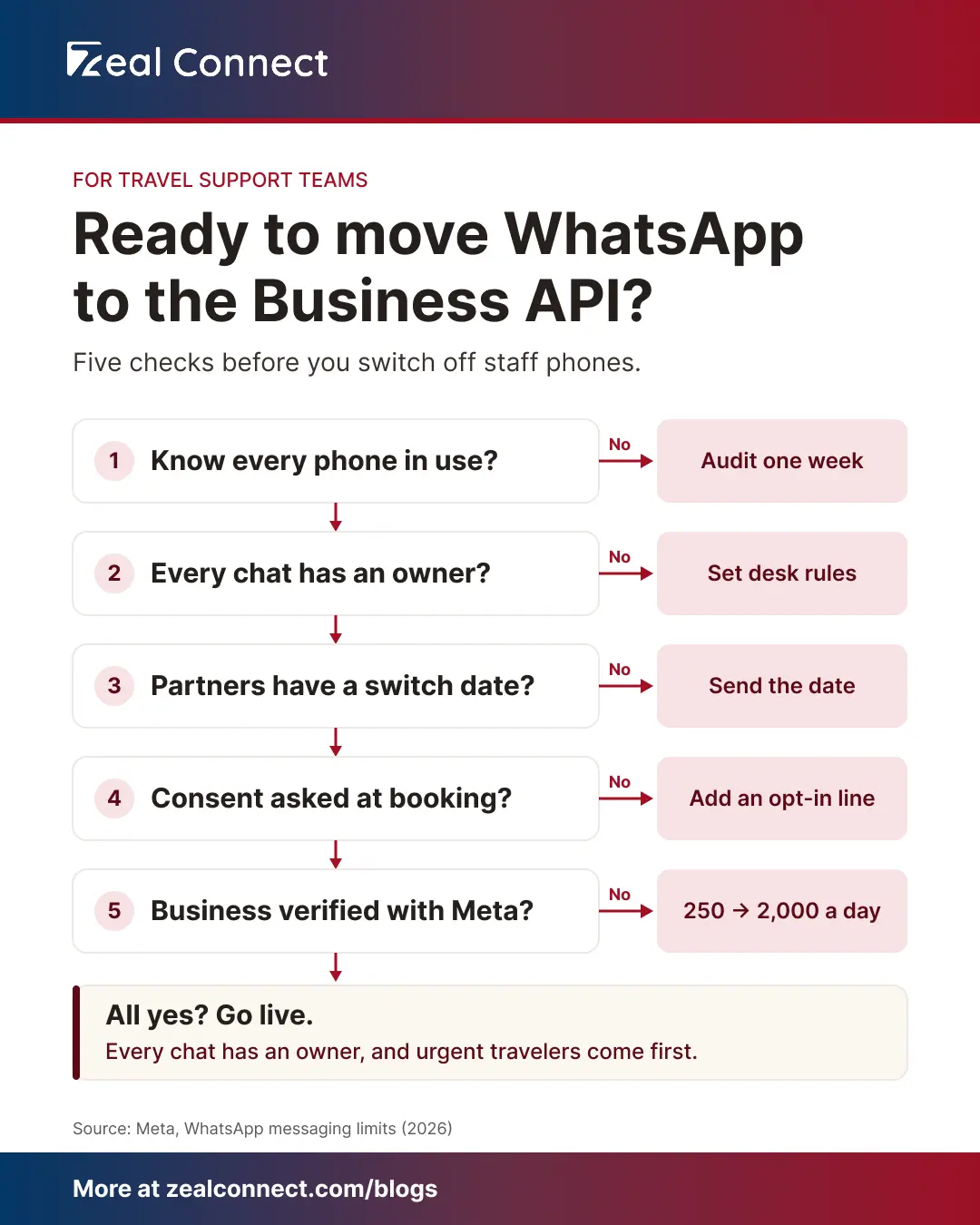
A WhatsApp Business API provider, or a help desk that offers WhatsApp, handles the technical side. It connects a company-owned number to your help desk, gets your business name approved by Meta, and submits your first message templates. Plan for a few weeks, because Meta reviews each step. One detail affects operations directly. A new account can message only 250 people first in a day, and verifying the business lifts that to 2,000. So start verification early.
WhatsApp Business API decisions only your operations team can make
Only your operations team can decide who answers which WhatsApp messages. The same goes for how fast each type needs a reply, what happens at shift change, and when partners stop using personal numbers. These choices set your SLA performance and your agents' workload. A provider can't make them for you, because they depend on how your desks are organized.
What goes wrong when WhatsApp Business API support has no desk rules?
Without desk rules, a connected WhatsApp number just moves the backlog to a new screen. Ten agents can now see every chat. Two may answer the same traveler while a third chat waits for someone to claim it. A guest column in Travel Weekly warns that shared WhatsApp accounts lead to duplicate or missed replies. Partners also keep messaging the old personal numbers, because nobody told them to stop.
Connecting the WhatsApp Business API moves the backlog to a new screen; the desk rules are what clear it.
What Is WhatsApp Business API Support for a Travel Desk?
WhatsApp Business API support is customer support run from a company-owned WhatsApp number connected to your help desk. Every message from a traveler, partner, or supplier then gets an owner, a response target, and a record.
Who messages a travel desk through WhatsApp Business API support?
Six kinds of sender message a travel desk on WhatsApp: travelers before the trip, travelers on the trip, partner agents, hotels and suppliers, drivers, and corporate bookers. Most desks plan only for travelers, who already treat messaging a business as normal: Meta counts more than 1 billion active threads with business accounts every day. Yet at a bedbank, DMC, or TMC, the trade sends a big part of the WhatsApp traffic. Travelers write before the trip and during it, and the two need very different speeds. Partner agents ask about bookings for their own clients, while drivers post arrival photos and no-show alerts. Each sender needs a different desk and a different clock.
How proactive WhatsApp Business API messages reduce incoming chats
Proactive WhatsApp messages answer a traveler's question before they ask it, so fewer chats come in. The API lets your booking system send them with Meta-approved templates. A confirmation, a pickup reminder the night before, or a delay alert answers the question before the traveler asks it. LATAM Airlines, for example, reported decreased support contacts after sending flight updates as WhatsApp utility messages (self-reported). Keep these messages strictly about the booking, so Meta classes them as utility rather than marketing. For a travel desk, fewer "where is my driver?" messages means more agent time for the problems that need a person.
Key Terms Worth Knowing
A few terms come up throughout this article on the WhatsApp Business API. Here is what each one means.
- Company-owned number: A WhatsApp number registered to the business and connected to your help desk, so it no longer depends on any one phone or person.
- Conversation owner: The agent or desk responsible for a WhatsApp conversation until it is closed or handed over.
- Response target: The time your team commits to for a first reply, set separately for each type of sender.
- Handover note: A short written summary an agent leaves on a conversation at shift change, so the next agent doesn't start from scratch.
- Proactive message: A message your team or system sends first, such as a pickup reminder, using a template Meta has approved.
- 24-hour reply window: After a traveler writes, agents can reply freely for 24 hours. After that, only approved templates can be sent.
- Coexistence: Keeping your existing WhatsApp Business app number while connecting it to the API, so the number on your vouchers still works.
The WhatsApp Ownership Map: Who Answers What on the WhatsApp Business API
With the senders clear, the next step is giving each one an owner and a clock. The map below is the core of the operational setup. Fill it in for your own desks before go-live.
The WhatsApp Business API ownership map for a travel desk
The ownership map gives every type of WhatsApp sender an owning desk and a response target. No message then waits for someone to claim it.
Table: The WhatsApp ownership map for a travel support desk
| Who's messaging | What they usually need | Desk that owns it | Response target to set | What changes on the API |
|---|---|---|---|---|
| Traveler before the trip | Changes, documents, add-ons | Reservations desk | Same business day | Chat sits on the booking |
| Traveler on the trip | Missed pickup, room problem, delay | On-trip or duty desk | Minutes, around the clock | Goes to whoever is on shift |
| Partner or sub-agent | Booking status, rooming lists | B2B or account desk | Within the hour | Shared thread, not one phone |
| Hotel or supplier | Confirmations, changes, no-shows | Supplier desk | Before the supplier's deadline | Reply visible to the next shift |
| Driver or ground handler | Arrival photos, no-show alerts | Transfer or duty desk | Minutes while operating | Alert reaches the duty agent |
| Corporate booker | Traveler changes, invoices | Account team | Per the contract SLA | Tracked against the account |
Example: how a WhatsApp ownership map sorts a 140-message backlog
With an ownership map, the Bali DMC's 140 unread WhatsApp messages become four desk queues, with urgent chats first. Say they split like this: 38 from travelers before their trip, 22 from travelers already in Bali, 41 from partner agents, 27 from hotels, and 12 from drivers. The duty desk sees the 22 on-trip travelers and 12 drivers first, because those can't wait. The B2B desk takes the partners, and the supplier desk takes the hotels. Reservations works through the rest the same day.
What response targets should a travel desk set for WhatsApp Business API support?
Set WhatsApp response targets by sender. A traveler stuck at the airport and one asking about next month's upgrade need very different speeds. On-trip travelers and drivers need minutes, at any hour. Partner agents need a fast answer too, because their own customer is waiting on them. Supplier messages run against the supplier's deadline, such as a release date or check-in time. For nights, name who is on call for on-trip chats.
On WhatsApp, one response target for everything means the stranded traveler waits behind the brochure request.
Rolling Out WhatsApp Business API Support in 30 Days
Once the map is drafted, the rollout itself fits into a month. The plan below runs alongside the provider's technical setup, so both finish around the same time.
Week 1: audit your current WhatsApp use before the API switch
A WhatsApp Business API rollout starts by finding out where WhatsApp lives today. List every phone, personal number, and group your team uses for work, and note which number is printed on vouchers and websites. Then sample one ordinary week. Count messages by sender type and by hour, and mark the ones that waited too long or went unanswered. This gives you the numbers to set targets and staff shifts. It also shows which number to keep. If the voucher number runs on the WhatsApp Business app, coexistence can connect it to the API and keep six months of chats.
Weeks 2 and 3: write WhatsApp desk rules and give partners a switch date
In weeks 2 and 3, write the WhatsApp rules your agents will follow and tell partners when to switch numbers. Every chat gets one owner as soon as it arrives. Agents leave a handover note at shift change. A stranded traveler or a safety issue moves to a phone call. Passport photos and payment details stay on the ticket, never on personal phones. Prepare your first proactive messages, such as the confirmation and the pickup reminder. Add a consent line to your booking form too, since Meta requires opt-in before you message travelers first. Then tell partners, hotels, and drivers which number to use, and set a date when personal numbers stop being used for work. Without that date, the old numbers never go quiet.
Week 4: go live on the WhatsApp Business API and track five numbers
Go live on a quiet weekday, well away from a peak weekend. Then track five numbers through the first month:
- The share of work WhatsApp arriving on the company number rather than personal phones.
- Conversations with no owner after 15 minutes.
- First response time on on-trip chats.
- Follow-ups like "any update?", which show where travelers were left waiting.
- Shift handovers made without a note.
A help desk built for travel makes these numbers easy to see. Zeal Desk, for one, turns WhatsApp messages and group messages into tickets in one queue alongside email and live chat, with WhatsApp settings per department.
Conclusion
Connecting a number to the WhatsApp Business API takes a provider a few weeks. Making it work is an operations job. Start by finding out who already messages your desk and on which phones. Give each type of sender an owning desk and a response target that matches how urgent they usually are. Write the rules for ownership, handover, and sensitive documents, and give partners a date to stop using personal numbers. Then go live and watch five numbers for a month. Those numbers tell you, and your COO, whether the change worked. Back at the Bali DMC, the next Monday morning starts with four sorted queues instead of 140 unread messages, and the driver's photo reaches the duty agent within minutes.
Frequently Asked Questions
How long does it take to move a travel desk onto the WhatsApp Business API?
About a month, if you run the technical and operational work side by side. The provider's setup takes a few weeks because Meta reviews your business and templates. Meanwhile, your team audits current WhatsApp use, writes desk rules, and tells partners about the change. Go live once both are ready.
Should partner agents and suppliers move to the company WhatsApp number too?
Yes. Partner and supplier messages often decide whether a traveler's trip goes smoothly, so they need an owner and a record like any traveler message. Tell them which number to use and set a date when personal numbers stop being used for work. Otherwise those conversations stay invisible to the rest of the desk.
What should agents do with passport photos and documents sent on WhatsApp?
Keep them on the ticket in your help desk, where access can be controlled, and never save them to personal phones. Ask travelers to share only what the booking needs. Then follow your own data retention policy for how long those files are kept and when they are deleted.
Can we keep the WhatsApp number that's printed on our vouchers?
Usually, yes. If the number runs on the WhatsApp Business app, coexistence connects it to the API and keeps six months of one-to-one chats, though group chats don't carry over. Moving the number off the app first erases its chat history, so decide before setup starts.
What should we measure in the first month on the WhatsApp Business API?
Track five numbers: the share of work WhatsApp on the company number, conversations with no owner, first response time on on-trip chats, "any update?" follow-ups, and handovers without a note. Together they show whether every message now has an owner and whether urgent travelers are answered first.