



- This article explains how a WhatsApp chatbot and a travel support desk share one WhatsApp conversation.
- It covers which booking queries the bot answers, how it turns an itinerary change into a ticket, and how an agent takes over the thread.
- It's written for support and operations leaders at OTAs, tour operators, TMCs, DMCs and bedbanks.
At 22:15, a traveler messages your WhatsApp number to ask what time tomorrow's airport pickup in Dubai is. Two messages later, they add that their flight has moved a day. So the hotel and the transfer both need to shift. The first question takes the booking record a second to answer. The second needs the hotel, the transfer company and a person on your team. A WhatsApp chatbot and your support desk have to split that one conversation cleanly. The split decides whether an agent starts with a complete ticket or a blank chat.
Why a WhatsApp Chatbot Belongs in Front of a Travel Support Desk
Travel queries on WhatsApp come in two kinds, and they often arrive in the same thread. Some are lookups: pickup times, check in times, what's included, what's still due. Others change the trip and need a supplier and a decision. A chatbot connected to your desk handles the first kind on the spot and prepares the second kind for an agent. Travelers are open to that. In Kantar research commissioned by Meta, 67.7% of consumers agree that getting a response from an AI chatbot is helpful (WhatsApp Business, 2026).
Travelers want quick WhatsApp answers, and a person for changes
Both expectations are real, and a good setup serves both. In an eviivo survey of 430 travelers, 58% said they prefer SMS, WhatsApp or email links for quick exchanges (eviivo, 2025). When plans break, though, the picture flips. Perk found that 58% of US business travelers prefer an agent by phone or in person when disrupted, and only 7% chose AI chatbots (Perk, 2025). So the bot should answer the quick questions fast and hand changes to a person early.
Large travel brands already run the WhatsApp chatbot as the desk's front door
Air France shows the pattern at scale. Customers who message about miles or luggage answer a series of automated questions before transfer to a live service agent if needed (Air France, April 2024 to April 2025, self reported). Those questions mean the agent receives a customer who has already been identified, with the topic already clear. That's the job a WhatsApp chatbot does best in front of a travel desk: it prepares the case, and a person finishes it.
What Is a WhatsApp Chatbot Connected to a Support Desk?
A WhatsApp chatbot connected to a support desk is an automated assistant on your WhatsApp business number. It answers simple booking questions from the booking record and turns everything else into a ticket in your desk, with the booking reference, request and chat history attached. An agent then picks it up and replies in the same WhatsApp thread.
The traveler never sees two systems. They see one chat, so the work behind it has to be divided carefully.
What the WhatsApp chatbot does, and what the desk records
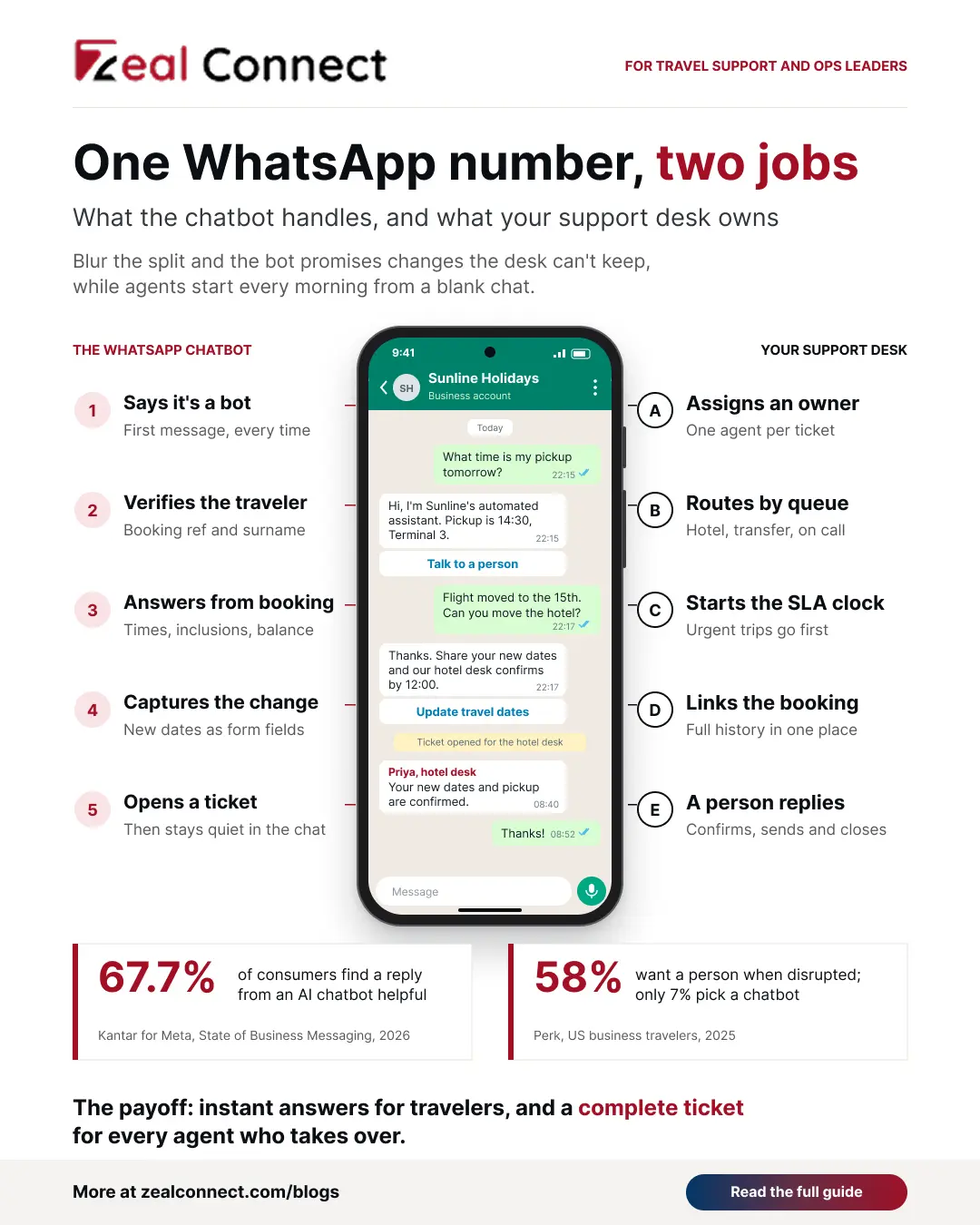
The bot works the front of the conversation. It greets the traveler, says it's an automated assistant and checks who they are. Then it answers from the booking and captures any request it can't answer. Finally, it opens the ticket. The desk holds everything that has to last. That means the owner, the queue, the SLA clock, the booking link, the full history and the reply that confirms the change.
Keeping that split clear stops the WhatsApp chatbot from making promises your desk then has to walk back.
Who is talking? One WhatsApp number, two kinds of reply
The traveler should always know, and so should your agents. Once the bot opens a ticket, it should stop replying in that thread. Any new message from the traveler joins the open ticket, and the agent answers from the desk. When the agent closes the ticket, the bot can take new questions again. Throughout, show a clear "talk to a person" option, so nobody gets stuck in a menu while a real problem waits.
Two WhatsApp rules a desk connected chatbot must follow
The WhatsApp Business Messaging Policy allows automated replies only alongside prompt, clear and direct escalation paths, such as transfer to a human agent. So the handoff to your desk is a platform requirement as well as a service choice. The second rule is honesty: say it's a bot. Salesforce research found that 72% of customers say it's important to know if they're communicating with an AI agent. WhatsApp's 24 hour reply window also applies to both bot and agent.
Key Terms Worth Knowing
A few terms come up throughout this article on connecting a WhatsApp chatbot to a support desk. Here is what each one means.
- Bot handoff: The moment the chatbot passes a conversation to a human agent, together with the details it has collected and the chat so far.
- Agent takeover: An agent replying in the same WhatsApp thread the bot started, while the bot stays silent until the ticket closes.
- Escalation path: The route to a person that WhatsApp policy requires whenever you automate replies, such as an in chat transfer to a live agent.
- WhatsApp Flows: In chat forms a bot can send to capture details such as new travel dates, passenger names or a choice between options, as structured fields.
- Missing details rate: The share of handed off tickets where the agent had to ask the traveler again for something the bot should have collected.
One WhatsApp Thread, Turn by Turn: From Chatbot Answer to Agent Takeover
The clearest way to design the split is to follow one thread. In this illustrative example from an OTA, a traveler arriving in Dubai tomorrow has a hotel booked through a bedbank and an airport transfer run by a local DMC. Watch where the bot answers, where it hands off, and what the desk holds at each turn.
The booking query the WhatsApp chatbot answers on its own
The thread opens with a lookup. The bot greets the traveler, says it's an automated assistant and offers a "talk to a person" button. It asks for the booking reference and surname. Then it reads the transfer: pickup at 14:30 from Terminal 3 arrivals, with driver details sent the day before. That's the whole interaction. No agent touches it. The desk simply logs the conversation against the booking, so the next agent can see it.
The itinerary change the WhatsApp chatbot turns into a ticket
Then the traveler writes: "My flight moved to the 15th. Can you move the hotel and the pickup?" The bot recognizes a change it can't make. It sends a short WhatsApp Flow, a form inside the chat, to capture the new arrival date and flight number. Next, it tells the traveler plainly that the hotel desk will confirm by midday, and opens the ticket. When the traveler adds a late checkout request, that note joins the same ticket. In the morning, an agent takes over the thread.
On one WhatsApp number, the chatbot answers what the booking record says, and the support desk owns everything that needs a supplier or a decision.
Urgent WhatsApp messages skip the chatbot's menu and go straight to the desk
Some messages shouldn't meet a menu at all: a traveler stranded at arrivals, a missed pickup, a payment dispute. The bot should spot these by keywords and booking dates, such as an arrival today, and pass them to an agent at once. A partner agent asking on a client's behalf should skip the menu too, because B2B requests often cover several bookings. All of them land in one shared queue with the right priority.
How to Connect a WhatsApp Chatbot to Your Support Desk
Four decisions make the thread above work. None of them depends on which bot builder or messaging provider you use, so the support lead who owns the desk should set them before the bot goes live.
Give the WhatsApp chatbot a narrow lane
Let the bot answer only what the booking record already says: times, addresses, inclusions, documents due and balance. Let it capture requests. Don't let it promise a change, a refund or a waiver, because those depend on a supplier's answer or a person's decision. A narrow lane keeps the bot accurate and saves agents from correcting it every morning. It also has to read live booking data.
What should the WhatsApp chatbot write into the ticket?
Everything the agent would otherwise ask for. Every ticket needs the verified booking reference, the traveler's language and what the bot has already promised. The rest depends on the request, so set the fields for each request type before launch. The table below is a starting point for a travel desk.
Table: What a WhatsApp chatbot should capture before it opens a ticket
Every field the WhatsApp chatbot fills is a question your agent doesn't have to ask the traveler again.
Set takeover rules so the bot and agent never talk over each other
Write the rules down. While a ticket is open, the bot stays silent and every new message from that traveler joins the ticket. After hours, the bot tells the traveler when a person will reply. The ticket then waits in the morning queue with its SLA running. Silence is what travelers remember: a CMAC Group survey found 21% of UK passengers received no communication during disruption (CMAC Group, 2025).
Measure the WhatsApp chatbot by the tickets it makes
Bot conversation counts tell you little. Instead, track four desk numbers in the first month. The missing details rate shows whether the bot collects what agents need. Time from handoff to the agent's first reply shows whether the queue keeps up. Reopened tickets point to a gap in the Flow. Repeat questions within a day of a bot answer show where the answer wasn't clear enough.
The missing details rate is the clearest test of a WhatsApp chatbot, because it shows whether agents can start work without going back to the traveler.
How Does Zeal Desk Run the Desk Side of WhatsApp Support?
Zeal Desk handles the desk side of this setup for travel teams. Each WhatsApp message becomes a ticket with the live booking pulled onto it, and an agent can turn any message in a partner group into a ticket too. AI classifies the ticket, extracts booking references and dates, and summarizes the thread, so the agent can start from the booking straight away. The agent then reviews the reply, sends it from the ticket and closes the ticket.
Conclusion
A WhatsApp chatbot and a travel support desk work best as one system with a clear split. The bot answers what the booking record says, collects the details for anything it can't answer, and hands the thread to a person. The desk owns the ticket, the clock and the reply. To get there, list your most common WhatsApp query types and decide which ones the bot may answer. Define the ticket fields it must fill, and write the takeover rules before launch. Then watch the missing details rate in the first month, because it shows quickly whether the handoff is working.
Frequently Asked Questions
Should every WhatsApp chatbot conversation become a support ticket?
No. If the bot answers a lookup from the booking record, such as a pickup time, log the conversation against the booking and stop there. Open a ticket only when the traveler needs a change, a refund, a complaint handled or a person. That keeps your desk queue for work that needs an agent.
What happens when a traveler messages again while an agent is handling their ticket?
The message should join the open ticket, and the agent answers it. The bot shouldn't restart its menu or open a second ticket for the same booking. Set this as a takeover rule before launch, because two replies from two sources in one thread confuse travelers quickly.
Can a WhatsApp chatbot confirm an itinerary change on its own?
Usually not. Most travel changes need a hotel, airline or ground supplier to agree, and sometimes a fee decision. The bot should capture the new dates and details, tell the traveler when a person will confirm, and open a ticket. The agent confirms the change once the supplier has replied.
What should a WhatsApp chatbot ask before handing off to an agent?
Ask for whatever the agent needs to start work. That covers the booking reference and surname, what the traveler wants changed, the new dates or details, and how urgent it is. A short WhatsApp Flow can capture these as fields, so the agent doesn't have to ask again.
Does a WhatsApp chatbot need to say it's a bot?
Yes, and it should say so in the first message. Travelers expect to know. In the EU, Article 50 of the AI Act requires AI systems that talk to people to tell them so, from 2 August 2026. WhatsApp's policy also requires a clear way to reach a human.