




- This article explains what a cloud-based ticketing system for travel actually requires, why most cloud ticketing tools satisfy only one of two independent needs (cloud-native architecture or travel-native operations), and how to evaluate both.
- You'll get a working definition, the Dual-Axis Evaluation Grid for placing any cloud ticketing system on a cloud maturity × travel awareness map, and the five operational capabilities your shortlist should prove.
- Written for operations and support leaders at OTAs, TMCs, DMCs, tour operators, and travel payment companies evaluating or switching cloud ticketing systems.
Every cloud based ticketing system you evaluate will check the same boxes: omnichannel intake, SLA tracking, AI features, and workflow automation. Yet your team still copies booking data by hand, chases suppliers in a separate email thread, and watches the queue triple during a disruption week. The reason is straightforward. "Cloud" and "travel-ready" are two separate requirements, and most vendors deliver only one. This article maps both so you can tell the difference before you sign.
Why Cloud Ticketing Alone Does Not Solve Travel Operations
Cloud has become the default delivery model for customer support software, and the numbers back that up. But for travel companies, adopting a cloud ticketing system does not automatically fix the operational problems that slow your team down. Cloud solves the infrastructure problem (scaling, remote access, automatic updates). It does not solve the travel operations problem: bookings tied to every ticket, suppliers who control half of your resolution time, disruption surges that change the nature of the work, and financial settlement that follows fare rules rather than refund policies.
Cloud Is the Default, and Travel Is Part of the Shift
According to Gartner (2025), worldwide spending on public cloud services is forecast to reach $723.4 billion in 2025, up 21.5% from the prior year. SaaS alone accounts for $299.1 billion of that. Travel companies are part of this shift. The question is no longer whether to run support in the cloud. It is whether the cloud ticketing system you pick understands your operation.
Why Generic Cloud Ticketing Systems Stall on Travel Workflows
A travel support ticket is structurally different from a retail or SaaS support ticket. It carries a live booking with dates, supplier references, and passenger data. Resolution depends on a third party (the airline, hotel, or ground handler), not just your agent. Volume can spike five to ten times normal during a weather event or schedule change. According to HubSpot (2024), 75% of customer service representatives reported seeing the highest-ever volume of tickets in 2024. For travel teams, that pressure compounds because the tickets themselves carry booking dependencies, supplier wait times, and financial consequences.
What Travel Companies Lose When the Cloud Ticketing System Is Industry-Generic
When the cloud ticketing system has no concept of a booking, agents retype reservation data into custom fields. Amendments create duplicate tickets because the system does not link them to the original booking. Supplier wait times are invisible because the supplier is not a participant in the ticket. According to Sabre (2025), 91% of travel agencies operate with four or more booking systems, and over half manage seven or more. That fragmentation is the integration challenge a generic cloud help desk was never built to solve. You need a definition that covers both the cloud requirement and the travel requirement.
What a Cloud Based Ticketing System for Travel Actually Means
A cloud-based ticketing system for travel is a support platform delivered through cloud-native infrastructure that organizes work around bookings, coordinates with suppliers inside each ticket, scales during disruption events, and meets travel-specific compliance requirements. It combines cloud-native architecture (elastic scaling, real-time API integration, continuous deployment, multi-tenant data isolation) with travel-native operations (booking-centric records, supplier coordination, disruption-event handling, PCI and PII compliance) in a single system.
The term "cloud-based ticketing system" usually describes the delivery model: hosted remotely, accessible via browser, updated continuously. For travel, that definition is incomplete. A cloud-based ticketing system for travel must satisfy two independent requirements at the same time: cloud-native architecture and travel-native operations. Most tools on your shortlist will be strong on one axis and weak on the other.
The Cloud-Native Axis: What "Cloud" Must Mean Beyond Hosting
Cloud-native means the software was designed from the start for cloud infrastructure. It scales elastically when load increases. It connects to other systems through APIs, not file exports. It deploys updates continuously without downtime. According to SITA (2025), airlines invested $36 billion in IT in 2025, with 83% using AI for operational decisions. That investment only pays off when the underlying platform is genuinely cloud-native. A cloud-hosted system (legacy software running on rented servers) looks like cloud on the invoice but cannot auto-scale during a disruption week or sync booking data in real time.
The Travel-Native Axis: Booking, Supplier, Disruption, Compliance
The travel axis has four operational requirements your cloud ticketing system must meet. First, the system must be booking-centric: every ticket organized around a reservation record (PNR, booking reference, supplier confirmations), not a generic conversation thread. Second, the supplier must be a first-class participant in the ticket, with its own SLA timer and communication history. Third, the system must handle disruption events by adjusting not just capacity but also workflows (rebooking queues, refund batches, supplier notifications). Fourth, the system must support PCI and PII compliance architecture for card data, personal information, and data residency.
A cloud ticketing system that passes every generic feature checklist can still fail travel operations if it satisfies only one axis: cloud-native without travel awareness, or travel-aware without cloud-native architecture.
The Dual-Axis Evaluation Grid for Cloud Ticketing in Travel
When you combine both axes, four categories of cloud ticketing tools emerge. The table below shows where each one sits and where it breaks for travel operations.
Table: The Dual-Axis Evaluation Grid for Cloud Ticketing Systems in Travel
| Tool category | Cloud maturity | Travel awareness | Where it breaks | Example |
|---|---|---|---|---|
| Cloud-hosted + generic | Legacy on cloud servers | None | No scaling, no booking data, no travel workflows | OTRS, osTicket on cloud hosting |
| Cloud-native + generic | Elastic, API-first, SaaS | None | Scales but treats every ticket as a conversation | Hiver, BoldDesk |
| Cloud-hosted + travel-aware | Legacy or hosted infra | Partial | Knows bookings but cannot scale during disruptions | Legacy travel-specific tools |
| Cloud-native + travel-native | Elastic, API-first, SaaS | Full | The target: both axes covered | Zeal Desk |
Your goal is the bottom-right quadrant: a cloud based ticketing system that is both cloud-native and travel-native. If the system you are evaluating sits in any other quadrant, your team carries the gap.
Key Terms Worth Knowing
A few terms come up throughout this article on cloud-based ticketing systems for travel. Here is what each one means.
- Cloud-native: software designed from the start for cloud infrastructure (elastic scaling, API-first integration, continuous deployment), not legacy software hosted on cloud servers.
- Cloud-hosted: legacy or on-premise software running on rented cloud servers. It looks like cloud on the invoice but lacks elastic scaling and real-time integration.
- Booking-centric ticketing: organizing support work around the booking record (PNR, reservation, supplier references), not around a generic conversation thread.
- Multi-tenant architecture: a single cloud instance serving multiple customers with data isolation, enabling shared improvements and cost efficiency.
- SLA (Service Level Agreement): the committed response and resolution times a support team must meet. In travel, SLAs often depend on supplier response, not just agent speed.
- PNR (Passenger Name Record): the booking container in airline and GDS systems. The core identifier linking a traveler's itinerary to the support ticket.
Five Cloud Ticketing Capabilities That Change Travel Operations
The Dual-Axis Evaluation Grid tells you where a cloud ticketing tool sits. These five capabilities tell you what it can actually do for your operation. Each one requires both cloud-native architecture and travel-native design to work properly. When one axis is missing, the capability either breaks or forces a manual workaround.
Live Booking Data Inside Every Cloud Ticket
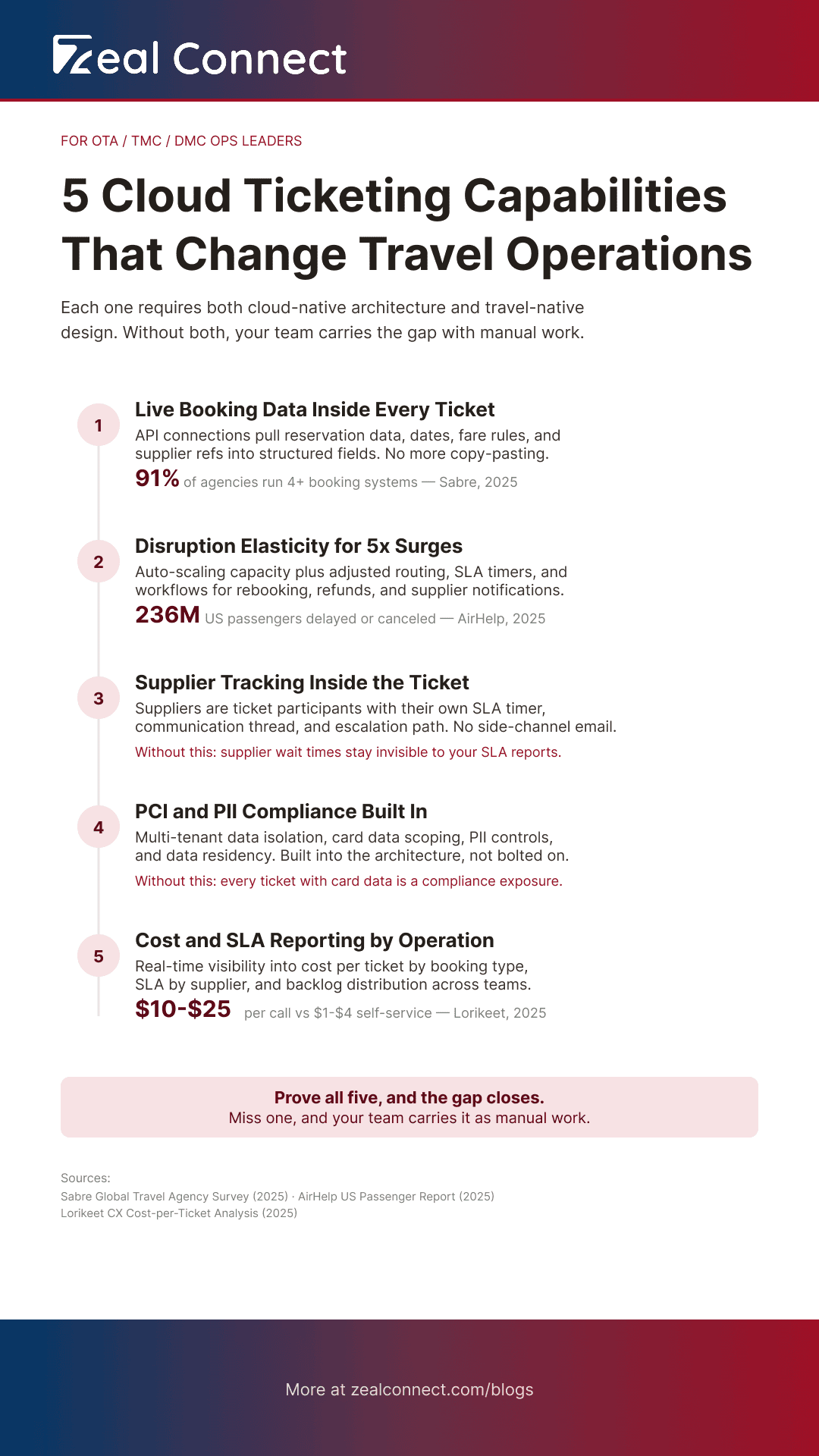
Cloud-native architecture enables real-time API connections to your booking systems (GDS, PMS, channel managers). Travel-native design means the ticket is organized around the booking itself: dates, supplier references, fare rules, and passenger details are structured fields, not text pasted into a notes box. Without both, your agents copy data by hand from multiple sources. Since 91% of agencies run four or more booking systems (Sabre, 2025), a cloud ticketing system that cannot pull live data from all of them leaves agents toggling between tabs.
Disruption Elasticity That Absorbs a 5× Surge
Cloud-native elastic compute can absorb sudden volume spikes without manual intervention. But scaling capacity is only half the problem. Travel-native design means the routing rules, SLA timers, and automation workflows adjust for disruption-specific work: rebooking requests, refund batches, supplier mass-notifications. According to AirHelp (2025), 236 million US passengers had their flight delayed or canceled in 2024. TravelPerk (2025) reports that 89% of business travelers were affected by disruptions in 2025, the highest in three years. A cloud help desk that scales the servers but not the workflows just gives you a bigger queue of misrouted tickets.
Supplier Coordination, Compliance, and Real-Time Reporting in the Cloud
Three more capabilities round out the cloud ticketing evaluation. First, supplier coordination: the supplier needs to be a participant inside the ticket, with its own communication thread, SLA timer, and escalation path. Cloud APIs make this possible in real time, but a generic cloud desk has no concept of a supplier as a ticket party. Second, compliance: travel tickets carry card data, personal information, and sometimes financial settlement records. Cloud-native multi-tenant isolation, PCI scoping, and data residency controls must be built in, not bolted on. Third, real-time reporting: you need to see cost per ticket by booking type, SLA performance by supplier, and backlog by sub-vertical. According to Lorikeet CX (2025), travel support costs between $10 and $25 per call, while self-service resolutions cost $1 to $4. Without reporting that breaks these numbers down by operation, you cannot identify where the cost is concentrated.
If your cloud ticketing system cannot report cost per ticket by booking type and SLA by supplier, you are measuring the desk, not the operation.
How to Evaluate a Cloud Based Ticketing System for Travel Operations
The Dual-Axis Evaluation Grid and the five capabilities give you the vocabulary. Now you need a practical way to test any vendor against both axes. These five operational proofs are the shortcut. If a vendor can demonstrate all five, the cloud ticketing system likely sits in the top-right quadrant. If it can show one or two, it is probably strong on one axis and weak on the other.
Five Operational Proofs Your Cloud Ticketing Shortlist Must Pass
Ask each vendor to demonstrate these five things in their product, not in a slide deck.
1. Live booking data. Show a ticket with booking details pulled via API from a live reservation system, updating in real time.
2. Disruption scaling. Show a disruption-day queue where capacity scaled automatically and routing rules adjusted for rebooking and refund workflows.
3. Supplier tracking. Show a supplier thread tracked inside the ticket with its own SLA timer and escalation path.
4. Compliance controls. Show where card data and PII are isolated, how data residency is handled, and what audit trail exists.
5. Operational reporting. Show real-time reporting by booking type, by supplier SLA, and by resolution cost.
What the Answers Tell You About the Cloud Ticketing System's Architecture
A system that passes all five is built for both axes. A cloud ticketing system that shows strong reporting and compliance but no live booking data is cloud-native without travel awareness. A system that pulls booking data but cannot scale automatically during a disruption is travel-aware but not cloud-native. According to PIRG (2025), airline complaints rose nearly 9% in 2024 while passenger volume increased only 4%. That growing gap between demand and complaints means the evaluation is urgent. Your next cloud based ticketing system either handles both axes or it adds to the pressure.
How Does a Cloud Based Ticketing System Built for Travel Cover Both Axes?
Zeal Desk is built for the top-right quadrant of the Dual-Axis Evaluation Grid: cloud-native architecture with travel-native operations as the default, not an add-on. Here is how it covers both axes across the five operational proofs.
How Does Zeal Desk Handle Live Booking Data and Supplier Coordination in the Cloud?
Zeal Desk's integration hub registers external booking APIs and maps live reservation data onto every ticket automatically. The ticket is organized around the booking, not the conversation. Parent/child linking connects a booking with its amendments, supplier escalations, and related traveler requests as one case. Suppliers are ticket participants with their own SLA timers and communication threads. By contrast, general-purpose cloud desks like Zendesk, Freshdesk, and Zoho Desk treat every ticket as a conversation. Booking fields become custom setup. Supplier coordination happens outside the system entirely.
How Does Zeal Desk Absorb Disruption Surges and Automate Travel Workflows?
Zeal Desk's AI intelligence layer works on top of its cloud infrastructure to handle both volume and complexity during disruptions. The classification engine categorizes tickets by the operation's own categories. Smart field extraction pulls booking references, dates, and amounts from incoming messages. AI booking extraction links the ticket to the right reservation. Intent, urgency, and sentiment detection routes the most critical cases first. For cases that need a human, auto-next-action suggests the next step grounded in the knowledge base and the live booking. The agent reviews, edits, and sends. AI drafts, but it does not close tickets or reply to travelers on its own.
How Does Zeal Desk Handle Compliance and Operational Reporting for Travel?
Enterprise governance is built into the platform: SSO and SAML, two-factor authentication, admin audit logging, GDPR tooling, PII redaction, field-level permissions, and multi-tenant data isolation. For operations leaders, the reporting layer delivers real-time visibility across departments, suppliers, and booking types. You can see SLA performance by supplier, cost per resolution by ticket category, and workload distribution across teams. General-purpose cloud desks offer compliance features, but they lack travel-specific reporting dimensions because their data model has no concept of a booking type, a supplier SLA, or a department structured by travel function.
Conclusion
The reason cloud ticketing tools still frustrate travel operations is that "cloud" and "travel-ready" are two separate requirements. Most cloud ticketing systems are built for any industry, so they handle the infrastructure side well: they scale, they update, they connect. But they have no concept of a booking, a supplier dependency, or a disruption workflow. Most travel-aware tools, on the other hand, understand the operation but run on older architecture that cannot scale elastically or integrate in real time.
The Dual-Axis Evaluation Grid gives you a way to place any cloud based ticketing system on both axes at once. The five operational proofs give you a practical test to run against any vendor on your shortlist. If your current system fails either axis, your team is carrying the gap with manual work. Test both.
Frequently Asked Questions
What is a cloud based ticketing system for travel?
A cloud-based ticketing system for travel is support software delivered through cloud infrastructure that is also designed for travel operations. It combines cloud-native capabilities (elastic scaling, API-first integration, continuous updates) with travel-native workflows (booking-centric records, supplier coordination, disruption handling, and travel-specific compliance). The "cloud" part covers how it runs. The "travel" part covers what it understands about your operation.
How is a cloud-based ticketing system different from on-premise for travel companies?
A cloud-based ticketing system scales automatically, updates without downtime, and connects to booking sources through APIs in real time. An on-premise system requires manual provisioning, scheduled maintenance windows, and often batch-based data imports. For travel companies that handle disruption surges and need live booking data across multiple reservation platforms, the cloud model removes the infrastructure bottleneck.
Can a generic cloud ticketing system handle travel operations?
It can handle the ticket logistics: receiving, routing, tracking, and reporting. But it cannot handle travel-specific workflows without significant custom setup. Booking data must be manually entered or mapped through custom fields. Suppliers are not modeled as ticket participants. SLA timers do not account for supplier response time. Disruption workflows (rebooking, refund batches) must be built from scratch. The system works, but your team fills the gaps.
What should you look for when evaluating a cloud ticketing system for travel?
Test five things: (1) live booking data pulled via API into every ticket, (2) disruption-day scaling with adjusted routing and automation, (3) supplier tracking inside the ticket with its own SLA, (4) PCI and PII compliance with data residency controls, and (5) real-time reporting by booking type, supplier SLA, and resolution cost. If a vendor cannot demonstrate all five, check which axis is weak.
Does AI in a cloud ticketing system replace travel support agents?
No. AI in a cloud-based ticketing system assists agents; it does not replace them. AI classifies incoming tickets, extracts booking references and dates, detects intent and urgency, summarizes long supplier threads, and suggests next steps. The agent reviews the AI's work, edits where needed, and sends the reply. For well-defined ticket types, AI agents can handle resolution end to end under configured guardrails. But the agent remains in control, and AI does not autonomously close complex cases.