



This article explains how to evaluate helpdesk platforms for travel companies using your own hardest tickets instead of a scripted vendor demo. You'll get the four ticket types worth replaying, what each reveals about how a platform is built, and how the four kinds of platform on a typical shortlist compare. It's written for operations and support leaders at OTAs, DMCs, TMCs, and travel payment teams.
A vendor demo is built to succeed. The tickets are clean, the supplier always answers, and nothing spikes. Then you buy the tool, and month two brings a schedule change, a three day supplier wait, and a refund that has to reconcile. So the smartest way to evaluate helpdesk platforms for travel companies is to stop watching demos and start replaying your own hardest tickets.
Why do helpdesk platforms for travel companies look right in the demo but break in month two?
Because a demo tests the tool on its best day, and travel operations run on their worst ones. Your real queue is a disruption surge, a supplier who goes quiet, and a booking that changes twice before anyone confirms it. So a platform can look perfect for forty minutes and still miss the conditions your team faces every peak.
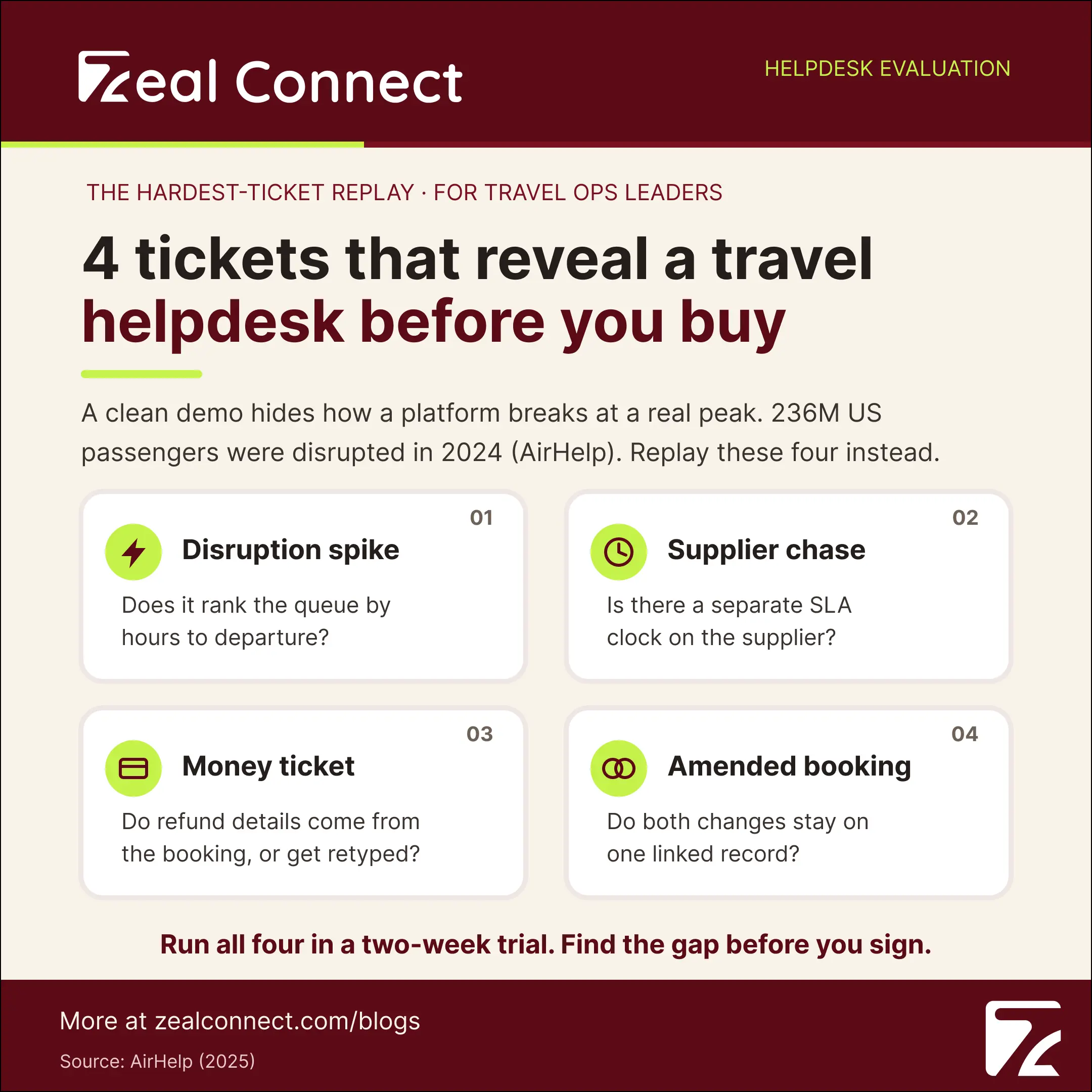
Why does a scripted demo hide how a travel helpdesk platform really behaves?
A demo removes the two things that stress a travel desk: volume and dependency, and disruption brings both at once. According to AirHelp (2025), 236 million US passengers had a flight delayed or canceled in 2024. Each disruption spawns rebooking, refund, and supplier tickets together, so a tool that handles one tidy ticket tells you nothing about fifty.
What conditions should evaluating helpdesk platforms for travel companies actually test?
Test the conditions that break generic tools, not the ones that flatter them. Four recur in every travel operation: a sudden volume spike, a ticket that waits on a supplier, a ticket carrying money, and a booking amended more than once. These are also getting more frequent. HubSpot (2025) found 75% of service reps saw the highest ever ticket volume in 2024.
Why does month two expose what the buying decision missed?
Month two is the first real peak after go live, and by then the hard tickets pile up, the supplier chases, the disputed refunds, the group booking that fell apart. A platform chosen on a clean demo now needs custom fields or a services call to cope. Replaying your hardest tickets first moves that discovery into the evaluation, where it is still cheap.
What is a hardest ticket replay, and which of your travel helpdesk tickets should it use?
A hardest ticket replay is an evaluation method: you rebuild your most difficult real tickets from your own history, then make each shortlisted platform process those exact tickets while you watch. Customer patience for a fumbled hard case is thin. Intercom (2024) found 87% of support teams saw customer expectations rise over the past year.
Instead of a vendor showing you what the tool does well, a hardest ticket replay shows the tool what your operation does every day.
What counts as a "hardest ticket" in a travel operation?
A hardest ticket is one where resolution depends on something outside your agent's control, a supplier, a deadline, a payment, or a change. Pull four archetypes from your own logs. First, a disruption batch: twenty rebookings from one schedule change. Second, a supplier chase that ran several days. Third, a money ticket, such as a refund or chargeback, that had to reconcile. Fourth, a booking amended twice.
How many tickets should a travel helpdesk replay include?
Keep it small and real, roughly eight to twelve tickets, taken verbatim from your last peak week. Two or three of each archetype shows how a platform tags a departure date, links an amendment to its parent booking, and clocks the supplier leg. Anonymize the customer details, but keep the messiness, because the mess is the point.
Why replay your own tickets instead of the vendor's sample data?
Because your tickets carry the real supplier names, the odd fare rules, the payment references, and the half finished amendments your agents deal with. When a platform processes your actual booking references and departure dates, you see its true fit rather than a rehearsed one.
Key Terms Worth Knowing
A few terms used throughout this guide, defined the way a travel operations team uses them:
- Hardest ticket replay: an evaluation where you rebuild your most difficult real tickets and make each shortlisted platform process them, instead of watching a vendor demo.
- Ticket archetype: a repeating pattern of hard ticket (disruption batch, supplier chase, money ticket, amended booking) you pull from your own history for the replay.
- Supplier SLA clock: a second deadline timer that runs on the supplier's response, separate from your first reply timer to the customer.
- Parent/child ticketing: linking a booking to its amendments, or a group's travelers, so related work stays connected as one case.
- Integration hub: the layer that registers your booking APIs and pulls live reservation data onto ticket fields, so agents work from the real booking.
- Proof of concept: a short, hands on trial where a platform runs your real work before you commit, rather than a slide based demonstration.
What does each replayed ticket reveal about a helpdesk platform?
Each archetype stresses a different part of the platform's architecture, and where it strains tells you how the tool was built. So run each of the four tickets with a specific question in mind, rather than a general impression of how the demo went.
What does the disruption batch reveal about a travel helpdesk platform?
It shows how the platform triages under volume. Does the queue rank by hours to departure, or by the time the message arrived? A traveler flying tonight and one flying next month look identical to a desk with no departure date field. Delays matter enough to test this. Perk (2025) found about 37% of flights faced a delay across an 18.6 million flight sample.
What does the supplier chase reveal about helpdesk solutions for travel?
It shows whether the platform treats a supplier as a real part of the workflow. In most desks, the supplier is just an email address in a thread, so the wait is invisible, and your first reply SLA still looks green. A travel fit platform runs a second clock on the supplier leg and keeps the chase attached to the booking.
What do the money ticket and the amended booking reveal?
These two expose the deepest design choice: what the platform thinks a unit of work is. On the money ticket, watch whether refund and payment references arrive from your booking system or an agent retypes them, which is where errors in the back office reconciliation an OTA runs begin. On the amended booking, watch whether both changes stay on one connected record. A desk that files each amendment as a separate ticket has told you it does not know what a booking is.
Table: What each replayed ticket reveals about the platform
| Replayed ticket | What it stresses | General purpose behavior | Travel native behavior |
|---|---|---|---|
| Disruption batch | Triage under volume | Sorts by time received | Ranks by hours to departure |
| Supplier chase | Supplier dependency | One first reply timer | Second SLA clock on supplier |
| Money ticket | Financial accuracy | Retyped or custom fields | Live booking and payment fields |
| Amended booking | Booking continuity | Separate unlinked tickets | Parent child on one booking |
Which type of helpdesk platform fits your travel operation, and what does the wrong one cost?
Once you know what the replay exposed, the choice narrows to four kinds of platform. The right answer depends on your ticket volume, how much of your work waits on suppliers, and how much engineering time you can commit.
What are your options in helpdesk platforms for travel companies?
Four categories cover almost every shortlist, and each sits differently alongside the rest of the software a travel business runs. General purpose desks like Zendesk, Freshdesk, and Zoho Desk are mature and broad, though travel logic arrives as custom fields and rules you build and maintain. Travel native platforms handle bookings, suppliers, and amendments by default, with a narrower ecosystem around them. CRM helpdesk hybrids hold strong customer history but treat supplier operations lightly. An in house build gives full control at a permanent engineering cost.
How much should automation weigh in your platform decision?
Weigh it on the routine input, not on promises of full resolution. The predictable parts of a travel ticket, classifying the request, extracting dates and booking references, routing to the right queue, automate cleanly, and that is what reduces handle time. Adoption is now mainstream: Salesforce, via digitalapplied (2026) reports 66% of customer service organizations use AI agents in 2026, up from 39% in 2025.
What does the wrong helpdesk platform cost a travel company?
More than the license, and the costs arrive late. Budget for four: rebuilding booking system integrations, migrating historical tickets, configuring travel logic that should have been native, and retraining agents on workarounds.
The real cost of a poor fit is not the license. It is the workaround your agents repeat on every ticket, forever.
How does Zeal Desk hold up when you replay your hardest travel tickets?
Zeal Desk is built only for travel, so the four archetypes are how the product works by default rather than configuration you add on. General purpose desks are made for any industry, which is a strength for broad use, but a booking, a supplier, and a departure date become custom fields you set up and maintain.
How does Zeal Desk handle the amended booking and supplier chase archetypes?
Work is organized around the booking, not the isolated ticket, with parent child linking that keeps a booking and its amendments as one case, so the twice amended ticket never loses its current state. An integration hub registers your booking APIs and maps live reservation data onto ticket fields, so the supplier chase runs against the real booking rather than a retyped summary. Supplier coordination and escalation are first class workflows, so the second SLA clock needs no custom building.
How does Zeal Desk process the disruption batch and the money ticket?
A classification engine sorts tickets by your own travel categories, and smart field extraction tags dates, references, and amounts automatically, so a disruption batch triages by departure and a money ticket carries its payment references without retyping. Smart assignment routes each ticket, and SLA prediction flags a deadline before it breaches.
Where does Zeal Desk's automation stop, and the agent take over?
The AI reads the request, understands the booking, and either drafts a reply or suggests the next action grounded in your knowledge base and live booking data. It does not send customer replies on its own; the agent reviews, edits, and sends. Gartner (2025) predicts agentic AI will autonomously resolve 80% of common service issues by 2029, but supplier dependent travel cases still route to a person with full context.
Conclusion
Evaluating a helpdesk platform for a travel company comes down to what you put in front of it. Replay a disruption batch, a supplier chase, a money ticket, and a twice amended booking, and each tells you something specific: how the platform triages under volume, whether it tracks a supplier, whether it connects to your booking data, and whether it understands a booking at all. Those answers point to one of the four options, from a general purpose desk you configure to a travel native platform that arrives ready. Pick with your own hardest tickets on the screen, and you will know what you are buying before the contract is signed.
Frequently Asked Questions
How do you evaluate helpdesk platforms for travel companies without relying on a vendor demo?
Build the hardest ticket replay. Pull eight to twelve of your most difficult real tickets, a disruption batch, a supplier chase, a money ticket, an amended booking, and make each shortlisted platform process them live while you score how natively it copes.
Which tickets should a travel helpdesk replay include?
Include four archetypes from your last peak: a batch of rebookings from one disruption, a supplier chase that ran several days, a refund or chargeback that had to reconcile, and a booking amended more than once. Two or three of each exposes most platform gaps.
What types of helpdesk platforms can travel companies choose from?
Four categories: general purpose desks such as Zendesk, Freshdesk, and Zoho Desk, broad but needing travel logic as custom setup; travel native platforms that handle bookings and suppliers by default; CRM helpdesk hybrids strong on customer history; and in house builds offering control at a permanent engineering cost.
How long should a helpdesk platform evaluation take?
Give it about two weeks with a fixed script, so every finalist faces the identical ticket pack and tasks. That is enough to run the replay, score each ticket by archetype, and compare finalists fairly without letting a single good demo settle it.
What is a red flag when evaluating helpdesk solutions for travel?
Any hard archetype that needs custom development to work. If the platform cannot run a separate supplier SLA clock, cannot link an amendment to its parent booking without code, or only automates routing after a paid configuration project, the fit is not native.