



- This article explains WhatsApp automation for a travel support desk in plain terms: what it does, which messages to automate first, and how to set it up so every message reaches the right person.
- It is written for operations and support leaders at OTAs, TMCs, DMCs, bedbanks and travel agencies that already use WhatsApp with travelers and partners.
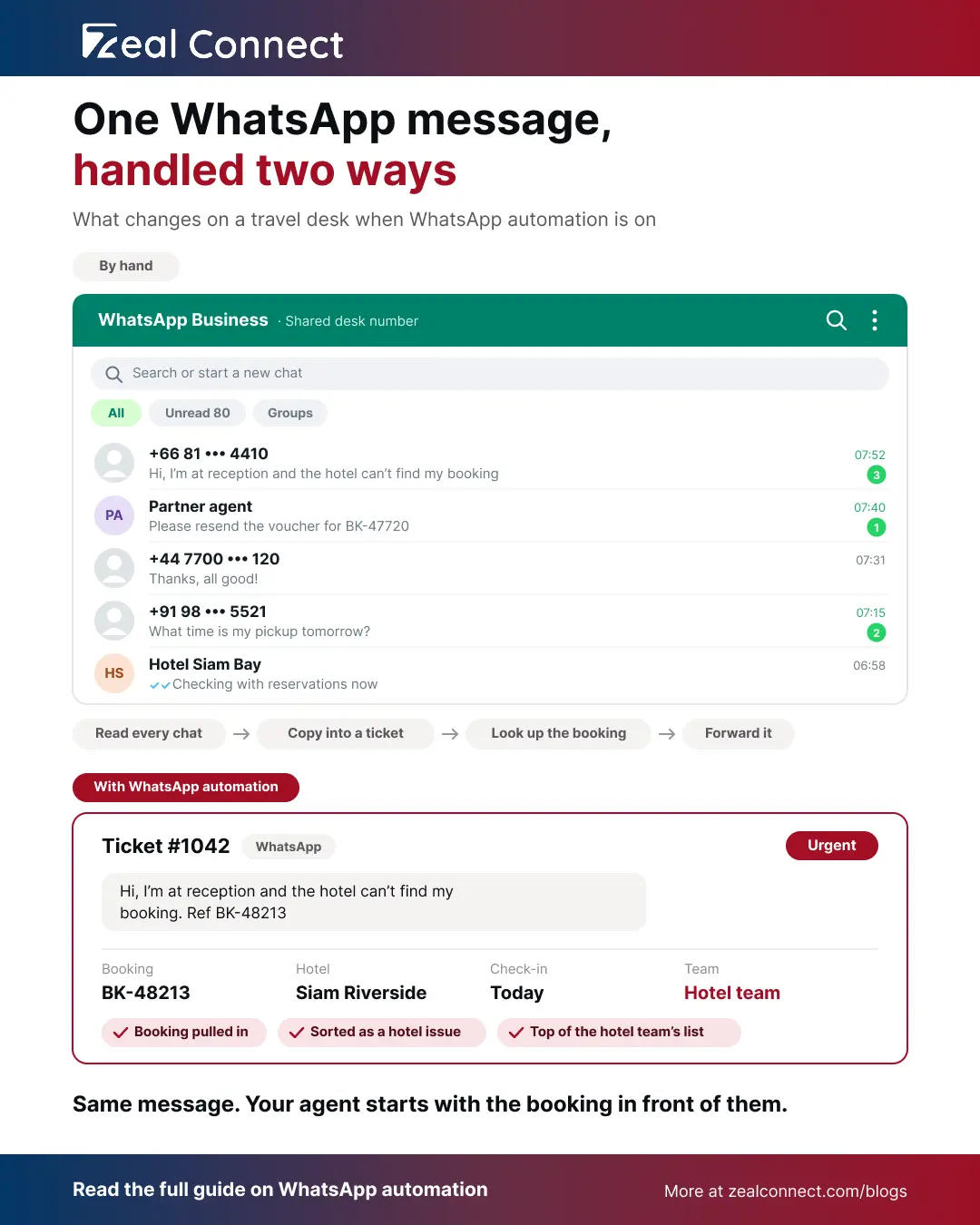
It's 8 a.m. on a bedbank's support desk, and 80 WhatsApp messages came in overnight. A partner agent wants a voucher resent. A guest says the hotel in Bangkok can't find their booking. Someone asks to change a name, and a traveler replies to yesterday's pickup message. Before anyone can help, an agent reads every message, copies the real queries into tickets and forwards them to the right person. WhatsApp automation for travel support does that sorting for you. It can also send the updates that stop many of those questions from being asked.
Why WhatsApp Support Is Hard to Run by Hand on a Travel Desk
Travelers and partners expect a quick answer on WhatsApp, so messages arrive all day and all night. Run by hand, one shared number turns into a long list that only a person can sort, one message at a time.
Every WhatsApp Message Waits for Someone to Read and Sort It
On most travel desks, WhatsApp messages land on one shared number. An agent reads each one, finds the booking, copies the details into a ticket and passes it to a colleague. That works at 20 messages a day. At 200, the morning starts with an hour of copying. Meanwhile, urgent messages wait in the same list as thank-you replies. So a guest standing at hotel reception can wait behind a name change that isn't needed until next month.
Many WhatsApp Questions Ask About Things the Desk Already Knows
Look at a week of your WhatsApp messages, and the same questions keep coming back. Where is my voucher? What time is my pickup? Is my hotel confirmed? Your booking system already holds every one of those answers. The traveler asks because nobody told them yet. Automation helps with both problems: it sends those updates on time, and it sorts the messages that still come in.
What Is WhatsApp Automation for Travel Support?
WhatsApp automation for travel support means letting your systems handle the repeat work on WhatsApp. They send trip updates when something happens to a booking, turn WhatsApp queries into tickets with the booking attached, and pass each ticket to the right person. Your agents still write and send the replies.
The Three Parts of WhatsApp Automation: Trip Alerts, Auto-Ticketing and Routing
Trip alerts are messages sent automatically when something happens to a booking. For example, a voucher is issued, a pickup is booked for tomorrow or a hotel changes. Meta's own guidance for travel companies is to link these updates to your reservation system so confirmations and reminders go out on their own. Next, auto-ticketing turns each WhatsApp query into a ticket and finds the booking it is about. A "thanks" or "ok" doesn't need a ticket, and a follow-up joins the ticket that's already open. Finally, routing passes that ticket to the team that handles it, with the most urgent first.
Is a WhatsApp Business Auto Reply Enough?
For a travel support team, no. The free WhatsApp Business app can send a greeting message when someone writes to you for the first time and an away message outside your hours. Both send the same fixed text to everyone. That's useful for saying "We reply from 8 a.m." However, an auto reply can't find a booking, create a ticket or send a pickup reminder. For that, you need the WhatsApp Business Platform, connected to your support desk through a provider.
What Do Your Agents Still Do With WhatsApp Automation?
Your agents still make every decision. Automation sends updates and sorts messages. AI can read a message, tag what it's about and pull out the booking reference. A person then reads it and sends the answer, especially when the answer changes a booking or involves money. So the automated part handles routine work, and your team keeps control of every conversation.
Automation sends the updates and sorts the messages, and your agents send every reply.
Key Terms Worth Knowing
A few terms come up throughout this article. Here is what each one means.
- Trip alert: an automatic WhatsApp message sent when something happens to a booking, such as a voucher being issued or a pickup being scheduled.
- Auto-ticketing: turning a WhatsApp message that needs an answer into a support ticket automatically, with the booking it mentions attached.
- Routing: sending each ticket to the right team or agent, with the most urgent ones first.
- WhatsApp Business Platform: the business version of WhatsApp that connects to your booking system and support desk. You set it up through a provider.
- Message template: a WhatsApp message that Meta approves in advance. You need one to message a traveler who hasn't written to you in the last 24 hours.
Which WhatsApp Messages Should You Automate First?
Start with the updates travelers ask for most. Each alert should answer a question before it's asked, and each reply it brings back should have a clear owner on your team.
Table: Trip updates worth automating on WhatsApp
Example: Sorting 80 Overnight WhatsApp Messages on a Bedbank Desk
Back to the bedbank desk with 80 overnight messages. With automation on, the system matches each one to its booking by the sender's number or the booking reference in the text. Say 20 come from guests whose hotel can't find their booking, all arriving today. Those go straight to the top of the hotel team's list. Another 30 ask for a voucher or a confirmation, so they go to reservations. Then 10 replies to pickup messages go to the transfer team. The last 20 are name changes and special requests, sorted by arrival date. These numbers are an example, not survey data. Still, the 30 voucher requests tell the team what to automate next: a confirmation message with the voucher attached.
The question your desk gets most often is usually the next WhatsApp alert worth automating.
How to Write a WhatsApp Alert Travelers Trust
Write each alert so the next question is already answered. Gartner found that clear directions and confidence in the message did the most to cut customer effort when a company contacted customers first (Gartner, 2022). Trust matters too. Booking.com reported a 500 to 900% rise in scams over 18 months (Travel News, 2024), so travelers are wary of unexpected messages. Use the traveler's name and booking reference. Say what you've already done, give one clear next step and say when the next update will come. Then send it from the number printed on the voucher, and never ask for card details.
How to Set Up WhatsApp Workflow Automation on Your Support Desk
Setup comes down to two rules: link each ticket to its booking, and get it to the person who can act on it.
Step 1: Link Each WhatsApp Ticket to Its Booking
When an agent has to ask for the booking reference, the traveler repeats themselves. J.D. Power found that 40% of customers repeated the same information several times in one interaction (J.D. Power, 2023). So put the booking reference in every alert you send. When a message comes in, match the sender's number to the booking. Then add the message to the open ticket for that booking, or create a new one. Anything the system can't match goes to one list that an agent checks every hour.
Put the booking reference in every WhatsApp alert, so every reply can be matched to its booking.
Step 2: Send Each WhatsApp Ticket to the Right Team, Most Urgent First
First, decide who owns each type of message. Pickup questions go to the transfer team, hotel problems to the hotel team, and voucher requests to reservations. Then sort each list by time to arrival, so a guest checking in tonight comes before a trip next month. Outside office hours, an away message tells travelers when you'll reply. Urgent messages, such as a guest stuck at reception, should still reach the agent on call.
How Does Zeal Desk Handle WhatsApp Automation for a Travel Support Desk?
Zeal Desk is a support desk built for travel companies, with WhatsApp, email and live chat in one queue. It covers the incoming side of WhatsApp automation, from the moment a traveler writes to the moment the right agent picks it up.
WhatsApp Tickets Arrive With the Booking Details
WhatsApp messages that need an answer become tickets automatically, and the traveler's contact record is created or updated at the same time. An agent can also turn any message in a partner or supplier WhatsApp group into a ticket. AI pulls the booking reference out of the message. Then Zeal Desk fetches the booking from your booking system through its API and shows the details on the ticket. So agents don't have to search another system for them.
Tickets Are Classified, Routed and Prioritised Automatically
AI classifies each ticket into your own categories, such as voucher request, pickup question or hotel issue. Routing then sends it to the right team, and automatic assignment spreads the work across agents who are available. Priority rules set each ticket's priority as it arrives, including from the traveler's tone. Meanwhile, SLA timers and escalation rules flag any ticket that waits too long, so urgent messages don't sit unseen.
Your Agents Stay in Control of Every WhatsApp Reply
AI summarises long threads and can polish an agent's draft reply. The agent still reviews the message and sends it from the ticket, with text or media. Teams that want separate Flight, Hotel or Transfer departments can give each one its own WhatsApp settings, SLA and assignment. Smaller teams can run everything from one shared queue.
Conclusion
WhatsApp automation helps a travel support desk in two ways. It sends trip updates before travelers have to ask, and it gets the questions that still come in to the right person with the booking in view. Start small. Pick the question your desk answers most, such as voucher requests or pickup times, and automate that one alert. Make sure the replies it brings back land as tickets with the booking attached. After a month, check whether that question comes in less often and how fast replies get a first answer. Then add the next alert.
Frequently Asked Questions
What is WhatsApp automation in travel support?
WhatsApp automation in travel support means your systems handle the repeat work on WhatsApp. They send trip updates such as vouchers and pickup details, turn WhatsApp queries into tickets with the booking attached, and pass each ticket to the right team. Agents still write and send the replies.
Is a WhatsApp auto reply enough for a travel support team?
No. A greeting or away message in the WhatsApp Business app sends the same text to everyone. It's useful for telling travelers when you'll reply. However, it can't find a booking, create a ticket or send a pickup reminder. For that, connect the WhatsApp Business Platform to your support desk.
Which WhatsApp messages should we automate first?
Start with the question your desk answers most. For many travel teams, that's voucher requests or pickup times. Automate that one alert and make sure replies land as tickets with the booking attached. After a month, check whether those questions dropped, then add the next alert.
Do travelers need to agree to get WhatsApp alerts?
Yes. WhatsApp only lets businesses message people who have agreed to hear from them, so ask at booking and record the answer. Keep trip alerts to booking updates. If you add offers or promotions, WhatsApp treats the message as marketing, which is priced and handled differently.
Can AI reply to travelers on WhatsApp automatically?
Keep a person sending the replies. AI can read a traveler's message, tag what it's about, pull out the booking reference and summarise the thread, which saves agents time. An agent should still send every reply, especially one that changes a booking or involves money.