




- This article shows travel operations teams how to evaluate ticketing tools by auditing their own ticket data first, before comparing any vendor.
- You will get five operational signals to measure in your own tickets, the evaluation criteria each one generates, and a self-audit method called the Ticket-Reality Audit.
- Written for ops and support leaders at OTAs, DMCs, TMCs, tour operators, and travel payment companies.
Most ticketing tool evaluations start at the vendor demo. The buyer watches a polished walkthrough, compares a feature checklist across three or four products, and picks the one that checks the most boxes. In travel operations, that process consistently produces bad outcomes. The tool passes every checklist item and then fails on the tickets that actually define your operation: booking amendments, supplier escalations, disruption surges, and multi-party refund chains. The problem is not the ticketing tools for travel ops. The problem is where the evaluation starts. Your evaluation criteria should come from your own ticket data, not from a vendor's feature list.
Why Most Ticketing Tool Evaluations Fail Travel Operations Teams
Travel operations teams evaluate ticketing tools the same way every other industry does. They compare features, watch demos, and check pricing. But travel tickets carry operational complexity that those comparisons never test for. A routing engine that works perfectly on a SaaS bug report behaves differently on a booking amendment that involves three suppliers. An SLA timer that tracks agent response time misses the hours lost waiting for a hotel confirmation. Because the evaluation never tests for these realities, the tool looks right on paper and breaks on the queue.
Every Ticketing Tool Passes the Feature Checklist
Routing, SLA management, automation, AI, and reporting appear on every vendor's feature page. According to Gartner (December 2024), 85% of customer service leaders will explore or pilot conversational GenAI solutions in 2025. AI is now table stakes, so "has AI" tells you nothing about whether that AI can read your booking data or just the message text. When every tool passes the checklist, the checklist is not an evaluation method.
Where Ticketing Tool Evaluations Go Wrong for Travel Teams
Three failure modes repeat across travel companies. First, buyers evaluate by features instead of behavior. They confirm a tool "has" SLA timers without checking whether those timers account for supplier response dependencies. Second, they test on demo data instead of their own tickets. A demo with a clean, two-message conversation looks nothing like a supplier thread with 14 forwarded emails and three booking references. Third, they ignore the supplier leg entirely. In travel, the median email response time is 36 hours (EdgeTier, 2023), partly because the agent is not the bottleneck. The supplier is. A tool that only tracks agent SLA misses the biggest source of delay.
The Cost of Choosing the Wrong Ticketing Tools for Travel Ops
Choosing the wrong tool does not just create frustration. It creates cost. According to MetricNet (2024), Tier 1 help desk resolutions cost approximately $22 per ticket, while escalation to Tier 3 costs $104 or more. In travel, misrouted tickets escalate more often because the tool cannot read booking data to classify or assign correctly. Every misroute is a 4 to 5x cost multiplier. Over a few hundred tickets a day, that compounds into a budget line your finance team will eventually question.
Every misroute is a 4 to 5x cost multiplier. Over a few hundred tickets a day, that becomes a budget line your finance team will question.
Five Operational Signals That Tell You What Your Ticketing Tools Must Do
A Ticket-Reality Audit is a self-diagnostic that travel operations teams run on their own ticket data before evaluating any vendor. It measures five operational signals, each of which generates a specific evaluation criterion. The audit replaces the feature checklist with criteria derived from your operation, so you evaluate ticketing tools for what your tickets actually need, not for what a marketing page promises.
Feature checklists compare what tools have. These five signals tell you what your operation needs. You can measure each one in your own ticket data, and each one generates a specific evaluation criterion that no generic listicle will surface. Together, they form the Ticket-Reality Audit: a pre-evaluation diagnostic you run before you shortlist any vendor.
Booking Density and Supplier Dependency in Your Ticketing Data
The first signal is booking-linked ticket percentage: how many of your tickets reference a PNR, booking confirmation, supplier ref, or reservation ID? If the answer is above 60%, your tool must pull live booking data onto the ticket automatically. Re-typing booking details into custom fields is a workaround, not a workflow. The second signal is supplier dependency ratio: what percentage of your resolution time waits on a supplier response? According to Freshworks (2025), Freddy AI deflected 52% of travel queries in 2024. However, the other 48% are the booking-dense, supplier-dependent tickets that require a tool to track the supplier as a participant with its own SLA and escalation path.
What Disruption Volume and Settlement Chains Reveal About Your Ticketing Tools
The third signal is your disruption volume multiplier: compare peak-week volume to average-week over the past 12 months. According to CMAC Group (2024), flight disruptions cost airlines an estimated 8% of total revenue, approximately $60 billion globally. Those disruptions cascade into your support queue. If your peak-to-trough ratio exceeds 3x, your tool must handle bulk actions, dynamic re-routing, and surge-mode SLA policies without manual intervention. The fourth signal is settlement chain depth: how many parties sit in a typical refund? If the chain runs traveler to agent to OTA to supplier to payment provider, you need parent-child tickets that track each party's status. The fifth signal is cross-desk handoff rate: how often does one ticket move between flight, hotel, transfer, or finance desks before it resolves?
The five signals in your tickets predict tool fit better than any feature comparison.
How to Read These Signals in Your Own Ticketing Tools Data
Pull a ticket export from your current tool covering the last 90 days. Search for tickets containing booking references, PNR codes, or supplier names to calculate your booking-linked percentage. Run an SLA report filtered by tickets with supplier threads to estimate supplier dependency. Compare your highest-volume week to your median week for the disruption multiplier. Count the parties named in your last 50 refund tickets for settlement chain depth. And tag tickets that touched more than one desk for your handoff rate.
Table: The Ticket-Reality Audit: Five Signals That Generate Your Evaluation Criteria
| What to measure in your tickets | Where to find it | What the number reveals | The evaluation criterion it generates |
|---|---|---|---|
| Booking-linked ticket % | Tag tickets referencing a PNR, booking ref, or reservation ID | How much work depends on booking data inside the ticket | The tool must pull live booking data onto the ticket automatically |
| Supplier dependency ratio | % of resolution time waiting on a supplier response | How much SLA is controlled by a third party | The tool must model the supplier as a participant with its own SLA |
| Disruption volume multiplier | Peak-week vs. average-week volume over 12 months | How elastic the tool must be under a 3 to 10x spike | The tool must support bulk actions, dynamic re-routing, surge SLA policies |
| Settlement chain depth | Parties involved in a typical refund or dispute | How many handoffs a financial ticket needs | The tool must link parent-child tickets across the chain |
| Cross-desk handoff rate | Tickets moving between desks before resolution | How dependent you are on cross-team coordination | The tool must support multi-department ticketing with shared context |
Key Terms Worth Knowing
A few terms come up throughout this article on ticketing tools for travel operations. Here is what each one means.
- Booking-aware ticketing: A ticket record that carries live booking data (PNR, supplier refs, dates, fare rules) rather than just the conversation thread between customer and agent.
- Supplier SLA: A service-level commitment tracked for the supplier's response time within a customer ticket, separate from the agent's own response SLA.
- Disruption surge: A sudden volume spike, typically 3 to 10x normal, triggered by schedule changes, weather events, or mass supplier cancellations.
- Parent-child ticketing: Linking a main ticket to related sub-tickets (for example, a group booking's 40 individual traveler issues) so they share context and resolve together.
- Cross-desk handoff: When a ticket moves between internal departments (flight desk, hotel desk, finance) during resolution, carrying its full context with it.
How the Audit Changes Ticketing Tool Evaluation Across Travel Sub-Verticals
The five signals produce different evaluation priorities depending on what kind of travel company you run. An OTA processing 2,000 tickets a day and a DMC handling 200 face structurally different ticket realities. Using the same evaluation criteria for both is like using the same staffing model for peak season and off-season. The audit gives you a way to weight your ticketing tools criteria for your specific operation.
Ticketing Tool Evaluation for OTAs and Tour Operators
OTAs and tour operators score highest on booking density and disruption volume. Their tickets are overwhelmingly booking-linked, and their queues are most exposed to seasonal and disruption-driven spikes. According to Unthread (2025), customer support volumes increase up to 42% during holiday peak seasons, and that figure climbs higher during irregular operations. For these companies, the top evaluation criteria are automation that reads booking data, bulk operations for disruption events, and queue management that absorbs a 3 to 5x surge without breaking SLAs.
Ticketing Tool Evaluation for DMCs and TMCs
DMCs score highest on supplier dependency and cross-desk handoffs. A DMC managing ground handling across 15 local suppliers spends more resolution time chasing confirmations than answering travelers. Their top evaluation criterion is supplier-as-participant: the tool must track supplier SLAs, escalation workflows, and response dependencies within the customer ticket. TMCs, by contrast, score highest on settlement chain depth and policy compliance. A corporate travel program generates tickets that involve the traveler, the travel manager, the TMC agent, the airline, and the payment provider. TMCs need parent-child linking and policy-driven routing more than bulk disruption tools.
The same five signals, weighted differently, give every travel sub-vertical its own evaluation criteria.
Why One Evaluation Scorecard Does Not Fit Every Travel Operation
A universal "best ticketing tools" list cannot serve both an OTA that needs disruption-surge capacity and a DMC that needs supplier coordination. According to Freshworks (2025), top-performing travel teams achieve 5-minute first responses and 29-minute resolutions, while lower performers take over 7 hours and 29 hours respectively. That 80x gap is not explained by effort. It is explained by whether the tool fits the operation. The audit tells you which signals are strongest in your operation, so you weight your criteria accordingly and stop comparing against a generic scorecard.
How to Run a Ticketing Tool Evaluation for Travel Ops Before the First Demo
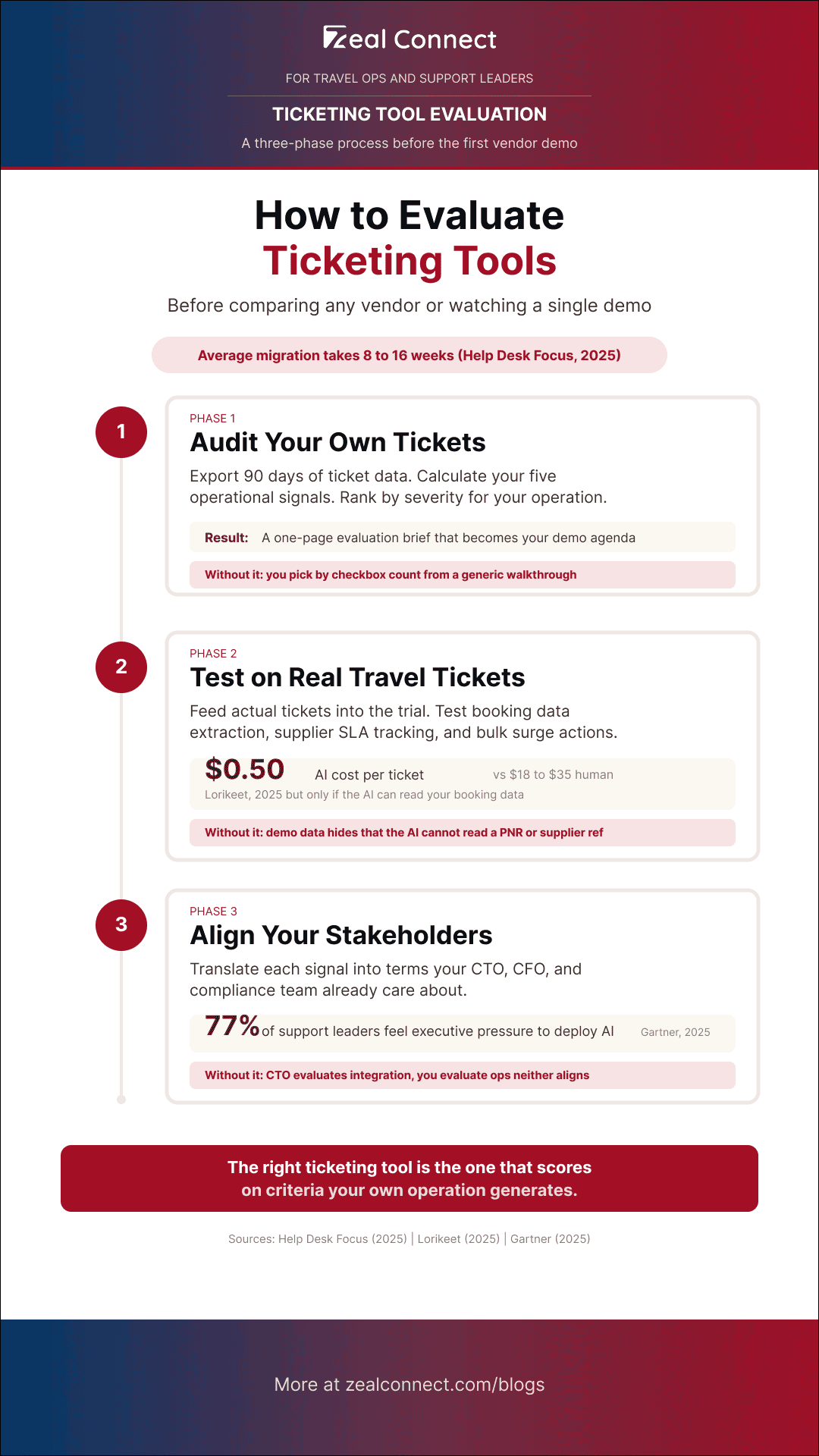
The evaluation runs in three phases: audit your own tickets, test vendors on your real data, and align your internal stakeholders before committing. Getting this wrong is expensive. According to Help Desk Focus (2025), average help desk migration takes 8 to 16 weeks, and integration failures cause 45% of migration delays. You do not want to repeat that cycle because the evaluation missed a signal.
Run the Ticket-Reality Audit Before You Shortlist Ticketing Tools
Before you request a single demo, export your ticket data and calculate all five signals. Rank the signals by severity for your operation. If your booking-linked percentage is 80% and your supplier dependency ratio is 60%, those two criteria should carry more weight than disruption volume in your evaluation. Build a one-page evaluation brief from the results: "We need a tool that does X because our tickets show Y." That brief becomes your demo agenda. You are no longer watching a generic walkthrough. You are testing against your own criteria.
How to Test Ticketing Tools on Your Real Travel Tickets, Not Demo Data
During a trial, feed your actual tickets (anonymized if needed) into the evaluation environment. Test whether the tool pulls booking data automatically or requires manual entry. Create a supplier thread and check whether the tool tracks supplier response time separately from agent SLA. Simulate a 3x volume day and test bulk actions, re-routing, and SLA adjustment. According to Lorikeet (2025), AI-handled support tickets cost between $0.50 and $2.37 per resolution, compared to $18 to $35 for human-handled SaaS tickets. However, that cost reduction only materializes if the AI can read your booking data during the trial. Test that specifically.
Test ticketing tools on your real tickets, not demo data. The behavior on a booking amendment with three suppliers tells you more than any feature comparison.
How to Align Your CTO and Finance Team on Ticketing Tool Evaluation Criteria
According to Gartner (June 2025), 77% of service and support leaders feel pressure from other senior executives to deploy AI. Your CTO is asking about AI capabilities. Your CFO is asking about cost per ticket. The audit gives you a shared language. Translate each signal into the terms your stakeholders care about. Booking density becomes an integration requirement (does the tool have an API that pulls live booking data?). Supplier dependency becomes a data model question (does the tool model third-party SLAs?). Settlement chain depth becomes a compliance point (can the tool track every party in a refund?). When everyone evaluates the same signals from different angles, alignment follows.
How Does Zeal Desk Perform When You Evaluate Ticketing Tools by Your Own Travel Operations Criteria?
Zeal Desk was built for travel operations, so the five audit signals are not edge cases for the platform. They are the design assumptions. Where a general-purpose help desk (Zendesk, Freshdesk, Zoho Desk) needs custom fields, workarounds, and integrations to approximate booking-aware behavior, Zeal Desk starts there.
How Does Zeal Desk Handle the Booking Density and Supplier Dependency Signals?
Zeal Desk organizes work around bookings, not isolated conversations. Its integration hub registers external APIs, pulls live booking records, and maps them onto ticket fields automatically. Agents and AI work from the real reservation, not a re-typed summary. For supplier dependency, the platform models the supplier as a first-class participant. Supplier SLAs, escalation workflows, and chasing timelines run inside the customer ticket. On a general-purpose desk, supplier threads are forwarded emails buried in the conversation. On Zeal Desk, they are tracked operations with their own deadlines.
How Does Zeal Desk Handle Disruption Surges and Multi-Desk Coordination?
Zeal Desk's multi-department model lets flight, hotel, transfer, and finance desks operate inside one instance with shared context. When a disruption event hits, tickets route across desks without losing booking data or SLA history. AI playbooks and support AI agents read booking data to classify, extract, and suggest the next action. The agent reviews, edits, and sends every customer reply. AI drafts; a person decides. That principle holds during a surge just as it does on a quiet day.
How Does Zeal Desk Handle Settlement Chains and Financial Tickets?
Parent-child ticketing links a booking and its related work (amendments, refund requests, supplier disputes) as one connected case. Each party in the settlement chain has a visible status. On a horizontal desk, those are separate, unlinked tickets. On Zeal Desk, the chain stays together, so no step in the refund or dispute process disappears between desks.
Conclusion
Your ticketing tool evaluation should not start with a vendor demo. It should start with your own ticket data. The five signals hiding in your tickets (booking density, supplier dependency, disruption volume, settlement chain depth, and cross-desk handoff rate) generate evaluation criteria that predict whether a tool will actually work for your operation. Those criteria differ by sub-vertical: an OTA weights disruption capacity; a DMC weights supplier coordination; a TMC weights settlement chain visibility. Run the Ticket-Reality Audit before you shortlist. Test vendors on your real tickets, not demo data. And translate your signals into the terms your CTO and CFO care about, so the evaluation earns internal alignment before you commit to a migration. The right ticketing tool for travel ops is the one that scores on the criteria your operation generates.
Frequently Asked Questions
How do I evaluate whether a ticketing tool's automation will work on my travel tickets specifically?
During a vendor trial, feed real travel tickets (anonymized if needed) into the evaluation environment. Check whether the AI can read booking data, including PNR references, supplier confirmations, and dates, or whether it only operates on the message text. If the AI cannot extract a check-in date or identify the supplier from your ticket, its automation will not work on your travel workflows regardless of what the feature list says.
What evaluation criteria should I use for supplier-side ticket handling?
Test three things: whether the tool tracks supplier response time separately from your agent's SLA, whether it supports escalation workflows for non-responsive suppliers, and whether supplier threads are visible inside the customer ticket rather than buried in forwarded emails. If a tool has no concept of "supplier," it cannot help you manage the biggest source of resolution delay in travel.
How do I test whether a ticketing tool can handle a disruption spike during a trial?
Simulate a 3x volume increase during your trial period. Test whether the tool supports bulk actions (reassigning or re-prioritizing hundreds of tickets at once), dynamic re-routing based on ticket type or urgency, and whether SLA timers can adjust for surge conditions. If bulk actions require manual one-by-one processing, the tool will not survive an irregular operations day.
Should I evaluate ticketing tools by features or by how those features behave on my tickets?
By behavior on your tickets. Every ticketing tool has routing, SLA, automation, and AI on its feature list. The difference is how those features behave when the ticket carries a booking, depends on a supplier, or arrives during a disruption spike. Run the Ticket-Reality Audit to generate criteria from your own data, then test each tool against those criteria during a trial.
How do I get my CTO aligned on ticketing tool evaluation criteria when they care about integration and I care about operational fit?
Translate the five audit signals into integration requirements your CTO already cares about. Booking density becomes an API question (does the tool pull live booking data?). Supplier dependency becomes a data model question (does it track third-party SLAs?). Settlement chain depth becomes a compliance question (can it link every party in a refund?). The same signals, framed differently, give both roles a shared evaluation framework.